Gadget Wisdom

Author: David Shanske

Registration time

2011-09-25 06:23:49

Website

https://david.shanske.com/

Email

david@shanske.com

All posts by David Shanske

0 Responses

Equipping your UPS – Planning

Geek out: Power protection

Hot on the heels of discussing emergency power for mobile, it is time to discuss thoughts about Uninterruptable Power Supplies(UPS). These battery backup devices use heavy-duty batteries to power your electronics in the event of failure. When power is lost, it automatically powers using the batteries.

The first rule of UPSes is to always get ones with a removable/replaceable battery. You can get replacement batteries without much issue, although manufacturers would obviously prefer you replace the unit.

Our current favorite simple UPS for home use is the APC BE550G. This is an 8 outlet 550VA UPS. The green feature is a master outlet, which turns controlled outlets off when the master device is off. This is also a great green feature for various surge protectors.

<asa>B0019804U8</asa>

However, the basic UPSes may have trouble with some power supplies, so mileage may vary. The issue is voltage regulation, and pure sine waves(necessary for Active PFC power supplies). There are more expensive UPSes, and more full featured ones. There are advantages to voltage regulation and purer power, but for some devices, it doesn’t matter.

Also, there are some issues with APC. We had used Belkin for a while, but had longevity and design issues. The Belkins we had tended to put the outlets on the top, which made placement difficult. There is also Cyberpower, which some people enjoy, but we’ve never tried one. We may next time.

<asa>B000OTEZ5</asa>

This Cyberpower Unit looks promises, offering an LCD control screen with basic stats. This looks rather promising for non-computer uses.

These devices were originally marketed for computers. They were designed for safe shutdown of a computer and monitor, and things have changed. More people are using these to power other devices. In preparing for this post, we started reading reviews, and people are powering big screen TVs and other devices.

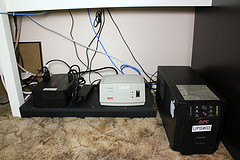
So, that is the sort of planning we want to discuss. For your cable modem, your router, etc. We have a simple 300VA UPS hooked up to our cordless telephone system, so it will work for a while in a power outage. As these devices are much lower power than a computer, many can run for hours with just a few necessary networking components hooked in.

The first step, even if you do not want to get into the wattage details, is to make an inventory of the devices you want to power. Make separate lists for extended outages, power hiccups, and voltage drops. Basically, most computers you may want to merely make a graceful shutdown, but you may want your networking gear to last for hours.

We predict, in our area, lots of people will be hiring electricians to install transfer switches for portable or permanent generators, after extended periods of power loss. But for the installation of a manual transfer switch will be close to a thousand dollars, if not more, as it requires disconnecting your house power in order to install the cutoff, and probably an adjustment of your house breaker box.

If your area isn’t prone to long power outages, you want to cover a few hours of power outage or irregular power, which is much less expensive than generators.

In the end, always buy UPSes with replaceable batteries, pick the devices that works for you, and do the advance planning.

What are your tips for planning for power loss with UPSes?


Published on November 25, 2012
Full Post
0 Responses

Give the Gift of Emergency Power This Holiday Season

English: A side by side line up of D, C, AA, A...

Last month, Hurricane Sandy hit hard in the New York area, in many places that hadn’t seen devastation of that level in half a century. Many people lost power and internet for days. Many people lost more than that…and our sympathies go out to them.

But, while we fortunately came out of it without any serious issues, it as given us a lot of time to think about emergency preparedness. The need to prepare for the unexpected.

One of the coolest devices we saw being used during this was the BioLite CampStove. This is a small portable camp stove that, when stowed, is the size of a water bottle. It uses twigs and other simple fuel, and can not only cook, but provide USB charging. The company took to the streets during the power outages to offer power and a warm drink. The list price is roughly $130 direct, and the money is partially used to fund a larger version used in third-world countries.

Most people will need to handle an outage of hours or a perhaps a day or two. A long extended outage does happen, but in most areas is not as common. In the case of New York, individuals were heading to areas that had power in search of a charge. Corporations sent in portable charging stations, people crowded around generators, and more.

Now, for individuals on the go in urban areas, carrying a camp stove is not a viable option. Solar is a possibility, but charging by solar takes hours. We haven’t had much luck in solar charging, but we haven’t tried lately. There have been a lot of developments in this area. We may try again.

Crank chargers seem like a lot of fun, and are great for portable radios and lights, but powering a cell phone is a bit hard. In testing, fifteen minutes of cranking got a few percent points of power back into a smartphone, but the crank broke off right after that, so future testing will not be possible.

That leads us to the most useful of emergency power measures….the battery. Buying extra batteries for devices works. But every time you get a new cell phone or other specialty device, you end up needing to buy new batteries. Devices that use standardized batteries, such as AA and AAA, are easier to keep batteries on hand for. But, with the increasing number of devices that use USB charging, you can get a battery with USB output, that will work with a variety of devices.

Buying batteries is not a problem. The issue is being prepared. In many cases, you can prepare for an emergency…bad weather, etc. may cause you to check your equipment. But many things will happen unexpectedly.  It is a good idea to keep good care of these items.

Next, we’ll be discussing UPS power…

Published on November 23, 2012
Full Post
0 Responses

Boxee announces Boxee TV

Image representing Boxee as depicted in CrunchBase

Boxee disappointed us a while back, when they discontinued their software in favor of their hardware solution. From the beginning, their hardware has suffered from problems, and software updates have been too infrequent.

Boxee has been at the forefront of negotiating for the future of unencrypted basic cable. As we previously have written, we aren’t thrilled with the solution the FCC came up with. But now, it is more clear why.

Boxee has announced the $99 Boxee TV. It is a DVR that stores recordings in the cloud(for $15 a month) and uses your antenna/basic unencrypted cable to do so.  It contains many of the Boxee apps, but not as many as the legacy Boxee box. By the way, they are killing the Boxee Box, except for maintenance updates.

This is just yet another example of Boxee pivoting again, and is bound to fail again. Not because some of their ideas aren’t good. But the Boxee Box attracted Cord Cutters…and it has a mandatory(not optional), $15 a month charge. In order to store in the cloud, you need to transcode and downgrade your HD signal.

And it relies on Cloudee, their cloud video service, to remain in business for the device to work. Boxee doesn’t have the best track record so far on continuing to provide service to its users. Tested did the math and estimated at 2 hours of recorded TV per day, that would be over 50GB uploaded a month at the estimated data rate.

So, to conclude. Don’t buy it. Don’t suggest anyone buy it. Because Boxee and its people will just dissapoint.

Published on October 17, 2012
Full Post
1 Response

FCC Kills clearQAM – Everyone Needs a Box

no-cable-tv

The FCC has issued an order amending its rules to allow cable operators to encrypt the basic service tier. This tier consists of broadcast and a few other assorted stations.

Their rationale for this is that it will ‘benefit’ consumers who can have their service activated and deactivated remotely, reducing truck rolls and waits for service calls.  The problem is the “small number” of cable subscribers who will be adversely affected.

A few years ago, you could change channels directly on your TV. These were cable channels…channels you paid for. You are still paying for them, but now you have to pay to rent equipment from the cable company. The current cost of a box from our cable provider is $10 a month, plus a $4 fee. To rent a cable card is only $2.50, by comparison.

This is an issue. The $90 a year difference would pay for a cable box purchase in two years, or pay the additional cost to add a cablecard slot to the average television. This has not happened.

As a condition of the FCC Rule, operators must provide either a converter box with home networking capability that can provide access to basic channels or allow existing equipment access with software upgrades. But, we have some doubts as to the utility of these devices.

As a user of open-source software, it is unlikely that they will allow anything to be used that they cannot control. So, in the end, it is time to break out the broadcast antenna.

There is, of course, the cablecard option, however, Time Warner Cable, our local cable company, is the only company to make a cablecard essentially useless to a Linux user.

Maybe it is time to cut the cord. That’s still an option, right? You can get Internet without TV, right?


Published on October 14, 2012
Full Post
0 Responses

Shrinking Your Electronics by Thinking Embedded Systems

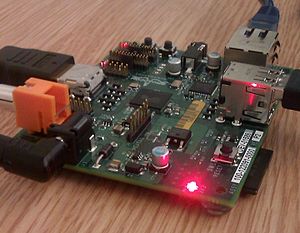
English: Extract from Raspberry Pi board at Tr...

Electronics are getting smaller.  People don’t have desktops in as large a number as they once did. Many have laptops, netbooks, tablets, etc.

This is an area we’ve been thinking about a lot lately, mostly due to the flood of inexpensive systems on a board, led by the Raspberry Pi. The Pi is a computer the size of a credit card, and the commonly sold version includes RCA video, HDMI video, two USB ports, and an Ethernet Port. The entire assembly is powered by a microUSB charger of the sort bundled with phones and other electronics. The GPU onboard is capable of blu-ray quality playback. There is no built in drive, the OS is loaded off of an SD card. You can hook in a USB drive, but not as a boot drive.

There is a special version of Fedora, Debian, and even an XBMC port to turn the Pi into a full-fledged media center

Now, this won’t be taking the place of a full-fledged PC for many things, but the Pi, and some of the competing devices are perfect for ’embedded system’ type functions.

An embedded system is a computer system designed for specific control functions within a larger system. With something like a Pi, with its pricing, even with the purchase of a case(we mentioned case not included, right?) you can buy multiple Pis and use them to do one thing.

This changes design conceptions a lot. When you are trying to figure out your connected home and life, you can build a Pi to boot, launch a function, and perform it well, just like your cable box(well, like your cable box could be), VoIP phone, etc.

We currently have a quad-core server, that does multiple functions. It does do CPU scaling when idle, but many of the functions could be taken over by a Pi. Using Wake On Lan functionality, the Pi could even wake up the full computer and transfer control to it.

There are a lot of good ideas here. Have a device that does one thing, and nothing else. This would mean incredible long term stability, and because the Pi loads its OS on an SD card, you could have different SD cards to change the Pi’s functionality.

What ideas do you have? We’re just getting started.

Published on October 12, 2012
Full Post
0 Responses

Feed Changes

English: This icon, known as the "feed ic...

To All RSS Subscribers:

Due to the recent uncertainty regarding the future of Feedburner, we are removing all redirects to Feedburner. All links on the site will now use local feeds. If possible, please update your subscriptions.

If not, the Feedburner feeds will continue to be maintained for as long as Google continues to offer the service, but we feel that self-hosting all feeds is the more prudent long-term move.

Feed: http://www.gadgetwisdom.com/feed/

Published on October 7, 2012
Full Post
0 Responses

Kindle Thoughts: A Day Later

SANTA MONICA, CA - SEPTEMBER 6:  Amazon CEO Je...

Yesterday, we quickly wrote up a few stories reporting the important details of the Amazon Kindle announcement. A day later, it is time to reflect.

Amazon has said it is about content. And they are. They started out as a bookseller, and despite being very technically adept, they’ve always used hardware as a way to move along their various content ecosystems. But we don’t quite believe them they aren’t being shrewd about the hardware too.

  • The base Kindle is now $69 with offers. We had thought it might go as low between $30 and $50, but at $69 it is still in the impulse buying range. It is almost disposable.
  • The Kindle Paperwhite is $119 with offers. It incorporates Amazon’s latest screen improvements, including a new lit design that allows for night reading as well as better contrast during the day, and still with amazing battery life. (8 hours). The 3G version is $179 with offers.
  • In the case of all three, to disable the offers is an additional $20.

So, let’s talk about a few things in the e-reader family before moving on to the Fires. Text to speech, a formerly touted feature, is gone on all Kindles(the Keyboard is still being sold, but that is legacy).

This appears to be because they will be offering Audible/Kindle book bundles in the future. To be honest, an e-reader really doesn’t need audio capability, and few people wanted to hear a book read using text to speech. More would prefer a human. So we’d imagine there wasn’t much interest in the feature, although vision impaired individuals are likely trying to figure out what they will do.

The Kindle DX is dead. No surprise there. A larger e-ink screen has its place, but there wasn’t sufficient interest.

Moving on to the Fire Line.

  • Kindle Fire(2nd generation) – $159. This is basically the same as the old Fire, but boosts the performance, memory, and battery life, also adds stereo speakers.
  • Kindle Fire HD – $199/(16GB), $249(32GB) 1280×800 resolution compared to the Fires 1024×600, Dolby Audio Speakers, dual-band/antenna wi-fi, bigger battery and more sensitive touchscreen.
  • Kindle Fire HD 8.9 – $299(16GB), $369 (32GB) – 1920×1200 display with anti-glare technology, faster processor
  • Kindle Fire HD 8.9 4G – $499(32GB), $599(64GB), adds 4G LTE and the option of a $50 a year 250MB data plan.

Some interesting facts about the new Fires.

  • Cloud Drive Storage included
  • Ads on the Lockscreen
  • Bing is the default search engine
  • Based on Android 4.0. Original Fire based on 2.3

A lot of the features that Amazon focused on were improvements to their content.

  • Whispersync for Voice, and between Audible books and Kindle books…this is just smart marketing. You can sell people the book twice by bundling them together and allowing them to switch back and forth.
  • X-Ray for Movies – They do own IMDB, and this allows them to use that data to make it easy for people to find more content…which they can now sell to you.
  • Kindle Serials – a serialized model for selling stories. A good move for a different product they can offer individuals as part of the book market.
  • Kindle FreeTime – Custom Profiles for users to restrict usage…an upgraded parental control
  • Whispersync for Games – Allowing you to sync your game data across platforms. Developers will have to build this in, but an API is likely out or will be.

There’s a lot there, but we can’t believe Amazon’s insistence that they want to be everywhere. The Kindle Fire has been out for a year, and yet there is still no native Android app for Amazon Video, and the Amazon Mobile app is not even tablet compatible. If Amazon wants hardware to advance content, they also have to release their software. The Kindle app, in varying qualities, is on everything. They should innovate features so that every device has access to the full range as soon as possible.

Then, they can truly be the indispensable source for content.

More on this in the future…but…who is going to order one of these?


Published on September 7, 2012
Full Post
0 Responses

Amazon MP3 Drops Linux Support, Adds DRM-Lite

DRM Is Killing Music

As we’ve previously mentioned, we’ve been redoing our music collection. Now, after weeks of part-time ripping, and some cleanup, it is time to upload the music to various sites, as a test.

Amazon has discontinued its music downloader for Linux and is no longer allowing Linux users to download the .azw file for use with a third-party application. The AZW files are used to download an entire album when purchased.

This occurred concurrently with the rollout of their new Cloud Player product, which included one other fun feature. DRM. Not on the file level. Amazon proudly sells DRM-free MP3s, but to upload or download albums, you need to authorize your device. You are allowed a maximum of 10 devices, you can deauthorize a device and the slot will reopen thirty days later. This includes Android devices. If you don’t do this, you can only download albums one track at a time.

We wanted to see who else was pointing out that this is a DRM-like feature, and came up with an interesting analysis of same by The Leisurely Historian. His theories are: (Comments are ours)

  • Compromise negotiated with music labels over cloud player – This seems the most likely. But, is increased monitoring of download/uploads really an unreasonable restriction? We made a complete backup of all of our Amazon purchases locally and we can copy it anywhere(even back to Amazon Cloud Drive, ironically.
  • Back door to DRM – We agree that DRM on Kindle and Video has been good to Amazon. But they can’t reverse course on music. So, they’ve created this hybrid model to support keeping people in their ecosystem.
  • This is all about User Tracking – This is quite possible. We have the tab…”You listened to ___, people who listened to ___ also bought ____.” This is the classic Amazon upsell method of getting you to buy more, based on offering you things they think you will like.
Basically, Amazon wants people to use Cloud Player and the Cloud Player apps. This keeps people inside their garden. So, bad enough we are forced to boot up Windows, which we never use, to retrieve/upload our music…but there is no indication from Amazon that they plan to restore Linux support in the future.
Even if they do not want to write Linux apps, they could provide developers with an API to build support into their products, but third-party support is not what they want on any platform.
Just to be fair, the web player does work on Linux. And, while we gave them $25 for a year of service, it does not mean we will next year…although it would cost more to store the same amount as data on Amazon S3(although there is always Glacier). It is just disappointing.
Published on August 27, 2012
Full Post
0 Responses

Amazon Glacier for the Home User


Backup Backup Backup - And Test Restores

Earlier this week, Amazon announced Glacier, which is long-term storage that costs one cent a gigabyte per month. This compares to the 12 cents a gigabyte per month for S3. The basic difference is that Glacier can take between 3 and 5 hours to retrieve data, and S3 is instantaneous.

Amazon S3 is a durable, secure, simple, and fast storage service designed to make web-scale computing easier for developers. Use Amazon S3 if you need low latency or frequent access to your data. Use Amazon Glacier if low storage cost is paramount, your data is rarely retrieved, and data retrieval times of several hours are acceptable.

But, let’s go to the pricing. As a home user, we’re assuming you have less than 50TB.

  • Storage
    • Glacier – 0.01 per GB/month
    • S3 – 0.12 per GB/month
  • Data Transfers In – Free on All
  • Data Transfer Out - Glacier and S3 both use the same pricing.
    • 1st GB free
    • Next 10GB, 0.12 a GB
    • Next 40GB, 0.09 a GB
  • Requests
    • Glacier
      • Data Retrievals are Free, however, Glacier is designed with the expectation that retrievals are infrequent and unusual, and data will be stored for extended periods of time. You can retrieve up to 5% of your average monthly storage (pro-rated daily) for free each month.
      • If you choose to retrieve more than this amount of data in a month, you are charged a retrieval fee starting at $0.01 per gigabyte. Learn more. In addition, there is a pro-rated charge of $0.03 per gigabyte for items deleted prior to 90 days

Amazon has promised that there will be an upcoming feature to export from S3 to Glacier based on data lifecycle policies. The details on how this will work aren’t 100% available, but we could imagine offloading from S3 to Glacier based on age. So, you keep the last 1-2 months of data on S3, and the older backups on Glacier. It would allow you to save a good deal of money for backups.

Not everyone, for that matter, needs high availability…especially if you are keeping something that is infrequently modified. For example, the family photo album. You can keep your local backups, and for 1 cent a month, you get a copy that you can access in an emergency.

What we’re missing is that many reports indicated that retrieval is potentially costly. But we found it equivalent to S3, only slower.

But, what would you use this for? We’d like to hear your thoughts.

Published on August 25, 2012
Full Post
0 Responses

Send Once, Read Everywhere – Kindle Everywhere

English: Amazon Kindle wordmark.
English: Amazon Kindle wordmark. (Photo credit: Wikipedia)

Earlier this week, Amazon launched the Send to Kindle Browser Extension for Chrome.

This adds to the Kindle ecosystem by allowing you to send web content to your Kindle, and choose to read it, or archive it for future use as part of the Kindle Personal Document Library.

Amazon continues to try to build the ecosystem of the Kindle. There are several third-party applications that had similar functionality, and multiple read it later services. But, one of the brilliant moves made with the Kindle is that it is completely platform agnostic. Amazon may make a Kindle Fire, and the e-ink line of Kindles, but they have desktop apps, mobile apps, a browser based reader, and continue to add functionality to the ecosystem completely independent of any hardware.

This is all part of the plan. People may complain about the walled gardens of certain closed systems, but if you can use your content on everything, then that is as close to open as you can get without actually being so.

Personal Documents was a good move on Amazon’s part, because it allowed reading of any document. People had been side-loading their own content anyway. Some even bought a Kindle and only acquired public-domain and free e-books. It makes the platform more valuable, which the tendency to buy from Amazon. Not only is your paid content there, but your personal content.

This is the sort of all-encompassing presence that turned Google into a verb for “To Search Online,” and iPad a synonym for any tablet(much as we correct people when they say so). Kindle is becoming a synonym for e-book, because of their presence in the market.

Once again, Amazon is getting our business because they have made it so easy, and removed the restrictions…although we hold out hope for more liberal policies in certain areas, we have already accepted the compromises.

That said, Send to Kindle is one more option that allows us to put more into the system, and makes it easy to do so, offering more options and integration than existing third-party options. Thus, it is worth a look.

Published on August 17, 2012
Full Post

Get New Posts By Email