Gadget Wisdom

Author: David Shanske

Registration time

2011-09-25 06:23:49

Website

https://david.shanske.com/

Email

david@shanske.com

All posts by David Shanske

0 Responses

Dvorak Likes Linux – Good or Bad?

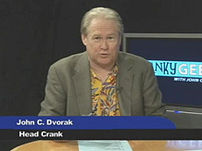
Dvorak hosting Episode 19 of CrankyGeeks.
Image via Wikipedia

We like John C. Dvorak. He’s a well known tech pundit, very outspoken, and interesting to read. However, one of the most interesting aspects of reading Dvorak is how often we disagree with him.

Dvorak has finally discovered Ubuntu 8.10, four months after the current version was released.

Many of its problems, for me, stem from its inability to run on my overloaded hardware, or the occasional driver that makes the OS impossible to use without hand-tweaking something or other.

To disagree with Mr. Dvorak, Linux has made great strides in hardware support, with both independent developers and hardware manufacturers working to ensure support. The simplest way to ensure you don’t come across a device that isn’t supported under Linux is to check before you buy it. Most devices are. So far, since we switched to Linux, we’ve only found a noname GPS receiver, a Canon Scanner, and a Radio Shack postal scale failing to work under it. But we usually check before we buy. Most minor hardware issues can usually be resolved with a little online searching. Even he admits Linux support is increasing on new hardware.

He does point out many good things about Linux during his exploration of Ubuntu.

  • The lightweight nature of it makes it perfect for older machines. Many distributions offer lower memory(RAM or HD) alternatives to programs, such as Abiword instead of OpenOffice, XFCE or Sugar instead of Gnome or KDE, etc.
  • “There is probably a Linux program that will substitute for just about any Windows programs with as much or more functionality.” Not sure we agree with him on Photoshop vs. Gimp, but we’re not artists.
  • Linux is mostly immune to malware and viruses, as the bulk of such things are written for Windows.
  • The Windows registry is ultimately flawed. It is an increasingly unwieldy database that over time, slows Windows to a crawl.

He does note that the Linux desktops are not as polished as Windows. However, we’re not sure whether or not he tried Compiz Fusion, which enables all those nice windows animations. We loved watching them, but we loved speed more, and ultimately turned them off. For productivity use, we’d rather simplify.

Even the French police recognize the wonder of Linux. They’ve saved millions by migrating to Ubuntu. Currently, they are running Ubuntu on about 5,000 workstations with long term plans to have their entire organization (90,000 workstations) running Ubuntu by 2015. Their budget has been reduced by seventy percent without losing any functionality.

We’d love to hear your thoughts on this. Comment with your thoughts.

Reblog this post [with Zemanta]
Published on March 12, 2009
Full Post
0 Responses

Kindle All Over the Place

Image representing Amazon Kindle as depicted i...
Image via CrunchBase

PC Magazine has a great article this week about the success of the Kindle, entitled Amazon’s Kindle Secret is in the Software. In it, Dan Costa argues that the announcement of a free Kindle Reader for the iPhone cements Amazon’s leadership role in the e-book market.

If you didn’t hear, Amazon released a Kindle reader for the iPhone and iPod Touch. Not only will it allow you access to the content you’ve purchased on the Kindle(if you have such content), but it will take you to where you left off, and allow you to view, but not edit, annotations and bookmarks you made on the Kindle. Thus, it seems to be for people who have already bought a Kindle, and wish to use their iPhone as a secondary reading device. And you need a computer to buy the books, it is apparently not easy to do from the iPhone itself(Disclosure: None here owns an iPhone)

What Amazon offers through Kindle is a DRM system for e-books. While the DRM is up to the content providers, most publishers have opted to lock up their books. Now, they are allowing content providers to enable or disable the text-to-speech options for their books. It is this closed format that allows Amazon to have collected over 230,000 titles in Kindle format. The Kindle doesn’t support ePub, the open digital book standard sponsored by the International Digital Publishing Forum (IDPF).

As Costa puts it:

Open-minded publishers like Tim O’Reilly, founder and CEO of O’Reilly Media, have already balked at joining Amazon’s single-source, single-file-format delivery system. As the market grows, so will the demand for alternatives. Even Apple supports multiple file formats on the iPod.

We object to any locked device. We understand DRM, but any good device should support alternative choices. As O’Reilly Radar points out, Amazon wants to own not only the hardware market, and the e-book format market. By releasing applications for other devices, they can do that. Techfragments predicts that a desktop and/or web-based version is probably in the works. The sync that allows you to pick up where you left off on the iPhone from your Kindle could work well on the desktop. And with hardcover book sized netbooks becoming popular, this will be another platform they can offer.

Amazon pushing the books over the devices will allow them greater long-term profit and control of the market. They can continue to offer free applications, offer a hardware device, and reap the benefits on all fronts.

Reblog this post [with Zemanta]
Published on March 8, 2009
Full Post
0 Responses

Less than Four Percent Not Ready for DTV

Since mid-February, the original digital television transition date, more than a half-million homes have prepared themselves for the revised transition date of June 12. As of March 1st, 3.9% are unprepared, compared to 5.1% a month earlier.

In a surprising move, older households(55+) are still the most ready of the groups, with the least ready under 35. Of course, these under 35s may have cable, and thus need no change, or dumped cable in favor of Netflix or IPTV. The statistics Nielson provides do not cover why this might be.

Assuming these statistics are accurate, what do you think? We’d love to hear your comments.

Reblog this post [with Zemanta]
Published on March 8, 2009
Full Post
1 Response

Amazon Video on Demand Support Making the Rounds

Image representing Amazon as depicted in Crunc...
Image via CrunchBase

PlayOn has added streaming support for Amazon’s Video on Demand service as well as content from free internet network, Revision3. PlayOn, as you might remember, is a software that allows streaming from a PC to several compatible media streaming devices. PlayOn supports Hulu, CBS.com, ESPN.com, CNN.com, YouTube, and Netflix, and is working on ABC.

We are not quite sure why this is acceptable, and Hulu’s content providers shut down Boxee support. It hardly seems fair. PlayOn could be seen as just as much of a cable-killer as Boxee, or MyMediaPlayer.

Amazon Video on Demand support in HD is still in the testing phase on Tivo. Which is particularly odd. It has been so for over three months now. There may be some problems with the high-definition implementation on the Amazon end, either technical or licensing. Considering the quality, people will start trying to hack it for their own purposes. The technical implementation will thus have to be secure. And the content providers get nervous about any new rollout and want to put limits on it.

We’re impressed with the continual technological breakthroughs allow real-time streaming of high-quality video. We know they’ll continue to get better. We’ll be here to watch.

Reblog this post [with Zemanta]
Published on March 8, 2009
Full Post
0 Responses

Cable and DVD Revenue Drops

The image shows a comparison in size of a :en:...
Image via Wikipedia

We keep trying to keep on top of the changing video watching market. Another of those wonderful articles from the New York Times came onto our desktop on Sunday, about how cable is being cut. It is no wonder the people at Hulu are getting pressure.

“So many of my friends treated cable as a utility, that it wasn’t a home until it was set up,” said Nick Jackson, 24, who lives on the Lower East Side and works in publishing. “I basically chose Internet over the cable.”

They are right, cable isn’t a utility. Internet, unless you use it for business, as we are doing(if you call blogging business), isn’t a utility. But, if you have to choose, internet clearly can bring you much video-watching pleasure. One percent of adults view televisions shows online daily, and eight percent watch shows at least once a week, up from six percent last year. This number can only grow, and the eight percent of adults who watch video online “strongly agree that they now watch TV less often.”

The cable companies are receiving more calls from people who are evaluating their bills and looking to save.

In the DVD market, rentals are doing better than sales. The emerging consumer tendency to rent rather than buy their movies is not good news for studios, because they keep a relatively small share of each rental dollar. Fox is even trying to convince people to buy instead of rent by selling stripped down versions to rental outlets and keeping the premium extras for buyers. One of the first discs with this treatment will be Slumdog Millionaire, where extras like deleted scenes and commentaries go retail only on the DVD. So far the Blu-Ray versions aren’t affected, but that may be coming,

Not everyone is with us, but we like extras. But we can see why a rental copy may make sense. Most people want to see the movie, and don’t bother with deleted scenes or director’s commentary. We think it is value-added though, and there is certainly a place for it in the market.

Disney is trying to get in on rentals, by launching a subscription-based online movie and TV rental service from the company’s huge video library.

And the cable and satellite companies continue to be interested in preventing their customers from dumping service by starting their own online on-demand services. As DirecTV sees it… “in the past, when a company tries to stop or block something from happening, it’s usually failed.” It might even get us the ala carte level of programming, if they offer pick-and-choose options that the standard cable service never would offer.

Reblog this post [with Zemanta]
Published on March 6, 2009
Full Post
0 Responses

Hulu on Boxee is Back…Sort Of

Image representing Boxee as depicted in CrunchBase
Image via CrunchBase

In a blog post today, Avner Ronen announced a new Boxee update. In characterizing the issues with Hulu, he said that “the fact that it’s becoming easy to consume Internet video on a TV brings into question many of the industry’s business models that developed before the web.” And this is the center of the problem with Hulu, or rather their content providers. Apparently, the industry gets it, but they need time to adjust to the new reality.

But, since users won’t wait, and are taking matters into their own hands, with hacks to reenable Hulu content in different ways, Boxee has  “decided to enable access to their favorite content using a new built-in RSS reader optimized for video. like IE, Firefox, or Google reader, the RSS reader supports Google Video, Yahoo!, YouTube and feeds from many other websites. while it’s not as attractive or robust as our previous Hulu application, it will additionally support Hulu’s public RSS feeds.

The new version will also include an Application Store, allowing users to install new applications and plugins from official and third-party repositories, as well as an Auto-Update feature. This is not a stable release…that is set for the Boxee Meetup on March 24th(which we hope to attend, schedule permitting). They are planning to share some concrete plans for the beta there. We hope for them to work on some of the code that makes Boxee(and XBMC) very Ubuntu-centric. Then they can cover the whole Linux market.

The new RSS video feed reader is not specifically designed for Hulu content. By itself, it is a good addition, as it will allow users to add in video content from RSS feeds without writing plugins. Plugins are a superior choice, as they can be customized for the content. But, it is a solution that keeps expanding Boxee’s reach. And it is certainly better than our kludge, which we’ve reenabled, which creates a menu out of the RSS feed, and launches Firefox, sets the video to start and play fullscreen.

In the meantime, at least Boxee is trying on both ends…enabling a Hulu alternative option and continuing to negotiate. We’ll keep an eye on both.

Update: Hulu has blocked the new Boxee browser from accessing the Hulu site. As they put it. “this is a disappointing development since their RSS feeds are publicly available, and our browser, while optimized for a great 10 ft video experience, is no different in how it accesses this content than Internet Explorer, Firefox, Flock, Opera or any of the other browsers out there.” Either way, Hulu is playing hardball.

Reblog this post [with Zemanta]
Published on March 6, 2009
Full Post
0 Responses

Getting a Copy of Fedora

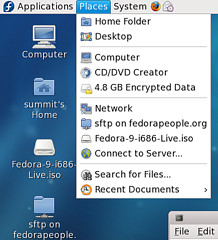
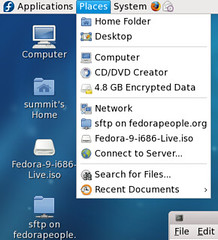
Fig 16. A mounted ISO image and a network moun...
Image by redhatmag via Flickr

No matter how much we learn, there is always more we can learn. We hate to be regurgitating comments to our own blog posts, but we continue to admit it when we’ve learned something new. But another comment from the head of the Fedora Project prompted us to write this post, on how to get a copy of Fedora if we’ve sold you on the idea of trying it out.

If you aren’t certain whether you want to install Fedora to a computer, you can try a Live CD. Fedora comes in two basic flavors(until the next version, where there will be a change in architectures). A 32-bit and a 64-bit version. We use the 64-bit version, as our processors can handle it. You may need to check. 64-bit only comes into play if you have more than 3.5GB of RAM, but if your processor can handle it, why not use the version that matches your computer?

In addition to the OS installation DVDs, you can get a Live CD which will launch a fully operational version of Fedora off a CD, or install that image to a USB drive so your settings will be saved in between boots. The basic version is a standard desktop which can be used to install the base operating system, after which the remaining packages you want will be installed and downloaded. This is also the design Ubuntu offers.

The nice thing about Live CDs is that you can test drive the OS without committing to it. The standard Live CD,called the Desktop Edition uses Gnome as its default desktop. Fedora offers an alternate KDE Live CD. It also offers some custom spins, which is defined as “a community release that has been created using one of the Fedora remixing tools, preferably either Pungi (regular images) or livecd-creator (Live CD/DVD’s). Custom spins should be strict subset’s of packages available in the official Fedora repositories.” Which means no official spins which add MP3 or DVD codecs can be hosted by Fedora. Current official Spins include:

  • XFCE – A version of the Fedora Desktop Live CD that uses XFCE as the desktop instead of Gnome or KDE
  • BROFFICE – Fedora will have for the first time the BrOffice.org brand for the office suite. This spin is intended to be a Brazilian Portuguese localized spin that provides the legal brand for OpenOffice.org in Brazil.
  • FEL – Fedora Electronic Lab, a high-end hardware design and simulation platform. This platform provides different hardware design flows based on the semiconductor industry’s current trend. FEL maps in new design, simulation and verification methodologies with opensource EDA software.
  • DEVELOPER – Live DVD jam-packed with various development applications, such as Eclipse, Anjuta, git, cvs, lynx, emacs, and a hex editor; and build tools like GCC, Inkscape, Koji, createrepo, mock, rpmdevtools, rpmlint and much more.
  • AOS – A JeOS spin for building pre-installed, pre-configured, system images. The Spin consists of a small set of packages upon which the appliance building tools can be used. The spin is part of the Appliance Tools feature. This feature consists of a tools and meta-data that make it easier for anyone (ISVs, developers, OEMS, etc) to create and deploy virtual appliances.
  • EDU-MATH – Educational spin tailored toward mathematics and scientific applications
  • GAMES – A LiveCD with a showcase of games from Fedora. Here’s a list of included games.

Fedora offers direct download of ISOs, torrents, and Jigdo. We mentioned Jigdo in a previous post. It is a JIGsaw DOwnloader. It takes RPM package files and assembles them into an install image. We had wondered why the custom spins and Live CDs are not offered this way, and had sent several emails asking, with no response, till the Head of the Fedora Project(maybe we should name him a Gadget Wisdom correspondent) came back with this answer.

Jeroen van Meeuwen from our Spins SIG was kind enough to send me this information on Jigdo:

“The jigdo method of distribution basically works as follows: for every file in a .iso that you tell jigdo is available from somewhere else, it strips the file (or slice, or piece of the .iso jigsaw) from the .iso leaving you with a relatively small .iso.template (only the parts of the .iso that are not available from somewhere else) and a list of files you can get from somewhere else.

“Now, with installation media, this means there’s a small part of the .iso you need to download in the form of a .iso.template, while the rest (install.img, and all RPMs) is available from any mirror (and you are going to use the closest and fastest one).

“With Live media however, the contents of the .iso is just a few files. Some of them are really small (vmlinuz0, initrd0.img), while others are very large and make up 99% of the size of the .iso (osmin.img and squashfs.img). Splitting those slices from the .iso isn’t very useful, because you would end up downloading a small .iso.template, several very small files, and then one single beast of a file (squashfs.img).”

Hopefully this helps clarify our jigdo availability. Thanks for the question!

So, our assumption that this would be helpful was incorrect, and we learned something new. We look forward to sharing other things we don’t know as we share and enhance our Fedora knowledge.

And for the Fedora Project…give it a shot. You certainly have a lot of ways to experience it, from full immersion to merely dipping your toes in. Hmm…maybe we should become a Fedora Ambassador, although we have yet to get someone to switch to Fedora for good. We came rather close with one person, but he fell off the wagon and went back to Microsoft.

Reblog this post [with Zemanta]
Published on March 5, 2009
Full Post
0 Responses

Fedora 11, Updates and Migration

Fedora Core 6 running GNOME with activated AIG...
Image via Wikipedia

We continue to want to write about Fedora, especially in light of our recent inspiration. We were reading this post on a blog about the fact that Fedora 11 will have roughly 60 new features, some of which we previously summarized. The last few releases have had less than half that. Today is the feature freeze for Fedora 11.

The author predicts these features will have other distributions rushing to catch up.  The beta freeze of F11 is in a week, with the Beta release on the 24th. The final release is set for the end of May.

Every time there is a new release of Fedora coming, we wipe and reinstall every system from scratch. Our preparations begin a month in advance, when we start mirroring the complete Fedora repository and the update repository for the release, as well as our favorite 3rd-party repositories. Every night, a cron job updates any changes made.

Jigdo allows us to use those files to assemble an install image. And we maintain the repository and keep it updated to keep our systems updated. As we mentioned previously, the new DeltaRPM system will save download bandwidth.

Creating a local repository is easy. You start with your installation DVD, if you have one, and copy the packages to a directory. Then, run the createrepo command on the directory(you may have to install it). The directory should be accessible on a local web server…we use lighttpd over apache for memory reasons(but more on that another time). Then, you can edit your yum configuration files in one of two ways…adding a local only repository file, or editing the existing files to redirect to the local server instead of one of the Fedora mirrors.

To sync a remote update use a command like this…

rsync -avrt rsync://mirrorsite/fedora/linux/releases/10/updates/x86_64/ /var/www/html/yum/updates/10/x86_64

Go to the Fedora Mirror List to find mirrors that work for you.

As a final step, the Fedora Unity project releases re-spins of the Fedora releases with updated packages, as well as the Fedora Everything spin, which is a multiple DVD release of the entire Fedora repository.

With hard drive space so cheap lately, and metered internet coming into vogue, this is a decent solution. Once one has the latest distribution, one has to figure out how to distribute it to multiple systems. We start by loading it onto one system, and breaking it in before distributing it elsewhere.

More to come…

Reblog this post [with Zemanta]
Published on March 3, 2009
Full Post
1 Response

New Eees Worth Looking At

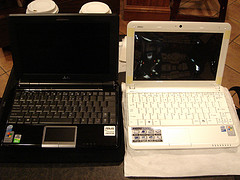
Eee Keyboard We wrote on the Eee Keyboard in January. Engadget checked out one of these at CeBIT. Asus included a 16GB SSD, 1GB of RAM, WiFi, Bluetooth, USB ports, and HDMI/VGA outputs. And it includes a 5-inch 800×480 touchpad.The whole thing is powered by an Atom N270, the same processor many netbooks use.

We’d consider buying one of these. It would be great as a hookup to the TV as an HTPC or similiar.

The Eee Top is now available for pre-order on Amazon. It is a 15.6 inch touchscreen PC with built-in media apps. It would make a decent kitchen or second-bedroom PC, with its form factor. Asus is really leveraging innovation at using the small form factors it pioneered with the Eee Netbook and PC

Update: The EEE Top has now been discontinued. Please see future articles on this site for successors.

Published on March 3, 2009
Full Post
0 Responses

Roku Video Player Preview – Amazon on Demand

Amazon VOD on Roku
Image by programwitch via Flickr

Roku upgraded Engadget’s Roku Netflix Player to the new offering for Amazon Video on Demand. The Netflix Player, to reflect this, will now be known as the Video Player. Amazon Video on Demand is the second service to be offered on the player. Roku is opening the platform to third-party channels, so eventually the $99 box will be able to stream from all kinds of sources.

Check out their thoughts, as well as a video of their testing here.

In the meantime, we’ll continue to wait for things like streaming from a home computer, Hulu, etc.

Reblog this post [with Zemanta]
Published on March 3, 2009
Full Post

Get New Posts By Email