
Gadget Wisdom

Author: David Shanske

Registration time

2011-09-25 06:23:49

Website

https://david.shanske.com/

Email

david@shanske.com

All posts by David Shanske

4 Responses

Internet Video May Be Coming to MythTV

Earlier today, on the MythTV Users list, contributor Robert McNamara announced that he and Doug Vaughan(who wrote JAMU and the TVDB grabber) are working on a new plugin for MythT called MythNetVision.

MythTV has had Internet video plugins before. MythStream was one of the earliest. We never could quite get it to work consistently, and it hasn’t been rewritten for MythUI, and those won’t work under MythTV 0.22. None of these have ever been included as part of the official MythTV package, which this has the potential to be.

From their description, it would have the following features:

  • Easy to Extend with Scripts so New Sites can be added. Adding a site would be as simple as parsing an API or site and formatting each item as an RSS article in the output of the script. Parsing happens in the background as long as the frontend is open to keep information current.
  • Support both media which is web-only (by spawning a browser directly to the playback link) and downloadable (by threading off a download and playing in the internal player as soon as enough data is buffered). Also supports external players.
  • Like other MythTV plugins, completely themeable.
  • Compliant with the Terms of Service of the websites it uses and shipped with a number of popular sites already supported. Scripts would only be distributed that were totally compliant, but other scripts could be added separately, outside of the distribution.
  • Two parts: An internet video search and an internet video browser.  Plans to include a “tree view” for a site by dumping the video
    RSS feeds for the site into a grabber config file (adding Revision3 as a fully browseable site would be as simple as dropping the RSS feeds
    in the grabber config).
  • All existing grabbers return full screen, autoplay results when they are available and the API allows. When not possible, the best possible result is played.
  • Downloadable media will be integrated into recordings.
Watch Recordings Menu under Graphite theme

There is a screencast video that can be viewed here. They hope to release by MythTV 0.23, but possibly sooner.

McNamara used the following sites as Examples of sites that should be very easily (and legally) implemented: Comedy Central, The Escapist Magazine, Revision3, Recent Apple Movie Trailers, BBC iPlayer. They’ve already included Youtube, Vimeo, Blip.tv, MTV Video, and TMDB Trailers.

All of them are very interesting. The Escapist just recently unveiled its app in Boxee at the Boxee Beta unveil, for example.

Speaking of Boxee…it has shifted its focus from media stored on a local drive to online content. MythTV has to do the same. It is a DVR software, and should remain so. But with more and more online content becoming available, it needs to address it, and offer ways for that content to become a part of the interface.

MythNetVideo’s design seems to accommodate for that. It launches external programs, or imports video, whichever it can. MythTV doens’t need to be all-encompassing, it can hand off control to other programs. But having that option allows it to be easily extensible, and that is what it needs.

Published on December 16, 2009
Full Post
2 Responses

Review: WD TV Mini Player

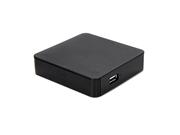
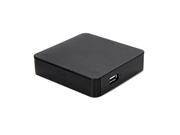
Western Digital WD TV Mini Media Player Model WDBAAL0000NBK-NESN

Recently, for a limited time, Newegg offered the Western Digital TV Mini Media Player for $40 including shipping. It is currently listed for $59.99.

The Mini is the little brother of the WD TV and the WD TV Live. The basic differences between the three is that the Mini is SD, and the WD TV Live includes networking capability.

The device has its pros and cons. It is very small, and can playback media from any USB drive formatted to FAT, FAT32, NTFS, or HFS. This makes it useful as a portable device, although the slightly larger WD TV and TV Live have much more functionality. The maximum resolution is 720 x 480 for most files. It doesn’t support MKV or H264 either. But it does support XviD, OGG, etc and a variety of other common formats.

It can playback not only video, but music and pictures.

This weekend, we field-tested it. It was able to playback everything within its defined parameters that we threw at it, including two movies, several Revision3 shows, and some audio podcasts.

Ultimately, this device is not something we’d have in our house. Quite franky we don’t need it. But it is a great device, for the price we paid, to stick in a bag and use to playback your digital media at whatever place you happen to be with a minimum of fuss. Reading reviews, two popular uses are to playback ripped movies and to hook into a car entertainment system.

We hope, however, that firmware updates bring additional features to this device in the future. Although we are not holding our breath.

Published on December 15, 2009
Full Post
2 Responses

Blu-Ray on Linux – Part 2

Blu-Ray Disc logo
Image via Wikipedia

After a lot of consideration between a dedicated hardware blu-ray player and a blu-ray drive, we prepared to take advantage of Newegg’s $49.99 Blu-Ray drive.

At the last minute, we changed to a $129.99 Blu-Ray burner, so we can experiment with blu-ray burning as well as play-back under Linux.

We installed it in a secondary computer, as opposed to our production system, and installed the MakeMKV beta for Linux. It compiled without incident, and was able to rip our test Blu-Ray video to a test drive.

Now, we want to emphasize this very clearly. WE HAVE NO INTENTION OF DISTRIBUTING ANY ILLEGAL VIDEO. Our intention is to be able to exercise our fair use and playback our legally purchased or legally rented videos.

It is a pain in the butt to have to spend this time ripping the Blu-Ray before we can play it. But that is the price we pay for our open-source lifestyle choice.

We figure, for our legally owned(not rented) Blu-Rays, we have two options.

  1. Rip the Blu-Ray, watch it, then delete the working files. This seems to make sense, as a single movie rip is taking up 30GB on a drive. How many of those is it worth storing.
  2. Do above, but create a lower-quality archival copy that can fit on a single DVD. Our first blu-ray came with a digital copy on a separate DVD that can only be played under Windows, so we might as well discard that disc and replace it with our on archival DVD.

Either of these, again, involve a fair amount of preprocessing and working space, however. In the meantime, however, we have a new movie to watch.

Published on December 6, 2009
Full Post
1 Response

Some of Our Issues With Apple – Redux

SAN FRANCISCO - SEPTEMBER 09: (FILE PHOTO) App...
Image by Getty Images via Daylife

Officially, Gadget Wisdom is not a pro-Apple organization. We admire many of their products, some of us even own them, but it is the issues that keep us from going out and embracing the Apple lifestyle, the fatal flaws for us. We like to bring the issue up every so often. Tonight, we were watching a documentary called MacHeads on Hulu and thought we’d justify ourselves again.

To be fair, we parted ways with Microsoft, except for rare occasions, as well. Many of those reasons are similar. It is an unpopular view to reject these companies in favor of…well, in our case, Linux.

It began many years ago, with the Macintosh Performa. We spent many an hour with a Performa. One time, as was apparently common on this system, the CMOS battery failed. Replacing it could only be done by an Authorized Repair Shop. It was a battery, not a hard drive. So, after several failed attempts, we did replace that battery, voiding our support, and…the thing never fit back together right after that. And after a while, we just let the computer think it was 1969.

But that was years ago. The Performa is generally considered one of Apple’s bigger mistakes. Apple computers have come a long way. They run OS X now, which is a UNIX-based system. They have some user replaceable hardware, which was an issue we always had with them. There is a lot more openness in many areas.

But Apple is a company committed to maintaining its control. It released the iPod, and the features of the iPod were so unique at the time that it was a game changer. Same with the iPhone. But other companies are producing good products too.

Apple’s attitude is epitomized in their ad campaign. In it, John Hodgman plays the older, somewhat goofy PC, versus Justin Long‘s hip younger Apple. We have no problem poking fun at the competition, in moderation, but we’ve never liked the tones. Meanwhile, adoption costs for Macintosh products are significantly more than those of the PC. One could say this is because quality comes with a price.

Which brings us back to the iPhone. The iPhone, a great network-connected handheld device with millions of apps in its app store. Here, we praise Apple for its openness. Anyone can submit an app…if you pay for the development kit and have the equipment to develop it on. So, Apple is making some money there. But, from all reports, what the iPhone is less than satisfactory at is actually being a phone. Some of that may be attributed to the AT&T network though. A problem with the Apple app store is the long approval process, even for updates. Check back with us when we try a Droid(we’re Verizon people). Apple, like many companies, wants to control what we do with their products once they’ve left the Apple Store. The Android OS for mobile phones offers an open platform.

Same thing with the iPod, which ties you to iTunes, which allows more Apple control of your lifestyle. Of course, we’re willing to hand parts of our lives over to Google, so we suppose we shouldn’t talk.

Fed up with the inefficiency of Windows, and the problems there, we, like many Mac Users, left that environment. We went to Linux. Linux, in our opinion, is the operating system for the DIYer. It has its problems, but if you are pissed off at how something works, you have the right to change it yourself. Edit the code, write your own. Conversely, it gives you very little standing if you want to complain. We could have gone to Mac. Some of our correspondents did.

Not long ago, we tried to get someone who would write us a review of their new iPod Touch. The Touch, which is essentially the iPhone minus the phone part(which may be an improvement), as a wi-fi enabled device is something you can advocate giving for people who don’t need the phone functionality, but want a pocket internet device. We’re hoping someone tries this with the Android OS, if they haven’t already. So far, no such review has been submitted to us, however.

So, what it amounts to is a choice. We admire much of Apple’s innovation, but we think it comes at too high a price. Not financially, but when factoring in the restrictions that chafe at our desire for freedom. That is our opinion. What’s yours?

Published on November 29, 2009
Full Post
1 Response

Roku Releases Ten New Content Channels for Video Player

Roku Netflix Player Size Comparison
Image by yonnage via Flickr

We love the idea of the Roku Video Player, formerly the Roku Netflix Player. We’ve been talking about it from early on, and have used one, although we admit to not owning one(not yet, at least).

Today, Roku started releasing a major update for the box. It includes ten new content channels:  Pandora, Facebook Photos, Revision3, Mediafly, TWiT, blip.tv, Flickr, FrameChannel, Motionbox and MobileTribe.

Now, there are some disappointments there. These are good sites, but nothing show stopping, like Hulu, or even Youtube. And the fact they haven’t incorporated streaming from your own home computer is equally disappointing.

The Roku Channel Store, the platform under which these new channels were launched, hopes to become a platform for future development. We’d love to see that.

Published on November 23, 2009
Full Post
1 Response

New Adobe Flash and Air in Beta

Adobe Systems Incorporated
Image via Wikipedia

Last week, Adobe offered up a prerelease of its latest versions of Adobe Air and Adobe Flash. One of the unique things is that they pushed out the beta for Windows, Mac, and Linux. There are a lot of new and exciting features for the new versions.

For Flash, they offer H.264 Hardware Video Acceleration for Windows using UVD2 for ATI Radeon graphics hardware, NVIDIA hardware with PureVideo, Intel GMA 4-Series acceleration support, and even Broadcom video acceleration support via their Crystal HD Enhanced Video Accelerator. Unfortunately for us, as Linux users, they didn’t opt to include Nvidia VDPAU or VA-API support.

For Air, there are a lot of new developer features that will increase functionality when developers integrate them into their programs. For the end-user, the system offers reduced CPU and memory usage, as well as support for features like multitouch.

Ultimately, Adobe plans to push 64-bit Linux versions of these applications. They have had a 64-bit prerelease of Flash for a while which was not updated as part of this beta. 64-Bit Air is held up by waiting for a 64-bit Flash build. No such flash has been released.

We look forward to Adobe pushing out equal versions of Flash for all major operating systems as a matter of policy. We hope they follow through and that more companies follow their example.

Published on November 22, 2009
Full Post
2 Responses

Blu-Ray and Linux – Or Why We Don’t Have Blu-Ray Yet

Blu-ray Disc
Image via Wikipedia

Many years ago, we owned a hardware DVD player. Then, over time, we dropped the extra device in favor of playing movies back through our Home Theater PC.

But Blu-Ray is a bit more complicated. We use Linux, and a group of intrepid individuals reverse-engineered the DVD standard, as no one would offer a licensed copy. At least until this past July, when Fluendo released a licensed DVD player for Linux. They have not yet released a Blu-Ray player.

Which leaves the reverse-engineering road. The latest versions of mplayer now support most of the Blu-Ray codecs. But that isn’t playback of the disc. That means you still need to rip and encode the disc for it to work. Which is where the problem comes in. There is a limited guide available for Ubuntu that offers some updates on what you might do.

MakeMKV has a Linux version, which apparently works for ripping Blu-Ray discs, even many BD+ encrypted titles. It will take them directly to the Matroska(MKV) container format.

A Blu-Ray rip will take at least 50GB, before post-processing down to a smaller format, which is a lot of hard drive space. Especially if your goal is to merely watch the disc.

Am looking forward to testing all of these methods someday, but will need a Blu-Ray drive and a sample Blu-Ray disc. Will likely choose to wait. Although we may choose to try a hardware Blu-Ray player to dip our feet into the world of Blu-Rays. We don’t really need to watch HD movies, as much as it would enhance our experience, but we want to slowly phase out purchasing DVDs in favor of Blu-Ray for new releases. Not that we buy any movies regularly. We save purchases for special titles.

We’d like to hear what other people think on the subject.

Published on November 22, 2009
Full Post
1 Response

LightScribing and Fedora

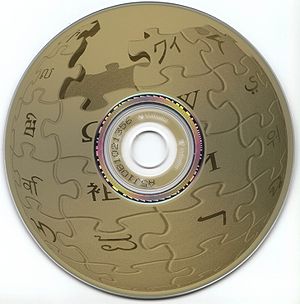
A LightScribe disc label printed with Wikipedi...
Image via Wikipedia

LightScribe is nothing new.  It has been around for years, We like the idea. After all, no one can read our handwriting anyway. And we want something that looks nice, but it easy to generate. A simple label making program that allows us to type the information and have it burned to the top of the DVD or CD seems ideal.

There are problems though. Lightscribe discs shouldn’t be stored in direct sunlight. It is recommended they be stored in polypropylene disc sleeves rather than PVC sleeves, and even certain residual chemicals on your hands can cause discloration.

For the record, the same technology, but not compatible, is available in the competing standard of  LabelFlash, which has some of the same problems. Neither of them offer color…yet.

The surprising thing is that this technology isn’t more prevalent. Of course, there is pricing to consider. We went to discounter Meritline.com to check on pricing. A 25 pack of Philips Lightscribe DVD+Rs costs $7.99, or about 32 cents a DVD. A 50 pack of regular Philips DVD+Rs costs $15.50, or about 31 cents a DVD. We picked Philips because they are about average quality. Either way, going Lightscribe isn’t going to break the bank.

Even with that, you can get DVDs for less if you look around. Our last DVD purchase was 100 Sony DVDs at 20 cents a DVD during a Staples sale. We hand label such things. But we keep a spindle of lightscribe CDs and DVDs, and do burn them occasionally.

What prompts us thinking about this again? Fedora has released a complete set of Lightscribe labels. They’ve produced LightScribe versions before, but this is the first time they’ve generated versions of all their labels, regular and Lightscribe, for all of the release versions, the various Live Disks and the Installation DVDs, as well as the blank label so you can add your own text.

Their label isn’t ideal for Lightscribe, which needs high contrast, but they’ve made the effort, and even without the background, the text and Fedora bubble logo made our burn look professional. We will have our Fedora review coming up soon, but we’ve had some trouble with it on our netbook, the first system to receive the upgrade, and want to fiddle a bit before getting to a second computer.

Published on November 19, 2009
Full Post
1 Response

Thinking about Online Backup

Image representing Dropbox as depicted in Crun...
Image via CrunchBase

Earlier, we were reading LifeHacker‘s Five Best Online Backup Tools. We’ve been in the market for an Online Backup solution. Right now, we use Dropbox.

Dropbox offers a free 2GB account that syncs a directory on your computer to their server. It offers a paid option for a monthly charge of $9.99/50GB or $19.99/100GB, which is a bit too much for our needs. It is a great tool that we use every day, but is, in our opinion, for our most used files…ones often changed. It offers clients for every operating system, which is important.

We need a solution that will work with Linux…our primary operating system. Thus, Mozy or Carbonite is not an option. Assuming we’re keeping to the Lifehacker list, that leaves CrashPlan and Jungle Disk.

Jungle Disk will be changing its pricing scheme this week, according to its blog.

  • Jungle Disk Simply Backup: $2/month, with 5GB of free storage
  • Jungle Disk Desktop Edition: $3/month, with 5GB of free storage
  • Jungle Disk Workgroup Edition: $4/month, with 10GB of free storage
  • Jungle Disk Server Edition: $5/month, with 10GB of free storage

The new plan includes a minimum 5GB of storage. Beyond that, you have your choice of cloud storage providers, either Amazon S3 or Rackspace Cloud Files. Both charge 15 cents per GB used, but S3 charges for bandwidth as well.

CrashPlan offers unlimited storage, either an individual unlimited plan for $3.50 a month if you purchase 3 years worth, or a family plan for $5.00 a month if you purchase 3 years worth. It is $4.50 or $8.33 if you buy a single year plan.

At the moment, while we like the idea of online backup, everything we have that is critical fits into the 2GB Dropbox partition and beyond that may not be worth it. Everything else…well, try encrypting it and sending it somewhere safe. Like a safety deposit box…the house of a friend in a different state, or even have your parents store it for you in your childhood home. Mom is certainly a cheap option.

If your friend/relative is willing to trade with you, you can store their emergency backups too.

But what do you think? Should we go for online backup?

Published on November 16, 2009
Full Post
2 Responses

So You’re Thinking of Trying MythTV

inside my new ubuntu linux PC
Image by spadger via Flickr

We’ve been writing a lot about the new features of the latest release of MythTV, which has now been fully released. Assuming we, or the myriad of other enthusiasts have convinced you to try MythTV as the core of your HTPC(Home Theater PC) system, what should you think about?

Go HD – Don’t Even Bother with SD

In this modern world, even though SD is cheaper, why limit yourself? High Definition TV is the wave of the future, so you should plan for it, even if you aren’t yet ready for it.

You don’t even need a powerful computer anymore to do playback. Just a good graphics card. Under Linux, the best supported cards are the Nvidia line of graphics cards. The 8000 and 9000 series support VDPAU, the latest in offloading video playback from the CPU to the GPU. With one of these graphics processors, you can even use an inexpensive low-power processor like the Atom(common in Netbooks) to run your system.

Now, that is playback. As for recordings, hard drives are fairly straightforward. Get enough space. GBs are cheap now. Beyond that, you need a recording device.

Even with Over-The-Air broadcasts, you can get HD programming using a tuner card. After that, if you have cable or satellite, you can get some channels unencrypted on the cable line, usually local stations as well. Beyond that, you can take the output from the cable or satelite box and pipe it into computer for recording. If you are lucky, you can get channels over a firewire cable from the box(cable only), if not, you can use the HD-PVR 1212 to capture from the analog outputs.

After that, all you need is a remote to control it, and a TV or computer monitor to output it to, and you have the basics of a MythTV setup. Easy, huh?

More to come…

Published on November 9, 2009
Full Post

Get New Posts By Email