Gadget Wisdom

Author: David Shanske

Registration time

2011-09-25 06:23:49

Website

https://david.shanske.com/

Email

david@shanske.com

All posts by David Shanske

0 Responses

An Android Slate – A gPad if you Will – Thoughts on Tablets

Reports are that Google is exploring building a tablet of its own based on the Android OS. Google had been encouraging third-parties to build such items, but now they are exploring a model closer to the Nexus One, where they sell the device directly.

Details on the Neofonie WePad were released. It will run an Intel Atom N450 processor, with an 11.6″ 1366×768 touchscreen, and a running time of about 6 hours. It will support full HD playback. The 16GB version will cost 449 Euro(about $600). A 3G version with GPS and 32GB will be 569 Euro. It will be available this summer.

Supporting established standards and peripherals like USB and bluetooth are essential. These standards are there, why not use them? Then any device will work.

The truth is, we’d like to see the tablet combined with the netbook. Lenovo is set to release the IdeaPad U1 Hybrid, which is both tablet and netbook, is an example. The screen can be removed from the netbook assembly and turned into a slate running an embedded OS. But having two processors and a $1000 price tag is a bit much.

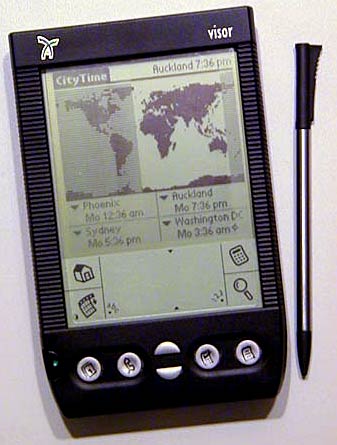
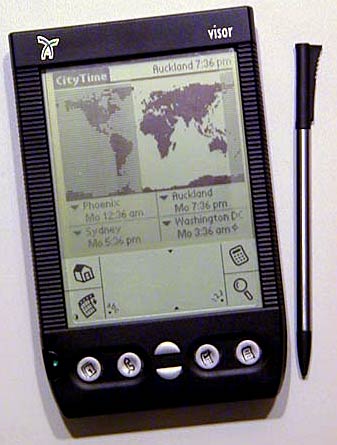
Many years ago, our editor spotted someone using a PDA with a Targus Stowaway Keyboard. After some deliberation, he rushed out and bought a Handspring Visor and its Stowaway Keyboard. In fact, several of the Gadget Wisdom team(long before it existed), did so. Not long after, Handspring ceased to exist, but that is another story. We picked the wrong horse to back there. But, the idea was sound. A portable device that could be used to do basic productivity events.

The Android phones we purchased have the same benefits for productivity as our old Handspring Visor…although built-in external keyboard support would be nice. The price for an iPad is $500. You can get a 10″ netbook for around $300.

The tablet/slate has yet to be proven successful. But a hybrid device that could serve multiple uses could be most useful. Someone just has to perfect it. We aren’t there yet.

In the meantime…anyone want to buy a Handspring Visor?

Published on April 13, 2010
Full Post
0 Responses

Celebrate National Library Week – Enjoy the Tech

National Library Week is this week. We here at Gadget Wisdom love to read, be it on our mobile devices, or traditional books. But the library is not just about reading.

Libraries offer DVD and video games you can borrow. They have e-books and digital media borrowing online. They offer free wi-fi. We hope the book itself, a piece of technology(if older tech), never dies, but the libraries are moving with the times. They have to, or they will cease to be.

So, support your local library.

Published on April 13, 2010
Full Post
0 Responses

Eee Keyboard May Finally Ship

http://www.youtube.com/watch?v=leTCKDmnnSQ

Liliputing, premiere site for netbooks and other compact computers, reports that Asus is finally set to ship the Eee Keyboard this month. We reported on the Eee Keyboard when it was first demoed at CES a year and a half ago.

It features wireless HDMI, and a built in touchscreen that can act as a small informational display.

The Eee Keyboard would make a compelling HTPC. It reminds us of our old Commodore 64, which had the entire computer within the keyboard enclosure. Of course, it would also, minus the computer power, make a nice keyboard by itself. We’re not sure of how this will take off. But we’ll be watching.

Published on April 12, 2010
Full Post
0 Responses

Revamping Gadget Wisdom

The keyboard, overall.
Image via Wikipedia

Recently, Gadget Wisdom moved to its new home, a new server that will hopefully be faster and more efficient, and give us the chance to add new features. As part of that, we’re revamping our offerings, trying to return to our roots. As part of that, we’re unveiling the following sections of our site, making it a bit easier to navigate and focus on what you are looking for.

  • Android – Since many of contributors have acquired Android phones, we’re adding a section to write about the Android OS.
  • Eco-Tech – Rededicating ourselves to our roots, which include our tag line of frugality, we’re hoping to bring back more stories on how to use new and more efficient technology to reduce waste and save money.
  • Home Theater PC – Not only Home Theater PCs, but Home Theater tech you can pair with it, and integrate with it.
  • Lifestyle – A long-standing part of Gadget Wisdom, Lifestyle covers tips, advice, and news on how you can live the sort of tech-savvy lifestyle.
  • Linux – The Linux section replaces the older Open Source Lifestyle section. We’re going to offer more of a focus on Linux and what you can do with it.
  • Mobile – Not just Cell Phones, but Mobile Technologies of all sort…Technology for People on the go.
  • News – All of our news stories.
  • Opinion – All opinion pieces.
  • Product Reviews – Product Reviews and New Product Developments
  • Security – Security News and How to Secure Your Data and Tech

All of these subjects have been here, in some form or another, but now we’re making it easier to sort through them. If anyone is interested in contributing an article to Gadget Wisdom, please Contact Us.

Reblog this post [with Zemanta]
Published on April 11, 2010
Full Post
0 Responses

The Other MythTV Rig

We recently did a review of our MythTV setup. But, we omitted the Other MythTV rig, where old MythTV parts come to their final resting place. Most of the parts here were once part of the primary MythTV rig, and have moved to this secondary location.

The rig in question, codenamed Glendale, is an AMD X2 BE-2400 low wattage processor, the same we use for one of the frontends in the main setup. But this one pulls double duty as both a frontend and a backend.

Inside are two old PVR-150s, as this location still has analog cable service, which has been eliminated at the primary location. There is also a Silicondust HDHomeRun, gotten inexpensively during a Black Friday sellout. The location has absolutely no broadcast reception. We figured, if the recorder ever goes out, any old system can stream from the Homerun, including a netbook.


The system has an old refurbished 250MB hard drive, which had failed in the primary backend and been replaced by the manufacturer. A recent addition is that of two E-Sata ports. Since this is a less frequently used location, we bring up video material to enjoy over recording it on location. E-Sata even would allow us to make the entire media drive for this system external with no loss of speed.

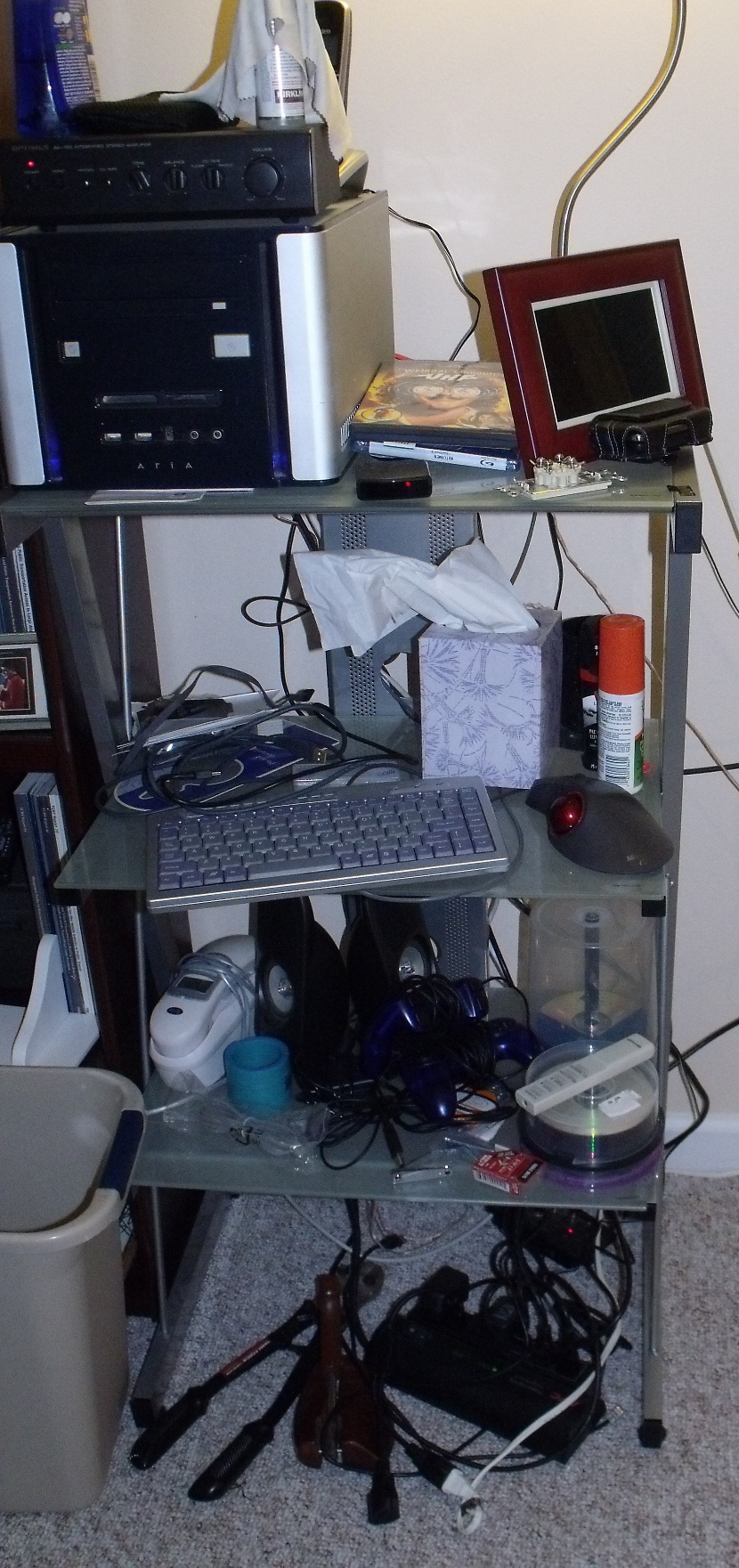
The stand is an audio stand we found one day on clearance at Staples, marked down to $10. On top of the Antec MicroATX cube is an old Radio Shack amplifier, hooked into some old speakers that used to be part of a Cambridge Soundworks speaker set. Next to it is a refurbished digital photo frame, and below it is a mini-keyboard and mouse.

The whole assembly is hooked into an APC power strip with a master control outlet, so when the computer shuts down, all the peripherals, including the monitor, shut down. This is useful, since this system takes advantage of a feature we don’t use at the primary site, ACPI wakeup. When there are no recordings, the system can be shut down and programmed to wake up in time for the next recording.

During the trip when these pictures were taken, we added VDPAU acceleration, so the system can encode the files recorded off the HD-PVR at our primary location.

As mentioned previously, we have hopes of upgrading our primary monitor to one that is HDMI capable, at which point we’ll net a widescreen monitor for this location to replace the current 19″.

The system runs Fedora, as is our custom. We have thought, as this is isolated from the rest of the systems, of switching to a MythTV distribution such as LinHES, MythDora, or MythBuntu. More on this if it happens.

Published on April 9, 2010
Full Post
1 Response

MythTV 0.23 Release Candidate 1 Released

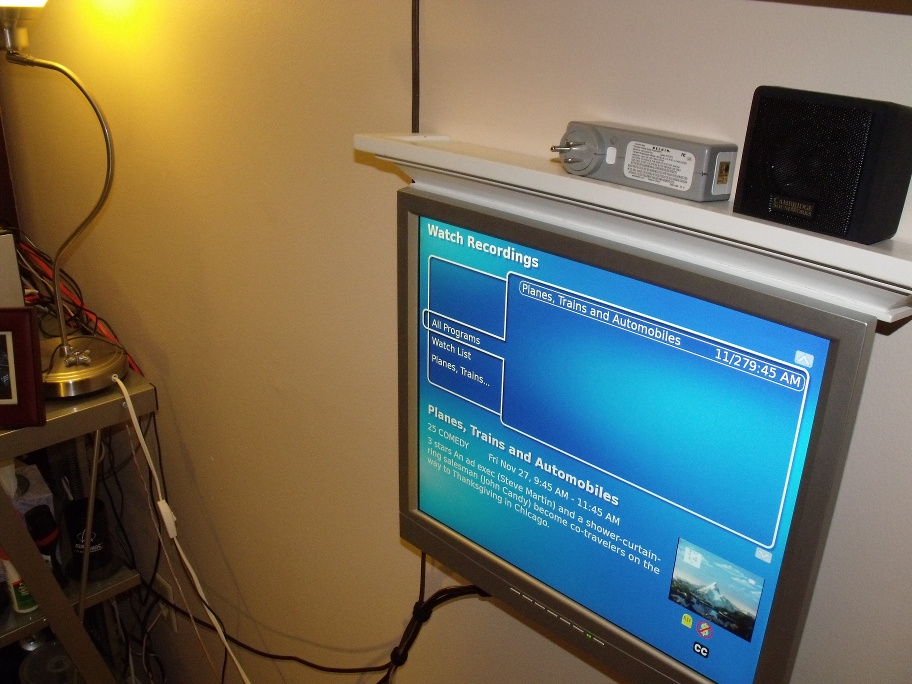
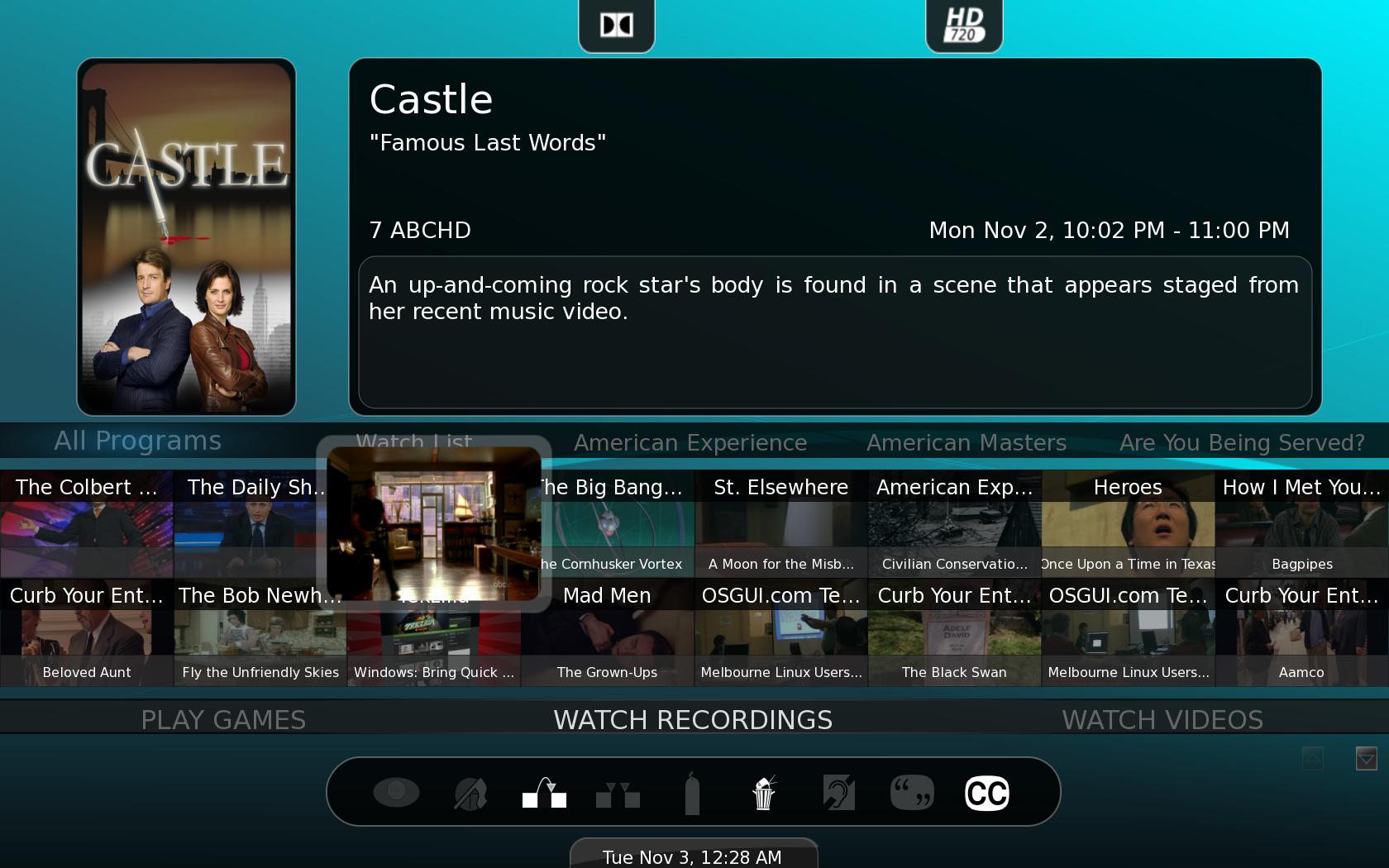
Watch Recordings Menu under Graphite theme

Today, the MythTV Development team released the first release candidate for MythTV version 0.23. Highlights include:

  • Beta of MythNetVision, which we previously reported on. MythNetVision is a an official Internet video plugin being developed for MythTV. It uses user contributed scripts scripts to parse information so that it can be extended to additional sites as time goes by. When possible, it will download the video to the drive. Otherwise it will launch a browser(MythBrowser or otherwise) to view it.
  • Rewritten Audio System
  • A New Event System to trigger user specified actions when certain events occur in MythTV.

Looks good so far. We’ve been waiting for MythNetVision, and a lot of the fixes set to come with future versions. The best news is the more rapid release cycle. The gap between 0.21 and 0.22 was much longer than anyone preferred. Hoping to see more.

Published on March 24, 2010
Full Post
3 Responses

Editorial: Find Me a Twitter Client

This icon, known as the "feed icon" ...
Image via Wikipedia

Guru is the editor of the Gadget Wisdom blog and the voice of GadgetWisdom on Twitter.

I have gotten addicted to Twitter. It wasn’t my idea. I got onto Twitter to promote the blog, initially, and didn’t think I would have much use for it. But like many Twitter has mostly replaced the RSS feed for me. I want to keep up on what is going on, and I want that information delivered to me.

So all of the sites I used to follow in my RSS reader that offer a Twitter feed, I unsubscribed to the RSS feed. I’m hardly alone in that. There is too much to go through out there. And the nice thing is that in addition to straight blog->twitter feeds, there is some human filtering. If Tweeter A shares my preferences, the things they link to and retweet are likely to be ones I want to know about. That also creates a social element, as there can be commentary/dialogue about these things.

I am also on Identi.ca/StatusNet, also at GadgetWisdom. It is the same philosophy, but has a significantly different set of people, and fewer of the news sources I’m looking for, so I use it less frequently. It does offer a higher percentage of tech people though, so it has its place.

The Gadget Wisdom blog auto-tweets new blog entries, and I do try to comment on what other people are saying to get involved in the conversation. But ultimately, my problem is finding the right Twitter client.

I am a Linux user. The most popular Twitter clients that will work on Linux are Adobe Air based. Adobe Air is nice in that Air programs will work on any OS you can successfully install the software onto. But Adobe software can be difficult, although to Adobe’s credit, they do maintain the software and try to improve it.

I’ve been using Twhirl, which has not been maintained since Seesmic acquired it. Seesmic has its own Desktop software, which they’ve spun off into a variety of other social networking products, including one for Android. Twhirl is not ideal, but it has several features I want. I am trying to find the Twitter client that does everything I want. So, here are my parameters for a Twitter client. Note: This is a discussion of desktop, not mobile clients.

When I return home after a few hours away, I want to catch up on my tweets. This is where the problems come in. For one, with any client, if I don’t leave the client running, then I can only retrieve an hour or two of tweets. What if I’m gone for the day…6-12 hours? Some programs even have a maximum number of tweets they’ll keep even if you do leave it running, causing you to lose some. And even using the web interface, it is hard to go back more than a certain number of hours in your timeline.

So, this is what I want in a Twitter client

  • Lightweight – It’s Twitter. I don’t need it to take up that much memory. I wouldn’t mind if it saved my Tweets locally in realtime. I could afford the hard drive space.
  • Keep Track of Read Tweets – When I go out, or even when I’m in, I want it to keep track of where I left off reading and make sure everything from then on until I return is retained.
  • Prioritize Mentions – When I return, I want to know if anyone said anything to or about me to reply with before I read through hours of tweets to catch up.
  • Multiple Account Support – I have to monitor more than one account.
  • Backup – Why can’t the program save my tweets locally as a backup? My IM client can. Is there a single Twitter client that can do this?

So, let’s take a look at some Twitter clients we’ve tried…We mentioned Twirl, and it isn’t maintained, so we’ll skip it for now…

TweetDeck

Tweetdeck is perhaps the most commonly used Twitter client after the Twitter web interface itself.

  • It uses a column based interface… It has a lot of good features.
  • No Status.net/Identi.ca support
  • Multiple Account Support, but you cannot combine/group information from multiple accounts together.
  • Online sync option, but only for column information, not for position or account information.
  • A dot appears next to Tweets to mark whether or not it is read or unread.

Seesmic

Seesmic Desktop is the most serious challenger to Tweetdeck.

  • Multiple Account Support
  • Either single or multiple column format. Offers a filter/columns to group information from multiple accounts or separately look at each feed.
  • No Status.net/Identi.ca support.
  • No Online Sync, despite the fact Seesmic offers a web-based product.
  • No good way to keep track of your place, except by clearing your read Tweets.

Seesmic Web is an online version of the Desktop client, with similar features.

Gwibber

I needed to cover a native Linux client. I want to love Gwibber. But it has a few showstoppers.

  • Multiple Account Support, including Status.net/Identi.ca.
  • Offers a singe column input, but offers the opportunity to filter the column to a specific stream, ie account, mentions, etc.
  • No way to keep track of read Tweets.
  • No support for Groups or Twitter Lists

A lot of the above is on their roadmap for future improvements, but it isn’t quite there yet. Of course, I’m running the latest testing version for Fedora, which is not the most current. Ubuntu Linux users would have a more current version.

Hootsuite

Hootsuite is a web based client, and very popular. But it has that same showstopping problem we can’t find a solution for. Keeping track of where we left off.

I’ve looked at other clients, but cannot find anything that works for me. So tell me, what do you use? What works?

Published on March 7, 2010
Full Post
1 Response

You and Your Android

Android Logo
Image by Arvid via Flickr

Recently, several members of the Wisdom family got themselves Android(TM) based phones. We all dived wholeheartedly into the application phone lifestyle. The term smartphone isn’t quite accurate, and the primary advantage of these types of phone are all the possibilities inherent in being able to run applications to do almost anything with them.

We’ve always been fans of the open platform.  For all the wonderful things iPhones can do, there is still a lot of things that are restricted by Apple‘s management policy. In some cases, the Android is perfectly capable of doing those things, but no one has yet written an app for that. But in that regard, the Android will be catching up as its popularity increases. Or so we hope.

But there are adoption problems. A recent survey indicated that 73% of Android users are male. However looking at the numbers, as is sometimes the case in technology, all numbers show a larger percentage of male users. The Blackberry, which has widespread adoption, is not listed. Verizon’s big Android push this year has put the technology, which was previously niche, into the mainstream. Every provider is increasing its Android phone offerings. We’ll be interested to see how the demographics evolve in a year.

Sometime in the near future Android will offer a Flash plugin. And while we find Flash is less than ideal as a platform, its everywhere online. This will spur more Android adoption in the future.

To that end, to celebrate our newfound enjoyment of the Android platform, we’ll be introducing some Android posts here on Gadget Wisdom. Look out for them.

Reblog this post [with Zemanta]
Published on March 1, 2010
Full Post
1 Response

MythTV Rig: Part 3 – The Home Theater Frontend

As the third part, and for now, the final part, of our multipart series, Better Know a MythTV configuration, we profile the second of our MythTV frontends. This frontend is the older of the two, and is hooked into some home theater equipment for a more immersive experience.

Now, with all of these systems, bear in mind they’ve been designed, redesigned, expanded, etc. But we are, by no means wealthy over here. Some concessions have been made, and parts upgraded and replaced as financial and practical considerations demand it.

The current system was built when HDMI was still at the upper end of hobbyist grade. Now, many computer monitors and amplifiers include HDMI switching. This system was designed originally with component video in mind, at the cusp of our upgrade to HD programming. It is set up for expansion, and likely will be, piece by piece in the future.

As you can see, we’ve continued our modular Ikea furniture theme from the other setup. Originally we did have a more conventional audio rack here, but switched to these two separate pieces. The router, the Silicondust HDHomerun, and the modem are actually stored in the bottom of one of those cabinets, and the glass door hides a tape deck and could hide additional equipment. An IR remote control would actually work through that glass.

Both rooms where you see the frontend setup were designed as possible backend locations. The whole goal of a redesign we implemented over the last two years was to allow us to rearrange the equipment in a variety of ways depending on changing need. For example, we moved a file cart to the right of the setup to show the wire hookups for relocating the backend if needed.

The receiver is located on the right, and is an inexpensive Yamaha that incorporated all the features we wanted at the time. On top of the frontend you can see what looks like an old style radio. It is that and a record player. It adds to the character of the room, in our opinion.

Then we finally get to the frontend itself. The case seen is long since discontinued. The closest current model is the Antec Fusion NSK2480, which is a newer version of what we actually have. Like all of the others, this system also has an Asus motherboard.  There is another CrystalFontz 635 LCD panel in this system, this one in Green. We prefer the blue, which is why we got it for the second panel.

The processor is an AMD Athlon(tm) 64 X2 Dual Core Processor 4200+, which was retired from the backend during a previous upgrade.  Both frontends have 2GB of RAM. RAM is fairly cheap nowadays anyway. The remote is an RF Snapstream Firefly.

The screen here is a 23″ Westinghouse LCD with DVI and Component inputs and a maximum resolution of 1600×1200, mounted on a swing arm. This is one of the pieces we are hoping to expand soon into a larger, higher resolution with HDMI inputs, which will certainly, if nothing else, allow a thinner cable down to the computer.

You can see under the monitor the Left, Right, and Center channel speakers, the right speaker nestled in between Tux the Linux Mascot and the Time Machine, which we recently bought on a whim. The configuration of the room, a long rectangle, is not 100% conducive to a home theater design. To the left of the image is a window, and thus the positioning of the monitor and speakers is the only way to make sure viewing isn’t on top of the monitor, and that optimal viewing and sound is accomplished from either the couch, placed on a long wall, or a chair placed in the center of the speakers.

The rear speakers are not pictured, but are placed in the traditional isosceles trapezoid configuration, oriented according to the limitations of the space, again planned to surround primarily a person seated in a chair in the middle of the room. Under the shelf that holds all the speakers pictured is a through-the-wall air conditioner, which is why the units that hold the equipment are not placed against it. As mentioned, some of the decisions were made due to the configuration of the room. If anyone thinks they might have a better idea, please suggest it, as we’ve yet to figure out a superior layout.

So, that is it for now. We certainly have expansion hopes for the future, including to migrate to a monitor with an HDMI input, and possibly the receiver as well. Someday we’d like to try an Atom-based frontend, for the size of it.

Hopefully, you’ve gotten some ideas for systems of your own. What we’ve learned over the years is to build simply, but build room for expansion and redundancy. Any questions?

Published on February 21, 2010
Full Post
1 Response

MythTV Rig: Part 2 – A Frontend

As the second part of our multipart series, Better Know a MythTV configuration, we profile one of our MythTV frontends.

This is the newer of the two frontends we currently have in use. The case is a Silverstone Sugo SG-02, which looks rather nice in black. Inside, you can see a generic DVD drive and a CrystalFontz 20×4 LCD display that hooks into the internal USB headers on the Asus mainboard.

The processor is an Athlon X2 Dual Core BE-2400, the lowest power dual core available at the time of purchase, and rather inexpensive even then. The newest component is a NVidia GeForce 8400 series graphics card, which replaced an older video card. The card supports overloading of video decoding/playback under Linux, allowing a computer with little processing power to playback high definition video.

The hard drive is only used for the operating system, and happens to be one of the retired drives from the file server. A USB drive would work just as well, but would slow boot time. We could also have tried booting and loading data off of the network, but using an old drive to store the OS seemed simplest.

The monitor is an Acer 22″ computer, not television monitor, with a maximum resolution of 1600×1200.

One of the features that is unique to this frontend is the addition of the pullout X-Arcade Solo Controller, which slides in below the monitor when not in use. This system can also double as an arcade emulator, for the playing of classic arcade games. The monitor is even set to rotate to accommodate the portrait style screen of such a system, however when we put the system into its current cabinet, we didn’t account for the fact the monitor does not currently have enough clearance to rotate without being removed, a problem we have not bothered yet to solve.

We’re not big gamers, but we enjoy the nostalgia of playing the ones we played when we were young. MythTV includes a plugin/launcher for this.

The speakers are Creative Gigaworks T20 speakers, and do not offer a subwoofer. Our other system has full surround audio, but this one was designed to be much quieter, so we opted for a simpler speaker setup.

Finally, the remote is a simple Windows MCE infrared remote(not pictured). The system, when not in use, is turned off. It is plugged into a power strip(not pictured) with a master outlet, which shuts the power to the speakers and monitor when the computer turns off.

There have been other features/tweaks we have contemplated. for one, triggering the start of the computer with the remote, which we’ve run of but have been unable to get working. Like anything else, systems continue to improve.

The last major addition added Hulu Desktop for Linux into the Frontend, so it can be launched, control handed over to Hulu, then back to MythTV.

Next time, Part 3, the final backend.

Published on February 21, 2010
Full Post

Get New Posts By Email