Gadget Wisdom

Category: Security & Networking

0 Responses

Reconsidering Powerline Networking

Years ago, I tried powerline networking, and it never quite worked for me. But, a recent dead spot in my residence caused me to give it a shot again. Wiring to connect the two locations where I needed network access would be an involved process.

Powerline networking adapters are simple square boxes with a network port. You plug your network into one end, and it comes out the other side. Some of these adapters also act as wireless access points.

It worked surprisingly well, although I was only able to get 2mbps…but this was plugged into an extension cord. The adapters tend to have degraded performance if not directly plugged into the wall.

The adapters I used were an inexpensive set of TP-Link AV200 adapters I got for $25, but there is a faster standard…AV500. On the far end, I hooked up a wireless access point. I have the option of adding a switch in order to wire in items.

So, if you haven’t considered powerline networking of late…you may wish to. A wire is still better, faster, and more reliable, but it is not always an option.

Published on November 9, 2014
Full Post
0 Responses

Nginx FastCGI Caching

English: Nginx Logo Español: Logo de Nginx
English: Nginx Logo Español: Logo de Nginx (Photo credit: Wikipedia)

Over the last few months, I’ve been doing a lot of work trying to speed up the sites on my server….perhaps to the detriment of this site, Gadget Wisdom.

Gadget Wisdom runs on WordPress on a Nginx web server. To run PHP on an Nginx server, you need to pass requests to a FastCGI server.

Nginx supports caching the responses. So, WordPress generates a page dynamically, Nginx caches the response and can serve the cached version on request. Since the resource intensive part is the application, and most people don’t need a changing page, it works for the majority of issues.

For the last few years, refreshing the cache has been done by sending a request with a specific header. This has the effect of telling the system to generate the page again and store the result. A recent upgrade added in the optional Nginx Cache Purge module. This allows a purge of a specific page using a simple URL scheme.

The net difference between the two in effect is that the purge function removes the cached version to be regenerated on the next load. The header option generates a new version of the page which is stored in the cache. The disadvantage of the Purge module is you have to custom-compile Nginx…which means you have to manually keep up on security bugfixes.

Either way, once you decide on methodology, you also have cache validity. For example, many people opt for a microcache solution…where the cache time is very short, measured in seconds. This means that only when the site is being hit will people be served ‘stale’ pages.

The alternative is a very long cache time…measured in hours/days. As long as you have a cache refresh function available, such as the options mentioned above so you can remove the stale pages on demand, you can keep the pages around for longer periods of time.

Right now, my cache validity time continues to rise over time. You also have browser caching. Right now, images are instructed to be cached by your browser for days. I don’t usually change my images much after posting…or at all.

So, this post hopefully covered the basic decision making process for FastCGI caching on Nginx. In Part 2(if I get to it), we’ll cover some of the settings to allow this, as well as some of the considerations you have to make while coding this.

Published on September 16, 2014
Full Post
1 Response

Why CDN.net Intrigues Me

CDN.net logo

CDN.net is the latest pay per use CDN I’ve been using. Pay Per Use is the best option if you want to manage your costs.

We were with CDN77 for a while, which offered a flat rate $49/tb service. But the level of service was not one that I was thrilled with. I felt as if they didn’t understand my questions and weren’t interested in working with me.

CDN.net is actually one of two fairly new pay per use CDNs based on the OnApp federated CDN. It essentially uses spare capacity on various servers to offer CDN services. The other is CDNify, which uses a flat rate $49/tb service fee.

CDN.net is more of a marketplace. You can pick your CDN locations out of their available options and customize the package. When I started with them, you needed a free trial to see their pricing, but they’ve recently changed that. Their pricing is a variable rate, based on location. So, you can route your data through Salt Lake City at less than 2 cents a GB, or through Chelyabinsk for 1 dollar a GB.

Your rate is locked in until you update your package…which means if the price goes down in one price, and up in another, you have a hard decision to make. I’m sorry to any Chelyabinsk readers, but you’ll have to wait an extra second or two to be served. I’m not paying that rate.

I like the idea of this choice, but sometimes the results are surprising compared to where statistics report my users are. Analytics suggests that many of my users are in the Eastern United States, but I’m running more data through Dallas than New York. But it is never that simple.

But no one is writing about CDN.net or CDNify. No reviews that I could find. Only early startup announcements.

So, I set up a test for both. I had no problem with performance between the two. But, they are using the same backend. CDNify had some report issues in their free trial, but they fixed that quickly after I advised.

CDN.net, which I ultimately settled on, has answered all of my questions…although they do not seem to respond on weekends. One of their people even invited me to chat.

CDNs are necessary to reduce load from your own server and speed loading of static assets. CDN.net is still new, and there are more things I hope they do in the future. They also believe that they can offer lower prices as they grow their user base, as the cost would be spread out.

In terms of services, I would like to see improvements to their reporting mechanisms, but they have made changes, so I’ll see what happens.

You can go for a free trial here.

Published on July 11, 2013
Full Post
0 Responses

Lightweight Server Monitoring

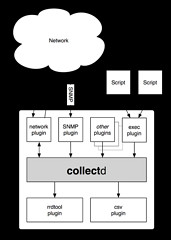
Collectd Architecture Schematic

I recently began a move of the Gadget Wisdom and related sites to a new server. The purpose of this was laying the infrastructure for a major upgrade.

One of the major pushes was upgrading monitoring features. Some of the software being used was no longer being maintained, and replacements had to be found.

Nagios and Munin are two of the most popular tools used by IT specialists for infrastructure monitoring. There are good reasons that I opted for something more lightweight though. There are dozens of monitoring tools, and it is quite overwhelming to choose one. These are two that I have been happy with so far.

One of the first ones I installed is collectd. Collectd is a tool that stores performance data. It is plugin based, which means it can be used to pipe into a variety of different pieces of software. So, it is incredibly extensible, which leaves room for future data gathering and future output. It is also incredibly lightweight, which has its advantages.

To output the data into graphs, I’m using a simple front-end called Jarmon for now. Jarmon downloads the files generated by collectd, and renders them on the client side.

The second is a monitoring tool called monit. Monit monitors various services to ensure they are up, and can take action if they go down, such as sending an alert, restarting a service, executing a script, etc. One of the most fun things about having alerts is reading them…and in many cases, knowing I don’t have to do anything, because I told monit to do it for me.

There will be more to come on this, but what do you use in similar situations?

Published on June 26, 2013
Full Post
5 Responses

Thinking about RAID vs Backup

Six hard disk drives with cases opened showing...

The cost of storage hit a low the last time it was time for a storage upgrade. Then prices shot through the roof after a flood in Thailand closed factories.

This shut down all of my hard drives purchases for over two years. When I emerged from my cocoon, Samsung was gone as a Hard Drive manufacturer…and I had bought many Samsung OEM hard drives.

The purpose of RAID in a redundant system is to protect against hardware failure. You have different levels of RAID for this, RAID 1 for just a straight mirror, and RAID 5 and 6, which involve a minimum of 3-4 drives to accomplish.

RAID is important if you care about uptime. If you can afford to be down for a bit, backups are a better choice.

What is being stored, in this case, consists of several categories: Video, Music, Documents, Configuration Files. There is no point in storing complete drive images. The OS can be reinstalled, and it probably will be better off and cleaner running after it is. The OS drive on all of the systems I’ve built or refurbed in the last two years is an SSD, which is a common practice nowadays.

I had been mulling this after reading an article on another hardware refresh by Adam Williamson. He hadn’t refreshed in seven and a half years and used a separate NAS and server. So, why refresh after only two and a half years? Partly it was due to mistakes.

I’d been using WD Green drives. These had several limitations. They park the head after only 8 seconds of inactivity, which increased the load cycle count. The WD Red Drive is designed for 24/7 operation in network attached storage, with a longer warranty, and I now have two 3TB drives. The only other alternative in WD’s stable was a Black drive, their performance drive. It might be time to consider a Seagate, the main competitor, as well.

The warranty situation in hard drives now continues to drop. Five years, down to thee, and down to two years. So there is less protection from the manufacturer and less inclination to create quality products. That was why we were buying OEM over Consumer Drives over the last few years.

Back to the subject at hand…why not a RAID? It is simply a matter of cost vs. benefit. This is terabytes of video data, mostly a DVD archive I intend to create by backing up my DVD collection to MKV. If it were lost, the original copies aren’t going anywhere. But, more importantly, cloud backup is impractical.

Using Amazon S3, for example, at a rate of 9.5 cents a GB, that is just under $100 a month per TB. Amazon Glacier, which is their long-term backup option, is 1 cent a GB, or roughly $10 a TB. But once you take video out of the equation, or sharply reduce it, budgeting $5 a month for important data is a reasonable amount, and still gets you a lot of storage options to work with.

So, to ensure redundancy, there is a second drive in the system, and backups will be done to it. From there, the backups of everything but the video store will be sent up to the cloud. As I’ve mostly given up buying DVDs(due to Blu-Ray), the collection should be fairly static.

Back to Adam Williamson, he had a great idea of having the other computers on the network back up their data to the server, independently isolated by each machine having a separate user account on the server. Not quite there yet, but sounds good. I have other plans to download data from my cloud service providers(Google, Dropbox, etc., and maintain a local backup, but that is a longer-term project. I’m reasonably certain in the interim, Google has a better backup system then I do.

What about off-site then? I still have the old 1TB Green Drives. They can be run through diagnostics, loaded up as a backup, and sent off to a relative’s house…I’ve added a hard drive dock through an E-SATA port to support this.

So in the end, RAID wasn’t necessary for me, but some redundancy was. It may be for you. Comments?

More to come…

Published on April 22, 2013
Full Post
0 Responses

Feed Changes

English: This icon, known as the "feed ic...

To All RSS Subscribers:

Due to the recent uncertainty regarding the future of Feedburner, we are removing all redirects to Feedburner. All links on the site will now use local feeds. If possible, please update your subscriptions.

If not, the Feedburner feeds will continue to be maintained for as long as Google continues to offer the service, but we feel that self-hosting all feeds is the more prudent long-term move.

Feed: http://www.gadgetwisdom.com/feed/

Published on October 7, 2012
Full Post
0 Responses

Amazon Glacier for the Home User


Backup Backup Backup - And Test Restores

Earlier this week, Amazon announced Glacier, which is long-term storage that costs one cent a gigabyte per month. This compares to the 12 cents a gigabyte per month for S3. The basic difference is that Glacier can take between 3 and 5 hours to retrieve data, and S3 is instantaneous.

Amazon S3 is a durable, secure, simple, and fast storage service designed to make web-scale computing easier for developers. Use Amazon S3 if you need low latency or frequent access to your data. Use Amazon Glacier if low storage cost is paramount, your data is rarely retrieved, and data retrieval times of several hours are acceptable.

But, let’s go to the pricing. As a home user, we’re assuming you have less than 50TB.

  • Storage
    • Glacier – 0.01 per GB/month
    • S3 – 0.12 per GB/month
  • Data Transfers In – Free on All
  • Data Transfer Out - Glacier and S3 both use the same pricing.
    • 1st GB free
    • Next 10GB, 0.12 a GB
    • Next 40GB, 0.09 a GB
  • Requests
    • Glacier
      • Data Retrievals are Free, however, Glacier is designed with the expectation that retrievals are infrequent and unusual, and data will be stored for extended periods of time. You can retrieve up to 5% of your average monthly storage (pro-rated daily) for free each month.
      • If you choose to retrieve more than this amount of data in a month, you are charged a retrieval fee starting at $0.01 per gigabyte. Learn more. In addition, there is a pro-rated charge of $0.03 per gigabyte for items deleted prior to 90 days

Amazon has promised that there will be an upcoming feature to export from S3 to Glacier based on data lifecycle policies. The details on how this will work aren’t 100% available, but we could imagine offloading from S3 to Glacier based on age. So, you keep the last 1-2 months of data on S3, and the older backups on Glacier. It would allow you to save a good deal of money for backups.

Not everyone, for that matter, needs high availability…especially if you are keeping something that is infrequently modified. For example, the family photo album. You can keep your local backups, and for 1 cent a month, you get a copy that you can access in an emergency.

What we’re missing is that many reports indicated that retrieval is potentially costly. But we found it equivalent to S3, only slower.

But, what would you use this for? We’d like to hear your thoughts.

Published on August 25, 2012
Full Post
1 Response

Mandatory PSA: Secure Your Digital Life

The KeePass Password Safe icon.

Every tech pundit out there has been talking about the heartbreaking story of Mat Honan of Wired and how hackers used social engineering to gain access to one of his accounts, and the chain reaction results.

One of Honan’s problems stemmed from how his accounts were daisy-chained together. `The recovery email for one account led to another, account names on different networks were consistent, etc. Figuring out how to mitigate this requires some thought. We have multiple email accounts, and it will probably require some diagramming and planning to figure everything out there.

Then there are passwords. We admit to people all the time that we don’t even know half our passwords. We use a two-pronged attack on this. One is the open-source, multi-platform app KeePass. KeePass offers a password vault stored as a file, encrypted using a single Master Password. All of the passwords in it are generated by the program and impossible for most people to remember.

We also use Lastpass as a service. Lastpass has a plugin for every browser, offers one click login, form filling, and more. The basic service is free, but the premium version adds mobile support and additional features. We’re not using half of the options that it offers, even with the $12 a year we give them for premium.

But, as part of a redundant philosophy, you should have your most important passwords in multiple locations. Also, having passwords even you don’t know in vault means you can easily change your credentials regularly for individual sites, should you choose to. do so.

Two factor authentication, although it could be a bit more user friendly, is enabled for all Google accounts and Lastpass. This is not a challenge for hackers to hack. There’s nothing very interesting there anyway.

In security, the mantra is trust no one. Try to walk the line between paranoia and rationality very carefully.

The second issue is backup. This is an area where we could be better. We have a backup plan that needs to be upgraded. We have various cloud backup solutions, and a few local ones. They need to be unified. We’ll get back to this in a future post, once we create a checklist.

But, for those of you out there, let’s cover a few basics. Periodically, extract your online data and store a copy somewhere, both locally and remotely, in addition to your cloud storage. Try a relative’s house. The likelihood of you and your relative both suffering calamities is probably slim. Remember that sending your data to a remote drive and deleting your original copy is an archive, not a backup.

Make a plan, automate as much as possible, because manual action is so easy to get behind on.

So, backup, secure your accounts, do some planning…we’ll be back with more. Consider yourself warned.

Published on August 12, 2012
Full Post
1 Response

Thinking about Dual Band Routers

RADIO FREQUENCY ENVIRONMENT AREA
RADIO FREQUENCY ENVIRONMENT AREA (Photo credit: elycefeliz)

Wireless-G has been the established standard for the last few years. We remember when we started playing with Wireless-B. It was only recently we jumped to Wireless-N. We didn’t need the speed jump.

With the increasing crowding of wireless spectrum, gigabit wired networks, where possible, are probably a good move.

We jumped this past month to dual band Wireless-N because of of the 5GHz frequency it offered. Wi-fi usually operates at 2.4GHz, but N supports two different frequency ranges.

Very few devices take advantage of the 5GHz band, which means that there will be little interference. Living in a city, there are at least 16 2.4GHz wireless networks in range of our test device.

Dual Band routers offer antennas for both frequencies, which means that you can have the devices that do not support 5GHz still operate.

After much consideration, we overbuilt and purchased the WNDR4500 when it was on sale.

[asa]B005KG44V0[/asa]

The router offers speed and reliability for the price, as well as multiple simultaneous full speed connections, guest networking, file sharing, and more. We needed the extra speed after we upgraded to wideband. The router had to keep up with the increased throughput.

This isn’t a router review. It is the most expensive router we have ever purchased. But if house networking is important to you, your router should be too. And if you are concerned about interference from other access points, upgrading to the 5GHz band is a viable option.

[asa]B0036BJN12[/asa]

The cost of a new Intel wireless mini-pci card is not prohibitive either. Most of these cards are easily accessible on a laptop, making it a simple upgrade.

But what do you think? Is less interference worth it? Do you care about the possible 450mbps throughput? What would be your rationale for going with a high-end router?

Published on April 2, 2012
Full Post
0 Responses

Urgent: Change your Wireless Security Settings

Linksys WAP54G 802.
Image via Wikipedia

Crunchgear reports today that researchers have developed an attack against WPA Encryption when using the TKIP protocol.

If you haven’t already, change your wireless access point security settings to the AES Protocol, or switch to WPA2 to stay one step ahead of them. Or, if you are out and about, and cannot do so, consider using SSH Tunneling or  VPN to encrypt your connection a second time.

Reblog this post [with Zemanta]
Published on August 27, 2009
Full Post

Get New Posts By Email