Gadget Wisdom

Author: David Shanske

Registration time

2011-09-25 06:23:49

Website

https://david.shanske.com/

Email

david@shanske.com

All posts by David Shanske

1 Response

Musings On Keycaps- Should you Favor ABS or PBT?

With my recent keyboard commentary, I thought it best to talk about keycaps…Keycaps are the covers for the mechanical switches on a mechanical keyboard. Likely the switches themselves, the keycaps are also the subject of intense debate. And I’m just experimenting with these things myself.

I remember, years ago, I bought this flat rollable keyboard, and within a few weeks, the letters started to rub off. I filed a warranty request, and spoke to the company…whose name I don’t remember at this point, but I remember was based in Texas, and they told me that some people’s natural oils tended to degrade the coating more than others. They sent me one with a newer coating they were working on and it lasted for years.

So, the tendency of letters to rub off, and keys to get shiny is certainly a concern of mine. You can clean the keyboard, but the ability to replace worn out keycaps is also a plus, and with mechanical keyboards, there are no end of options I’m still trying to figure out.

The most common discussed materials are ABS or PBT plastic. ABS is the most common keycap material on all types of keyboards. ABS is the one that tends to get shiny in a shorter period of time. But even within the two categories, there are differing levels of quality. PBT is usually more expensive, but you can get cheap and poor quality, or high quality in either material.

PBT has a bit more texture, to most opinions as well, which many enthusiasts prefer. It is generally thought to have a less jarring sound when typed on, but ABS can have the same property if you get a thicker ABS keycap as opposed to the more common ones.

This is not to mention stylistic questions like:

  • Doubleshot – two color keycaps, often used to mix a solid color on the top with transparency on the sides for backlit keys
  • Backlit keys
  • Side or top printing of the legends
  • Printing…Laser Etched, Dye Sublimation, or Pad Printing as the way to label the keys…or….do you need legens on the keys at all…some people like all blanks
  • Profiles…the shape of the key.

So many choices. In the end, I’m not buying the most expensive PBT, but I have, on the keyboards I use regularly, replaced the keys with PBT because I like the benefits. Even on the inexpensive budget keyboard I just bought, I switched out the keycaps for an inexpensive PBT set on sale. Still feels better than the originals.

My only problem is specialty keys. For example, it seems like no one makes PBT keycaps with the media markings on the function keys. I rarely use the function keys on my keyboard, having them show the traditional media options instead would be useful. I guess I’ll just have to remember which is which.

In case you are just getting started, like me, here are some brands I have experimented with, with a few examples as of publish date that were on sale.

Published on January 28, 2024
Full Post
3 Responses

Review: The Keychron C3 Pro Keyboard- A Value Priced Mechanical Keyboard


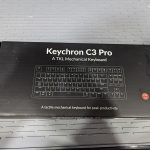
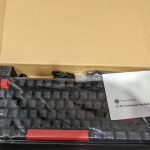
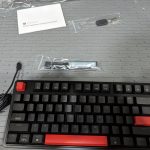
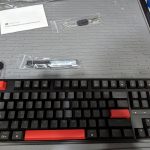
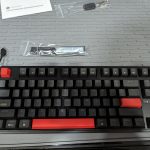
I have a problem. I keep buying mechanical keyboards. I only have one set of hands, and I don’t type with my feet, so why do I keep buying new ones? Partially because I’m hard on my keyboards. I gave up on non-mechanical keyboards years ago, but I didn’t buy really expensive ones. I bought a moderately priced ones. And I keep looking for new options in that. The pictures you see are the Keychron C3 Pro Keyboard. This particular model, an Amazon exclusive, retails for more, but I was able to get it for $29.99 on sale, which made it worth a try. I’m typing this post on it right now.

The keyboard comes in two switch varieties, red and brown. It offers a red backlight. The keycaps are replaceable, but the switches are not. Keychron makes plenty of keyboards that allow you to swap the switches as well. It is well-built for a budget keyboard, and neither version is overly loud, something people tend to comment on with these keyboards. It has many of the features a more expensive keyboard would.

I’m clearly not a keyboard aficionado, despite my keyboard purchases. I have generally bought budget mechanical keyboards, there are too many color switches I don’t have an opinion on…I don’t know the lingo. The feature that interested me particularly is something called QMK/VIA. The feature allows reprogramming the mapping of the keyboard. Never use your Scroll Lock key? Turn it into a Mute button for Zoom. Build macros into the keyboard instead of software. Certainly an interesting thing to play with. With a few custom keycaps…you can repurpose keys you barely use.

There are upgraded models from Keychron, and competing models from other companies, but for the price and features, I doubt they can beat it…especially if you get it at $30.

Update: April 2024 – Keychron is now offering the C3 Pro in an RGB hot swappable variation for only $10 more than the regular price of the variation they originally released.

Published on January 26, 2024
Full Post
2 Responses

Review: AirGradient Open Air Outdoor Air Quality Kit

In my previous post, Finding The Right Outdoor Air Quality Monitor, I laid out my decision making process for purchasing the AirGradient Open Air outdoor air quality monitor kit.

Much to my surprise, right after I ordered the kit, which included 2 PMS5003T particulate sensors, and added an SGP40 NOx and VOC sensor, they stopped selling the kit I purchased. The new version bundles the SGP40 and instead of a second PMS5003T, a SenseAir S8 NDIR CO2 sensor.

The interesting thing about having an S8 and an SGP40 outside is that they are not measuring what you want them to measure per se. The CO2 sensor isn’t sensitive enough to measure exact CO2 in the atmosphere, better suited for inside, but like inside, elevated CO2 levels indicate other things.

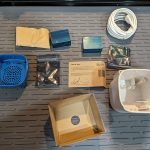
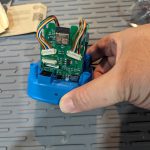
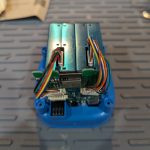
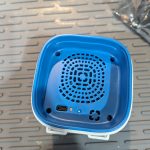
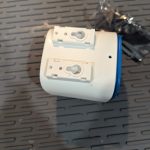
So, to the device…I was able to easily assemble it in only a few minutes. Then came the software. By default, AirGradient loads it up with their own software that hooks up to their own dashboard. I loaded ESPHome on instead. Fortunately, multiple enthusiasts had configuration files for ESPHome, so it was set up in record time and reporting data, and mounted outside. With the air vents on the bottom, instead of my version, on the side, it should hopefully be resistant to the weather.

This was an incredibly simple build, supports customizable firmware, and was integrated into my Home Assistant and WeeWX installation just as quickly. I am already planning to purchase additional units for future projects.


Published on January 23, 2024
Full Post
0 Responses

WeeWX Version 5.0 Released- Should You Upgrade Now?

WeeWX released version 5 of its Weather Station software. While there were a lot of foundational improvements, as usually indicated by a major version change, there is little here in terms of showstopping features. Which is fine, this is a stable project, showstopping features are not what is expected. But a lot of essential updates and refactoring. A few highlights:

  • Minimum Python version is now 3.6. Considering the previous minimum hit end of life in January of 2020, this is sort of a necessity. Python 3.6 hit end of life at the end of 2021. Python is currently at 3.12, which was released in October of 2023 and will not hit end of life until 2028. But in my experience, if you don’t have a reason to drop support for an older version, is there a reason just because it isn’t supported any longer? It can be a slow gradual process. For me, WeeWX supporting 3.0 meant I didn’t have to install multiple versions of Python.
  • A new utility, weectl, replaces all the individual utilities.
  • Package installs now use systemd…Systemd has been a staple on Linux systems for over a year.
  • Several Enhancements for Derived Types, including a fix to an issue related to an Air Quality Index calculating extension

A worthy update which should improve the performance and stability of your weather tracking system.  While an upgrade is not immediately necessary, it would be worthwhile to update your installation of WeeWX to version 5.0 in the next few months.

Published on January 15, 2024
Full Post
0 Responses

What To Know When Considering Switching To A Smart Lock

In a previous post, I discussed digital locks. Digital locks are locks that can be opened with a keypad over a key, and are either electronic or mechanical. There are other types of non-keyed locks. Increasingly, the market is filled with smart locks. Smart locks are ones that can be operated remotely and cover a broad range of options. This consists of a few different options:

  • Complete replacement – this removes the entire lock mechanism and replaces it with the completely new mechanism. There are both deadbolt and knob replacement options here.
  • Retrofit deadbolt – This replaces the thumb turn of your deadbolt. The exterior appearance of the door, and the locking mechanism remain the same
  • Renter Options – These options attach on top of the thumb turn of deadbolts to allow for easy removal.

There are a few different interface options as well. And some have combinations of these

  • Key – Just because it is a smartlock doesn’t mean it can’t have a physical key as well
  • Keypad – Not only do some models offer built in keypads, some offer it as a separate unit you can attach to the doorframe, leaving no built in lock interface
  • Fingerprint – Biometric sensors
  • Bluetooth – These locks usually allow you to open/close with your phone only, or have a gateway/hub that allows you to do so over a network connection. These hubs, as well as the phone app to control the lock over bluetooth  are usually proprietary to the manufacturer.
  • Zigbee/Z-Wave – Zigbee and Z-Wave are two established home automation wireless protocols. They both require a hub/gateway. But unlike Bluetooth, there are a variety of devices with support for one or both of these protocols.
  • Matter over Thread – This is the new hot home automation standard, but the first lock supporting it was only released at CES 2024, so stay tuned. Like Zigbee and Z-Wave, it would require a hub/gateway.
  • Wi-Fi – Wi-Fi smart devices are problematic, because wi-fi can be rather battery intensive and smart locks are usually battery powered. The other negative for Wi-Fi is proprietary software.

You might note that a recurring issue for bluetooth and Wi-Fi locks, which you might initially prefer because you don’t have to add a gateway or a hub to connect it to your existing devices. The problem is support. You are relying on those manufacturers and their app. It could be argued you are relying on them anyway, because they made the device, but the biggest risk of smart devices in general is, if they rely wholly on a manufacturer app or a manufacturer cloud service, that it will eventually be discontinued, making your device useless. The local control options have issues of their own. Some manufacturers don’t implement the Zigbee or Z-Wave protocol consistently, which could create some issues depending on your hub/gateway’s support. We will write a bit about these protocols and gateways in future.


Published on January 11, 2024
Full Post
0 Responses

What Do Air Quality Monitors Measure?

In a previous post, I discussed my plans for buying an outdoor quality sensor. But, I didn’t explain what air quality actually entails. It isn’t just one thing. There are a lot of factors involved.  The US Environmental Protection Agency sets an air quality index for five major air pollutants:

  • ground-level ozone – created by chemical reactions between oxides of nitrogen (NOx) and volatile organic compounds (VOC). Ozone is most likely to reach unhealthy levels on hot sunny days in urban environments, but can still reach high levels during colder months. Ozone can also be transported long distances by wind.
  • particle pollution –  This most commonly includes PM2.5 and PM10. The 2.5 and the 10 indicates the size of of particulates and the measurement is of the concentration in the air
  • carbon monoxide – The most common source of CO outdoors would be cars, trucks and other vehicles or machinery that burn fossil fuels. Indoors, gas appliances, furnaces, and chmineys.
  • sulfur dioxide – The most common source of SO2 is burning of fossil fuels by power plants and other industrial facilities, as well as some heavy equipment.
  • nitrogen dioxide – NO2 forms when fossil fuels such as coal, oil, natural gas or diesel are burned at high temperatures. Again, cars are the most common one here.

These are all a concern indoors as well to some degree, but there are additional items that are a focus indoors:

  • carbon dioxide – CO2 is produced both naturally and through human activities, such as burning gasoline, coal, oil, and wood. People exhale CO2 which contributes to CO2 levels in the air. Why is this important indoors? It is often measured to quickly but indirectly assess approximately how much outdoor air is entering a room in relation to the number of occupants. During the pandemic, as a measurement of air circulation, using this as a way to determine how well ventilated a space is. When I was in one older building with a group of people, the bulding had a protocol that, if the levels grew too high, they would open windows to get it down.
  • formaldehyde – HCHO is found in some building materials, including composite wood, insulation, glues, paints and finishes, preservatives, pesticides, cigarette smoke, etc…
  • volatile organic compounds – emitted as gases from certain solids or liquids and are emitted by thousands of products such as paint, solvents, aerosol sprays, cleansers and disinfectants, air fresheners, automotive products, hobby supplies, dry-cleaned clothing, pesticides, copiers, etc.

Scary stuff. Most indoor air quality sensors contain a TVOC sensor, a PM2.5 sensor, and a CO2 or eCO2 sensor.

  • TVOC – because there are so many VOCs, it’s impossible to monitor them all. TVOC is a measurement used to measure the overall amount of VOCs in a space. It is not uniformly defined.
  • PM2.5 – As mentioned before, this is the size of the particulates. Anything PM10 or less is inhalable. Fine particulates are PM2.5 or less. Therefore, the PM10 reading contains the PM2.5 particulates as well. Combustion of gasoline, oil, diesel fuel or wood produces most of the PM2.5 pollution in the air, and PM10 also includes dust from construction sites, landfills and agriculture, wildfires and brush/waste burning, industrial sources, wind-blown dust from open lands, pollen and fragments of bacteria.
  • CO2 vs eCO2 – Estimated CO2 is a derived number based on the TVOC reading of a sensor. . If there are substantial concentrations of other VOCs present, the eCO2 reading would be higher than the actual CO2 level.

If you remember from that previous post, my on-order outdoor sensor has dual PMS5003T sensors, which measure PM2.5 and PM10, an SGP41 for VOC and NOx measurements, and I could opt to add a NDIR CO2 sensor. In fact, after I ordered, they switched from dual particulate sensors to 1 Particulate and one CO2 sensor for their outdoor kit. While elevated CO2 levels are usually used to derive indoor air circulation and quality, they can also be used outdoors to indicate other harmful gases that are often emitted with CO2 like SO2, NO and NO2 as they are often emitted with them.  Similarly, VOC is more commonly measured on indoor sensors, but can also appear outdoors near chemical factories, gas stations, natural gas leakages, and burning of garbage.

Air Quality is derived from the concentration of these items in the air and usually displayed as a number on the Air Quality Index. Different countries have different scales and formulas for calculating this. The US EPA’s scale is 0-500 and uses color coded ‘traffic light’ system to indicate good versus bad air.

  • 0-50 is Good(Green)
  • 51-100 is Moderate (Yellow)
  • 101-150 is Unhealthy for Sensitive Groups (Orange)
  • 151-200 is Unhealthy (Red)
  • 201-300 is Very Unhealthy (Purple)
  • Above 300 is Hazardous (Maroon)


Published on January 9, 2024
Full Post
1 Response

Throw Away The Key- Should You Be Switching to a Digital Lock?

In my exploration of home automation, locks and cameras are always the most concerning when it comes to privacy and security. With all the hacks and exploits you hear about, trusting a third-party with the keys to your house can be a scary thing. Having control of your security is important. Every time I’ve compromised on control in the name of convenience, I’ve regretted it.

So, rather than starting with Smart Locks, I’m starting with the concept of digital locks in general. I’ll get to smart locks in a subsequent post.

What are Digital Locks?

The term can be somewhat confusing, because a digital lock is not necessarily electronic, it can be mechanical. It refers to a lock that is opened using a combination keypad over a key.  Some people still prefer a mechanical digital lock. Why?

  • Electronic deadbolts are usually battery powered…what happens when the battery dies?
  • They often contain a motor to turn the bolt, and this part can wear out or otherwise over time meaning more frequent replacement.
  • Mechanical Options are also popular with Observant Jews as they would refrain from using electronic devices on Saturdays and holidays.

A digital lock replaces something you have…a key, with something you know…a code, although many of these locks still offer a key override. But this is nothing new. For years, one of the entries to my building has been through a garage, with a keypad on the outside to open it. More and more people are moving to locks that don’t require a traditional key for at least one entry into their home. In my follow-up where I get into Smart Lock technology, these do not just include built-in keypads, but using your phone to unlock, fingerprint, etc.

Digital locks have also become increasingly popular for short term rentals, such as AirBnB, as providing a code is easier than key exchange, and changing the code is a trivial matter. The Smart digital locks allow remote changing of the code and the others allow changing at the unit itself.

Are Digital Locks Safer than Keyed Locks?

The traditional keyed lock itself is inherently risky in itself. An expert lock-picker can pick a lock rather quickly. It is possible the absence of a key may actually be more secure, because there is nothing to pick.

But all this doesn’t mean you can’t bypass a digital lock in the same way most people bypass keyed locks, it just means you can’t do it with a pick. In most cases, the biggest security of a lock, is not the key. Most criminals are more likely to use brute force to break in over picking the lock. So, a key question in any lock purchase is hard it is to brute force it. For example, Consumer Reports tests their door locks with a 100 pound steel battering ram, and test both with and without a reinforced box strike plate. Their recommendation, by the way is to invest in reinforcing against a brute force attack as well as a hardened lock that is not easy to drill or otherwise break.

Again, that doesn’t mean a determined individual can’t get in. Security is often about making things harder, not impossible.


Published on January 7, 2024
Full Post
2 Responses

Finding the Right Outdoor Air Quality Monitor

In 2023, there were wildfires in Canada which blanketed the Northeastern United States with smoke. This marked a change in what parts of North America had to deal with this problem. This marked an overall increase in interest in air quality sensors.  I had looked into air quality sensors over the last few years, and there are a lot of options for indoor air quality sensors, but not quite so many for outdoor. Will talk a bit more about indoor air quality and how air quality is evaluated in a separate post.

My requirements were not achieved easily by most of the commercial options I explored. After failing to find one I liked, I built my own outdoor air quality sensor. It failed. So I rebuilt it…and it failed again…this time due to condensation somehow getting into the assembly. You can’t fully enclose the sensor because it needs air to flow over it, so there is this risk. So, after wasting two perfectly good sensors, I decided to fall back to something made by someone else as clearly I’m not that level of builder.

Requirements

  • Local access to the data as opposed to having to get data from my own network from a remote API. I feed everything into Weewx, so anything with local data can be fed that way.
  • User replaceable parts
  • More than just a PM2.5 sensor.


The Other Options

That initially took me to the Purpleair line of products. Purpleair offers a several sensors plus a community of enthusiasts and their devices can be polled directly. At the time I last looked, they had what they now call the Classic…which did not her user replaceable sensors…being as the PM5003 sensors they use only have a few years of lifespan, it meant replacing the entire unit at that point. Their new Flex and Zen models allow replacement of the sensors without having to replace the whole unit, but you have to get parts from them. And the unit is are just under $300 each.

I looked at Ecowitt as well. Ecowitt sensors are sold under several names in multiple countries. They have 3 air quality sensors, only one is rated for outdoor use, and is battery operated. I tried it, but on battery it has an update time of ten minutes…which created a variety of problems in my receiver missing the update. The indoor ones allow for USB power which increases the frequency of updates.

What I Picked

I explored a few additional choices and finally found something to try. A company in Thaland called AirGradient. AirGradient is an open-source platform with a strong community behind it. They launched their first outdoor design in December of 2022.

Pros

  • They design long lasting air quality monitors that are open source and open hardware…perfect for my philosophy on the matter.
  • The prices are reasonable, and if you don’t like them, you could in theory build it yourself.
  • They provide kits to various organizations.

Cons

  • 1-3 Weeks to Ship, and 2-3 weeks once shipped to most destinations

Their outdoor unit can be purchased as a DIY kit with all the parts or as a preassembled and tested unit. It consists of:

  • Dual PMS5003T air quality sensors. The T variation includes temperature and humidity sensors.
  • Based on an ESP32 C3 chip, which means you can install Esphome…the software platform I used for my homebrew sensors
  • A sensor slot for a third sensor, they offer a TVOC/NOx board for this, an SGP40
  • While the two PMS5003T sensors are for redundancy, one could be replaced by an CO2 sensor which they sell.

The fully assembled version includes either the SGP40 or the SGP40 plus a NDIR CO2 sensor included, as well as full testing of the unit with a report.

So, I’ve ordered one of these kits for $95 with all the parts. If it works, I may order more of their products. But, even if I never order from them again, I can get PMS5003 replacement sensors from a variety of vendors and keep the one I have going indefinitely. But, if it is as advertised, I feel another weeks long order coming on.

Their indoor sensor is equally impressive, and even includes an RGB LED system to act as an air quality ‘traffic light’, but will talk about that in future.


Published on January 2, 2024
Full Post
0 Responses

Monitoring with Uptime Kuma

Earlier today, the server that hosts Gadget Wisdom was down for ten minutes. This happens every so often, and the server is due for replacement one of these days as the oldest one I have. But one of the problems I have is that local monitoring is…well, local. You shouldn’t run your monitoring solely on the server you are monitoring. You need something external as well.

So, enter Uptime Kuma. Uptime Kuma came onto the scene two years ago, as a self-hosted version of something like UptimeRobot(which does offer a free tier). There are other self-hosted products as well, but I was able to get this running in a short period of time and it provides exactly what I want, and it looks like it has an active development team.

So, what features does Uptime Kuma offer?

  • Dozens of notification methods to configure….email, messaging, SMS, etc.
  • HTTP, ping, as well as server specific monitoring.
  • Useful Stats and Graphs
  • Optional Public Status Pages

So, now, I’m waiting for my next downtime, to see how exactly this works in production, but just having the ability to remotely monitor and get notifications is another tool in my monitoring arsenal.

Published on December 26, 2023
Full Post
1 Response

Home Automation Obsession: The Home Assistant Green

Years ago, as part of this series, I started to discuss why my preferred home automation platform is Home Assistant. The fact that it merges multiple different platforms together into a seamless whole means you don’t have to pick a side, per se. The most popular platform people run Home Assistant on is a Raspberry Pi. I’ve always had issues, much as I love the Pi, with the fact that it uses a microSD card for storing the operating system and data….as those cards would regularly fail on me.

But, despite the process of installation therefore was, insert microSD card into computer, write to it, and then insert in Pi…that was still a higher level than many people were willing to go. So, the Home Assistant team tried a few different iterations of hardware before they got to one meant for someone who just wants to plug and play. The Home Assistant Green. It is $99 MSRP, and you can add a USB dongle to support Zigbee, Z-Wave, or Thread radios. It has built in storage for the operating system, It does not have built-in wifi though, but your home automation hub is probably more reliable wired.

After you plug it in, you can configure it with a web browser or a mobile app. And since it can be easily upgraded with the latest version of Home Assistant, you’ll continue to get new integrations with various platforms and technology on your network.

Published on December 24, 2023
Full Post

Get New Posts By Email