Gadget Wisdom

Author: David Shanske

Registration time

2011-09-25 06:23:49

Website

https://david.shanske.com/

Email

david@shanske.com

All posts by David Shanske

0 Responses

Good Gear

We troll the tech websites looking for things we find interesting or potentially useful. Here are a few selections…

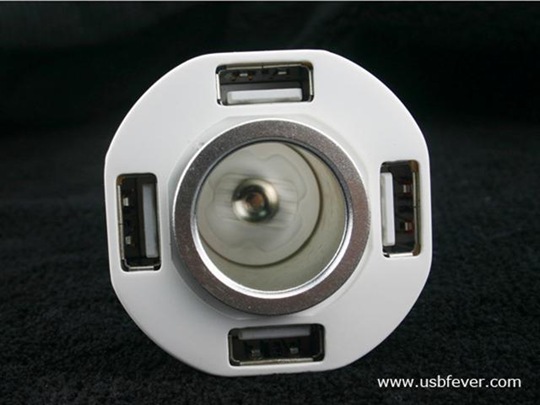
  • Crunchgear turned us on to this car cigarette lighter with 4 USB connections.Most things can charge via USB nowadays…Cell phones, music players, etc. If you have four devices you want to charge and still have your cigarette lighter free for other things, this is certainly useful. The cost is $22.99 as of this post from USBFever.com with 2.99 per order S&H.
  • This tiny keyboard with a retractable USB cable was also revealed to us on Crunchgear. Cost is $25 from Brando.com.hk. It would certainly work better as a wireless keyboard, but something like this is useful to have in one’s arsenal of tools. We keep a toolbox with a spare mouse, screwdrivers, misc. little computer and data cables, etc for when we are off repairing something.
  • Ion, the company known for cheap analog to digital converters including Record Players, is releasing a $100 slide and negative scanner called Slides 2 PC. for those of us wanting to get rid of boxes of analog media, items like this that make it simple are worth the investment. Scan your media, archive it, and dispose of the slides. You can even make a DVD. If you don’t want to do it yourself, there are plenty of organizations that will do it for you, even your local Costco.
  • This tiny USB powered LCD monitor is useful, although we’ll wait till it is much much cheaper.

For more looks at the stuff we find interesting to consider as part of your hardware arsenal, keep reading…

Reblog this post [with Zemanta]
Published on October 13, 2008
Full Post
1 Response

The Simplest Way to Save Energy – Shutting Things Off

Cable Box
Image by _ES via Flickr

This past week, prompted by increased utility costs, we became obsessed with the idea of vampire power. Vampire power, standby power, or phantom power, whatever you wish to call it, is the power a device draws when supposedly turned off.

So, we did the research. If you like tech, and we do, you can go with a Master Control surge protector. This is where the power draw on one outlet kicks in the power to other outlets. For top of the line right now, you can go with the APC Back-UPS ES BE750G 10 Outlet 750VA Master Control.

We rushed out and bought one of these things, which marries the idea with a UPS. One of the Battery controlled outlets can have your computer plugged into it, and when the computer is on, it flicks on three of the surge controlled outlets. We’re using it for our monitor and speakers on one system, and will be adding more to the controlled outlets as soon as we crawl under the desk to audit our wires.

Now, not everyone needs such a heavy-duty item, or even power protection. As an alternative, there is the Smart Strip LCG3. There are several variations that offer different numbers of outlets and/or coaxial or modem surge protection. One of the most useful options on this surge strip is a adjustment knob to adjust the master outlet’s sensitivity. The APC UPS also has three adjustment settings.

We couldn’t wait, so we went to the store and bought the APC Power-Saving Essential Surgearrest. It is that adjustment knob we missed. On the system we tried to put it on, it didn’t accurately detect the turning on of our low-energy thin-client PC. Of course, it may not have been designed for low-power systems, and lacks the adjustment knob of the Smart Strips.

BITS Limited, the company responsible for the Smart Strips, has not only come out with a 3rd generation version of their product designed with a “greater range of sensitivity and device compatibility for low-power devices like the Dell 800 series laptops and Mac Mini computers.” Which means it would have solved our problem with the APC. They all are accepting initial orders on a USB Smart Strip, identical to the LCG3 model shown above except in addition to the power outlet, this one will switch when the USB port receives power as well.

Being as we run multiple systems and are trying to be more energy efficient, for the low-power client and its peripherals we decided to go the low-tech route. We tried to find a switch to insert between the peripheral and the outlet, but no one seems to make three-pronged plug-in switches. So, despite Underwriter’s Laboratories’ recommendations about daisy-chaining surge protectors, we took the advice we found from Smart Strips FAQ and plugged a power strip into our UPS and then on to the components in question.

This is technically safe, as long as you don’t overload the circuit. The same people think an extension cord to a surge protector is dangerous and most of us do that. Our biggest problem was of a visual nature. How do you make the switch accessible without the unsightliness of the wires coming out in all directions?

One solution is another new product, the Belkin Conserve 10-Outlet Surge Protector with Remote Switch. Sounds good in theory. A surge protector you conceal with a wireless remote to allow you to turn things on. There are also all manner of surge protectors that hide the wiring.

We, on the other hand, went low-tech. We mounted the surge protector on the wall such that the switch was visible above the desk, but the outlets were below and weren’t visible unless you peeked under. Another option we considered was mounting the strip upside-down under the desk in such a position that you can flick the switch with little effort.

If you are more electrically inclined, you can build a plug-in switch using some basic electronics since no one seems to be selling one(comment if you’ve found one).

For those on the cutting edge of tech, semiconductor maker Rohm has developed a circuit that uses no power while in standby mode. They hope to start deploying it next year. In a few years, it could make it or circuits like it could make its way into most new appliances sold, reducing or eliminating the bulk of this problem.

Reblog this post [with Zemanta]
Published on October 7, 2008
Full Post
4 Responses

Taking Your Laptop on the Plane

ThWhen you go to the airport with your laptop, you are forced to go through the annoyance of removing your laptop from its bag and placing it in a bin. However, the TSA last month announced the results of its initiative to encourage manufacturers to design checkpoint-friendly laptop bags. Below is an image of the friendliest styles of laptop bags.

Now, the problem is the most popular styles are these unapproved ones. Purchasing one of the approved bags will not guarantee that you can leave your laptop in your bag for screening. If the bag does not present a clear and distinct image of the laptop separate from the rest of the bag, you’ll still have to remove it.

The guidelines for these bags are as follows:

  • Your laptop bag has a designated laptop-only section that you can lay flat on the X-ray belt
  • There are no metal snaps, zippers or buckles inside, underneath or on-top of the laptop-only section
  • There are no pockets on the inside or outside of the laptop-only section
  • There is nothing in the laptop compartment other than the laptop
  • You have completely unfolded your bag so that there is nothing above or below the laptop-only section, allowing the bag to lie flat on the X-ray belt

The TSA does not endorse any specific bag. And these new bags that have been reviewed according to their guidelines will take time to flood the market, and will likely initially be more expensive than other bags.

Reblog this post [with Zemanta]
Published on September 28, 2008
Full Post
0 Responses

SanDisk introduces slotMusic – microSD cards preloaded with music

Apple iPod nano (third-generation), a best-sel...
Image via Wikipedia

SanDisk has announced(see Press Release) the launch of a new music option. microSD cards will soon be made available with pre-loaded high-quality DRM-free MP3 music of top artists from EMI Music, SONY BMG, Universal Music Group, and Warner Music Group.

slotMusic cards enable consumers to instantly and easily enjoy music from their favorite artists without being dependent on a PC or internet connection. Users simply insert the slotMusic card into their microSD-enabled mobile phone or MP3 player to hear the music – without passwords, downloading or digital-rights-management interfering with their personal use.

The cards will be packaged with a USB sleeve to allow them to be interfaced with a computer. They will be encoded at 320kbps and…

Musicians will find slotMusic cards offer a compelling new way to express themselves to their fans. With 1GB1 (gigabyte) of capacity, slotMusic cards can hold songs, as well as liner notes, album art, videos, and other creative content that an artist may choose. Consumers can also add their own content to a slotMusic card, creating a personal plug-and-play media library.

We tried to be enthusiastic about this idea. We realize that the RIAA and SanDisk are trying. We reviewed the comments on a CrunchGear post about this very development. Many people feel they can just make their own, that a 1GB card was small.

However, they’ve overlooked an untapped market. The impulse buyer. They intend to distribute this at brick-and-mortar and online stores. Online is the worst distribution method for this. slotMusic will have a market in people who are in a hurry. They should sell it at convenience stores, airports, and train stations. It will do well with people who suddenly decide to buy some music. Best Buy and Walmart will do well with the impulse buy as well.

Wherever there are people who cannot be bothered to do otherwise, there will be a market. We also predict that this is merely the first step. Imagine this system linked into an online system where you go into a store, select your album or albums from a machine, and it is delivered to you on a card. But this has to start somewhere.

Reblog this post [with Zemanta]
Published on September 28, 2008
Full Post
1 Response

Microsoft is in the Toilet

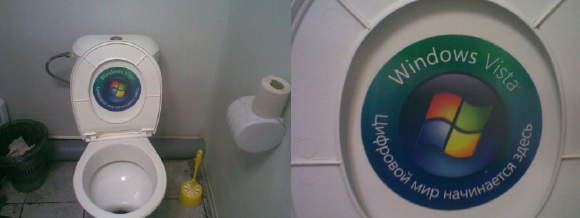
Crunchgear posted this amusing image from Russia. It reads, “Windows Vista – The Digital Future Starts Here.”

We’re not thrilled with Vista from the time we spent fiddling with it. It certainly, we admit, has some new features of us, but a lot of things are not as easy to locate in the system as they were under XP.

That aside, Microsoft is advertising on toilets. We can just picture poor Yuri, after a night of drinking vodka, stumbling to the restroom to worship the porcelain deity and…inspired by the ad he sees as he voids his stomach, buying a new computer loaded with Microsoft Windows Vista.

Reblog this post [with Zemanta]
Published on September 28, 2008
Full Post
0 Responses

Convert Word 2007 Files

Microsoft Word (Windows)
Image via Wikipedia

We recently received a file by email from someone with the extension .docx, which is the new Word 2007 format. They redid everything, probably to make us shell out more money. We had to email our friend and ask them to save the file in a different format and send it back to us. It is easier to find ways to do it ourselves.

(more…)

Published on September 28, 2008
Full Post
1 Response

Rockbox 3.0 Released

Rockbox
Image via Wikipedia

Lifehacker alerted us this week to the release of Rockbox 3.0. Rockbox is a product we already use on our MP3 player. It is an alternative open-source firmware which includes not only expanded music support, but album art, games, video playback, and more.

For those of you wishing to try it, but not willing to give up the manufacturer’s firmware, it installs a dual-boot firmware loader, allowing you to press a hotkey to boot into the old firmware.

We have switched from MP3 to playing files encoded using open-source format OGG and this software allows us to do so. It runs on a variety of players produced by Apple, Archos, Cowon, iriver, Olympus, SanDisk, and Toshiba. More will come, as people work to port it.

So, check Rockbox out. If you don’t like it, you can uninstall it.

Reblog this post [with Zemanta]
Published on September 28, 2008
Full Post
2 Responses

Sync and Back Up Files using Dropbox

We recently started testing a freeware application and web service called Dropbox. Dropbox instantly backs up files you place in a designated folder to the Dropbox server. Whenever you modify a file, it will update the copy on the server. Dropbox also does revision history, so you can recover older versions should you lose something.

You can check out Dropbox at their site, and download a Windows, Mac, or Linux client.

Published on September 22, 2008
Full Post
0 Responses

USB Cell Finally Arrives

Two years ago, in one of our earliest posts, we blogged about a new kind of rechargeable battery available from a company in the United Kingdom.

We still love this product in theory. After two years, we finally saw it being sold at the counter at our local Microcenter. We’re still charging them, which takes 5-7 hours, as we speak, and the product is everything we expected. It is small, easy to recharge, and is perfect as emergency batteries for the peripherals we carry in our bag with our laptop.

However, despite our high hopes, their website two years later has not changed much. The AAA, C/D, 9V and various other batteries have not yet been released for sale. Maybe thre are problems with the longevity of the products.

We checked out what people were saying about these batteries..Here’s a review from one blog. It notes that the shipping process should you buy direct from the manufacturer is efficient, and that the batteries have half the charge of a standard rechargeable battery. They have 1300mAh, but bear in mind the charger is built in so that likely takes space in the form factor.

Published on September 15, 2008
Full Post
0 Responses

Congress to Investigate Text Messaging

For all of us wondering why text messages have doubled in price in the last year, rest assured, the Federal Government is on the case.

Senator Herb Kohl, Chairman of the Anti-Trust Subcommittee of the Senate Judiciary Committee sent a letter this month to the four major wireless carriers, AT&T, Sprint, Verizon, and T-Mobile asking them to explain the increase.

Carriers limit the number of characters in a text message to 160. Assuming a maximum of 140bytes stored per message, that means that if you were charged the same per-byte rate to download a 4MB song, you would pay about $6000. Nothing has changed particularly in the cost of providing the service, however, companies have the right to charge whatever they can get away with.

The odd thing is that math. We have a phone where text messages are 20 cents each, yet megabytes of downloaded data are 1.99 each. If we want to use Instant Messenging applications provided on our phone, they use text messages as opposed to using data time so they can charge more(We’re Verizon customers, in the interest of disclosure).

Kohl has asked for a response by October 6th. Some experts feel the increases may be a reflection of the decrease in competition as the four major players absorb smaller regional providers.

We look forward to hearing the response from the providers and hope it sparks some sort of change. The current system is ridiculous.

Published on September 14, 2008
Full Post

Get New Posts By Email