Gadget Wisdom

Author: David Shanske

Registration time

2011-09-25 06:23:49

Website

https://david.shanske.com/

Email

david@shanske.com

All posts by David Shanske

1 Response

Let’s Build a Server: Part 2 – Monitoring

Monit

Last time, in Part 1, we discussed setting up a firewall and an email relay so notifications from the firewall could get to us.

Now, in Part 2, we’re going to talk about more signal. Server monitoring and alerting. Our primary software for monitoring is Monit.

Monit has a single configuration file, but many distributions, including mine, set up a /etc/monit.d folder so you can divide your monit configuration into different files.

Once it is running, you can monitor its status by running
monit status
It will show the status of whatever is monitoring. There is also an optional web component, if you want to check status in a web browser.

What can you monitor?

Monit can monitor any program and restart it if it crashes.
check process nginx with pidfile /var/run/nginx.pid
start program = "/bin/systemctl start nginx.service"
stop program = "/bin/systemctl stop nginx.service"
if failed host 127.0.0.1 port 80
protocol http then restart
if 5 restarts within 5 cycles then timeout

As you can see, the simple scripting language allows you to not only restart, execute programs, but alert the user.

Not only can it make sure something is running, but it can monitor its resource usage, as well as system resource usage. It can monitor processes, network connections, programs and scripts, files, directories, etc.

An Alternative to Email Alerts

The default for an alert is to send an alert email, but for bigger emergencies, a phone push notification is also useful.

Monit provides a simple instruction on how to set it up for Pushover. There is also the alternative of PushBullet.

Pushover costs $5 per platform(Android, iOS, Desktop) to use on as many devices as you want. There is a per application limit of 7,500 messages per month. Pushbullet is, by comparison, free. The basic difference as I see it is that Pushbullet is more geared toward the consumer, and Pushover is more geared toward developers in how it was initially set up. They do have similar feature sets though.

Here is Monit’s suggested Pushover script, which can be run instead of an email alert.

/usr/bin/curl -s
-F "token=your_mmonit_or_monit_app_token"
-F "user=your_pushover_net_user_token"
-F "message=[$MONIT_HOST] $MONIT_SERVICE - $MONIT_DESCRIPTION"
https://api.pushover.net/1/messages.json

Here is an alternative version for Pushbullet

curl -u <your_access_token_here>: -X POST https://api.pushbullet.com/v2/pushes --header 'Content-Type: application/json' --data-binary '{"type": "note", "title": "$MONIT_HOST", "body": "$MONIT_SERVICE - $MONIT_DESCRIPTION"}'

Conclusion

In all cases, monit allows you to monitor your system and take action based on a change in performance. The complexity of your rules is entirely up to you. But, if you give thought to their setup, you can not only be told when there is a server emergency, but the system can take action to fix it.

Published on December 7, 2014
Full Post
0 Responses

A Bluetooth Toothbrush is on Sale…What?

[asa]B00O8ODHOA[/asa]

I subscribe to the Amazon Deals of the Day, and often there is something worth considering on them. Today, the Deal of the Day is an Oral-B Pro 5000 SmartSeries Bluetooth Electric Rechargeable Power Toothbrush.

And there is the what…I get the motorized toothbrush idea…it is like having professional dental tools in your home. However…bluetooth?

“Bluetooth communication between brush and smartphone provides real-time feedback on brushing habits, helping you achieve amazing results. It acts like a dental professional in your bathroom, guiding your brushing experience and providing feedback in real-time to help you brush thoroughly and gently for the dentist-recommended 2 minutes. ”

So, my smartphone can tell me I need to brush my teeth, and I should do it better? According to the reviews, I can also monitor my brushing, shop for brush heads, get achievement badges.

I’m not sure I’m comfortable with the Quantified Self philosophy that is becoming so popular…there are some things that aren’t interesting to record.

Right now, anyone want to buy a bluetooth toothbrush…I’m predicting next I’ll be able to compete with other brushers for points…gamification is popular too.

Published on December 4, 2014
Full Post
1 Response

Let’s Build a Server: Part 1 – The Firewall

Tux, the Linux penguin

Necessity is the mother of invention. It is once again time to upgrade the Gadget Wisdom servers. And, as I have committed to writing more here, I will be writing some articles on server construction.

Now, this will all be done using a Virtual Private Server, so the hardware is outside of the scope of this series.

The first piece of software I usually install on network accessible servers is the ConfigServer Security & Firewall(CSF). This is a firewall with login/intrusion detection, and security. Most distributions of Linux come with some sort of firewall, but this set of scripts works with iptables to be much more secure.

CSF provides scripting for a firewall, and handles login failure handling for a variety of stock services, as well as unsupported services using regular expressions.

There are a lot of options in the CSF configuration file…read through the description of each…decide which ports you want open, and deploy. CSF will automatically update itself when there is a new version.

In order to ensure notifications from the firewall and other administrative notifications are read, you will likely wish to arrange for the ability to send mail. However, you may not need or wish the trouble of setting up a mail server. The simpler solution is to set up an SMTP relay.

The example below configures Postfix, available with many Linux distributions, for use with a gmail account. Add the following lines to the bottom of your /etc/postfix/main.cf

smtp_use_tls=yes
smtp_sasl_auth_enable = yes
smtp_sasl_password_maps = hash:/etc/postfix/sasl_passwd
smtp_sasl_security_options = noanonymous
smtp_sasl_tls_security_options = noanonymous

Create a file with your gmail credentials.

smtp.gmail.com user@gmail.com:PASSWORD

Then secure the file.

chmod 640 /etc/postfix/sasl_passwd*
postmap /etc/postfix/sasl_passwd

Now, any external email will route through your gmail account. We have now protected our server from a variety of attacks, and ensured, if there is a problem, we’ll be notified of it.

There are alternatives to Gmail. For example, Mandrill offers 12,000 emails per month for free, and 20 cents per thousand after that, and Sendgrid offers 200 emails, and 10 cents per thousand.

You can use Mandrill or Sendgrid instead of Gmail by using the below credentials.

[smtp.mandrillapp.com]:587 USERNAME:API_KEY
[smtp.sendgrid.net]:587 USERNAME:PASSWORD


Published on November 28, 2014
Full Post
0 Responses

Let’s Encrypt – A New Certificate Authority

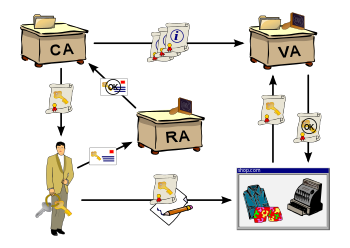
Diagram of a public key infrastructure


Security Expert Bruce Schneier recently pointed to a joint project to create a new certificate authority that lets everyone get basic certificates for their domain through a simple process.


The idea would include not only free, but automatic, secure, transparent, open, and cooperative.

The service, called Let’s Encrypt, is set to launch in the summer of 2015.

The reason for the delay is that the service wants to leverage new standards. The most notable is ACME(Automated Certificate Management Environment). The idea is that the Certificate Authority communicates with the web server and the two work together to prove ownership and download the certificate, as well as handle configuration and renewal.

Now, considering how much of a chore certificates are right now, the standard, even outside of Lets Encrypt, would save a lot of anguish. Once the server has proven that it is the server of record for that domain, it can handle everything.

There’s more to it then that, and certainly, there are still risks, but we’ll see what these people come up with by the time the ACME standard is finalized.


Published on November 23, 2014
Full Post
0 Responses

KeyCDN: A Review

KeyCDN LogoIn a continuing effort to get the best combination of services and pricing, I often review my choice of provider. While it is a pain to migrate services, things do change over time.

As a small site, I want the benefits of a CDN, but the monthly cost of one is not within my budget. Which is why I explore pay-per-use CDNs. Metering means that I can prepay for a few GBs of traffic and it can last me a while. I wrote about this back in 2013, when I was talking about how new providers intrigued me.

After some problems with other incumbents, I was once again looking for new options, and came upon KeyCDN, which is a Swiss CDN that is well regarded so far. I’ve been using them for about six months now. They offer $0.04 per GB for the first 10TB. And in the last six months, they’ve continued to add features.

Here are a few of their features:

  • Pay Per Use Pricing – So no minimum monthly costs
  • A Free Trial(although most of these services have that)
  • Unlimited Zones that can be aliased as subdomains on your site.
  • SSL – Shared or Custom SSL. Shared SSL is them using their certificate. If you want to alias the CDN zone as a subdomain on your site, you need to buy a certificate from them or supply your own.
  • SPDY Support
  • Push Zones(if you want them to store the content, not just pull and cache it from your site)
    • Cost is $0.90/GB per month.
    • They added rsync support after I signed up, in addition to FTP, allowing you to sync your static site to them if you want.
  • Export log files to your own syslog server
  • An API if you want to control your zones

They keep adding more features….or I keep noticing them. Until I started writing this, I didn’t know they had added syslog support. Which brings me to my only real criticism of KeyCDN. The last time I looked intently, I don’t think I saw the feature. So they certainly could be better at conveying new features to me.

Whenever I’ve needed help, they have been prompt in their response and have worked with me.

But there is so much here I don’t take advantage of that I wish to. This is a basic review, but I may go into more detail in future. I’d like to try to play with their API, as they have a PHP library on Github and I’ve been working on my PHP skills as part of maintaining this site, which runs WordPress(written in PHP).

So, give them a try…if you do, try my links…I wouldn’t mind the extra few credits in my account. If you have any questions, please send a message or leave a comment.

Responsible Disclosure: I am a customer of KeyCDN, and I am using my affiliate link, which provides me with extra CDN credit. However, my decision to finally get around to reviewing them is due to the responsiveness of their support and their feature set.


Published on November 22, 2014
Full Post
0 Responses

Who Needs a Smartwatch? Why not Just a Pod?

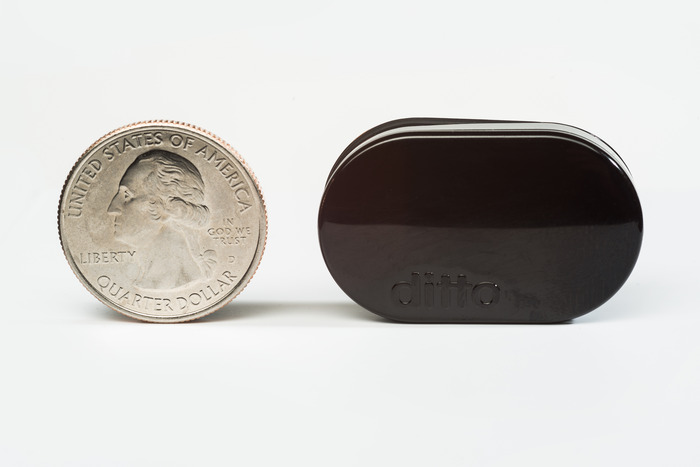
The Ditto

When I tried out the Pebble Smart Watch, the main thing that interested me about it was the ability to know there was something that might need my attention. The vibrator in the Pebble is powerful enough to vibrate itself off my nightstand when not being worn.

The simplicity of the Pebble, compared to the increased complexity of Android Wear watches, makes it an appealing option.

But a new company, Simple Matters, led by designer Bob Olodort, is going even simpler. Olodort created one of my favorite classic devices, the stowaway keyboard…something I wish they’d remake.

The first product being released by Olodort is called the Ditto. It’s a tiny pod with an optional clip which acts as a remote vibrating notification device for your phone. You can set vibration patterns from their app.

It’s simple…it does one thing, and uses a battery that only needs replacing every 4-6 months.

The Ditto is currently in a Kickstarter, but partially, it is said, for publicity purposes. For $29, you can get a Ditto…assuming it is made and meets its $100,000 goal. The device will ultimately have a $49 MSRP.


Published on November 20, 2014
Full Post
0 Responses

Revisiting the Chromebook Challenge

English: An Acer Chromebook showing the introd...

Back in January of 2013, I took a Chromebook challenge, and invited several other members of the Gadget Wisdom family to try the thing out.

This was the $199 Acer C7 Chromebook. This set up Chromebooks as the successor to the old netbook market…the small portable device you took along for productivity, but was not your primary driver.

At the end of that, I concluded it was a solid investment.

So, has anything changed in nearly two years? More manufacturers are making Chromebooks. The gambit runs from the cheaper ones to the ultra-expensive top of the line Pixel, with regrettably, few options midrange.

While the apps aren’t there, Chrome OS does support native apps, and Android apps are starting to come over. With time, the ecosystem will continue to mature. More on this to come.


Published on November 18, 2014
Full Post
0 Responses

NYC to Replace Payphones With Hotspots

LinkNYCMy hometown of New York City has announced a plan to replace thousands of payphones with wi-fi hotspots. The Link(as it is called) will provide free public wifi, free phone calls anywhere in the U.S., a touchscreen interface to city services and directions, easy 311/911 access, free charging for mobile, and digital displays for advertising and PSAs.

The wi-fi will be encrypted, which is not common in public hotspots, and some locations will be gigabit.

On a practical level, this modernizes the payphone. It still has the important aspects…the ability to call for emergency services, make telephone calls when needed, etc. But it adds in the services that we desire in the modern age.

I am a bit concerned about a few things. One, this is a ten-foot tall spire with ads on the side. The ads are by necessity. That’s what is going to fund this. But I worry about the intrusiveness of these things. But it will likely be no more intrusive than other ads. Also, imagine a group of digital nomads clustered around this spire with its internet and charging station.

A ten foot tall device actually could blanket a wider area than just immediately around the device. It is tall enough to theoretically stretch down the street. It could change a lot.


Published on November 18, 2014
Full Post
0 Responses

Square Launches Chip Credit Card Reader

A diagram showing the front side of a typical ...
A diagram showing the front side of a typical credit/debit card. (1) is the bank logo. (2) is the EMV chip (commonly referred to as ‘Chip And Pin’) (3) is the Hologram (4) is the 16 digit card number (5) is the logo of the card type (6) is the expiry date (7) is the name of the cardholder (Photo credit: Wikipedia)

Square has announced they will be launching a mobile phone chip credit card reader for $29. The current magnetic swipe reader for mobile phones is offered as a free item.

Chip technology in credit cards will be mandatory in 2015. The chips make the cards more difficult to clone and have been successful in reducing fraud outside of the U.S.

VentureBeat notes in their article that Square will be supporting chip and signature, not chip and pin transactions, but this may merely be in the initial stages.

Chip and Pin is the most secure of these new technologies. It requires something you have…the credit card, and something you know…the Pin. Chip and Signature makes the card harder to duplicate, but as I rarely see people checking signatures now, which they are supposed to do, it eliminates the second factor and makes it less secure than otherwise.

So, despite the push for these new cards, the credit card industry is weakening the effort and will hopefully move to the more secure technology later on.

In the meantime though, Square is ahead of the curve by offering this in an inexpensive manner as part of their continued attempts to expand their presence as a payment processor.

(Via Venturebeat)

Published on November 13, 2014
Full Post
0 Responses

And We’re Back

After a hiatus, I’m trying to bring this site back and commit to regular contributions. You are going to see a variety of different posts as I try to figure out the best combination of stories to generate a unique spin on things.

There are a lot of technology themed sites out there, and there is certainly a lot of room in the space. Looking forward to more.

In the meantime, why not subscribe, follow, like….whatever works for you. And if you have any comments or ideas, I’d love to hear them.

Published on November 12, 2014
Full Post

Get New Posts By Email