
Gadget Wisdom

Tag: Docker

0 Responses

GeoPulse vs. Dawarich: I Tested Both With 13 Years of Location Data

For many years, I have been tracking my location using Aaron Parecki’s Compass. Compass is a fairly lightweight tracking server that stores data in flat files. It pairs nicely with Overland, Aaron’s iOS app and other apps to receive location data and store it. But, much as I like the software, it is in need of update (something Aaron himself has noted he will get to).  A piece of software not being updated for a few years is not necessarily a reason to leave it, but it does make you want to look at what else is out there.

Why Location Tracking

Different people have different reasons for wanting to track their location. For me, it is related to maps and photos. Most of the time, where I am is rather uninteresting. But when I am traveling, it can be much more interesting. I want to see those maps, revisit places I’ve been.

I first discovered I had turned on this feature without realizing it on Google, with its timeline service. When I realized it, I changed to their current short term timeline service but downloaded all the data first. Then I migrated it into Compass and started adding my own with a variety of tools on my Android phone, as Overland didn’t have an Android equivalent.

For Android, I’m currently using Colota, which replaced my long-time use of GPSLogger, which was designed more for short-term tracking. Colota has the features that work for me. Connects to a server of your choice, queues offline and syncs, saves on device, etc. The developer even offers a companion product called Colota Forwarder, which I use. I run Home Assistant, and rather than having multiple apps on my phone track my location, I send to a small forwarder instance, which forwards it to Compass, Home Assistant, and currently two other products I’m testing.

GeoPulse

The first of the two self-hosted location servers is GeoPulse, which bills itself as an alternative to Google Timeline, the product I originally had turned on location for. GeoPulse accepts GPS data, groups them into stays, trips, and gaps in data. You can make manual corrections. GeoPulse is free for personal use under a BSL1.1 license.

  • It does lookups on the locations to create a step by step timeline.
  • It tries to straighten routes to align with roadways.
  • It includes weather polling for all the points.
  • It offers street images
  • Integration with Immich for photo maps
  • It has a full API.

According to its own docuemtns, in typical self-hosted usage GeoPulse uses about 50-100 MB of memory and stays below 1% CPU outside imports, timeline regeneration, and other background jobs. That makes it good for lightweight deployment.

Dawarich

Dawarich also bills itself as a replacement for the missing Google Timeline. Dawarich offers a hosted and self-hosted version. The cost of running a server means some people might prefer the hosted version, although the different plans they offer have limits.

Dawarich compares itself to GeoPulse on its own page, noting in addition to the same features GeoPulse offer, it offers native apps, privacy zones in shared links and exports, richer sharing, a more permissive AGLP-3.0 license, and a much broader contributor community.

Dawarich has a much beefier set of hardware requirements. 2GB of RAM, 1 CPU Core, and 10GB of disk space. You can limit its memory usage.

Comparing the Products

I agree with Dawarich’s statement that it offers a much broader community. I’m coming from a product that has a single maintainer, and only a few contributors. But the memory usage is also a concern. I imported 13 years of data into both. Both are running on the same hardware, a 1GB VPS. Even limited down to the size of the server, the cost of running Dawarich on hardware it requires well exceeds GeoPulse.

I picked a day from my 13 years, when was on a trip, and told both of them to retrieve it. GeoPulse pulled it up quickly and displayed the information. Dawarich in its default configuration took much longer on the same low powered server.

So, if I were going to leave Compass, I would move to GeoPulse. For now though, I’m going to tear down Dawarich after I do some additional testing and run Compass and GeoPulse in parallel and decide what I’m going to do next. But for a new user, who is looking for a full featured yet lightweight option, I’d seriously consider that one.
Published on October 20, 2026
Full Post
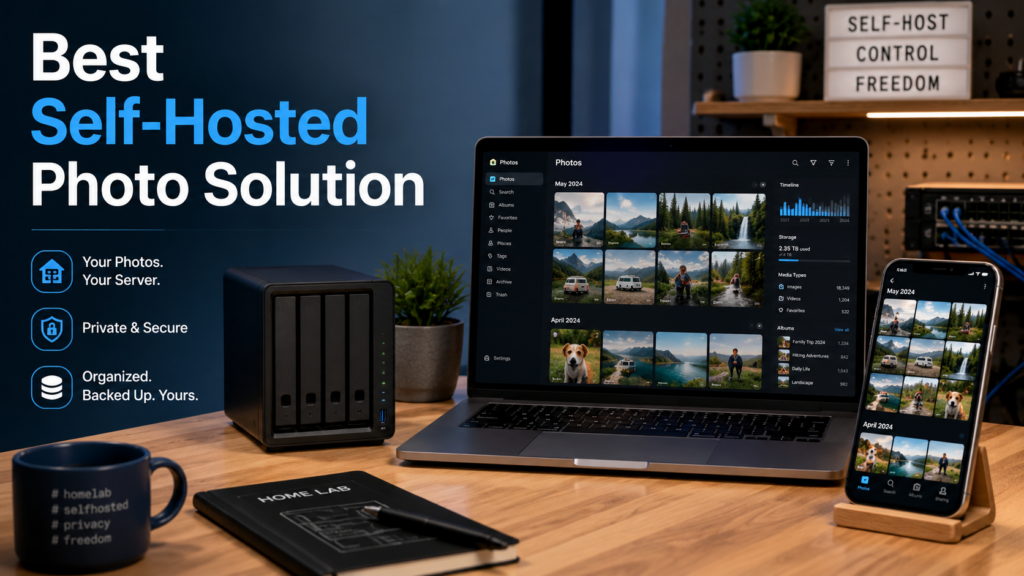
Self-hosted photo library setup with phone, laptop, and home server, illustrating Immich as a Google Photos alternative
0 Responses

Best Self-Hosted Photo Solution: Why I Chose Immich

I am a big believer in the concept of multiple redundant backups. And few things are more important than memories and the family photos. I have built a NAS and have been keeping my important files on it, with the files backed up in two other locations. However, I had not done that for my photos. I have them in multiple locations, but I am paying for hosting.

One of my solutions is free…in a way. I back up to Amazon Photos, as it is included with Amazon Prime. However, so was Prime Video until they added ads, so it is not a guarantee this will continue and I never use it to retrieve photos, just as an extra location. The most popular photo sharing and storage site is probably Google Photos right now, though there are plenty of alternatives. I have stuff there as well.

I needed a place under my control to organize and share my photos, not just a disorganized archive. It was time to migrate to a less expensive self hosted solution, backed by my NAS for storage. Then I could incorporate my existing multi location backup system to keep the files safe.

Quick Answer: Is Immich the Best Self-Hosted Photo Solution?

For my needs, Immich is the best self-hosted photo solution because it feels closer to a modern Google Photos replacement than a simple file browser. It offers mobile app uploads, photo organization, map views, face and object recognition, sharing links, and a familiar interface while letting me keep the storage under my own control.

But Immich should not be treated as your only backup. It is a photo-management system, not a complete backup strategy by itself. If you self-host your photos, you still need multiple copies of the original files, ideally in more than one location.

Option Best For Big Caveat
Immich A modern self-hosted Google Photos-style experience Still requires a separate backup strategy
PhotoPrism Self-hosted photo browsing and organization Different feel and workflow than Google Photos
Google Photos Convenience, sharing, and cloud access Storage costs, privacy tradeoffs, and less control
Amazon Photos Extra photo storage for Prime members Useful as another copy, but not the system I want to depend on
NAS folder structure Long-term file control and backups Not a polished photo-browsing experience by itself

Immich

I had heard a lot about different self hosted solutions, but the most popular one I keep hearing about of late is Immich. Immich is in beta, but it is meant to reach stable this year. It already seems to be extremely stable, but it warns that you should have a backup strategy outside of it, as it is not meant to be a backup strategy by itself. I already have one, once I include this in the pipeline.

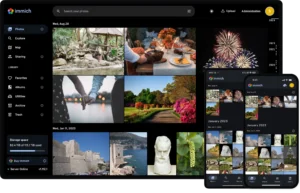
immich screenshotImmich is a full fledged system for photo sharing and organization. It supports showing photos on a map, face and object recognition, and more. I can easily share photos with expiring links or ones that will last forever. There is an API I can use to integrate with other systems.

While there are alternatives, such as Photoprism, Immich has a familiar design language, modern features, and offers a mobile app which can automatically backup your photos into Immich.

Immich Is Not a Backup Strategy By Itself

This is the part that matters most. Immich can organize, display, and sync photos, but that does not mean the photos are safe if Immich is the only place they exist.

For me, Immich makes sense because it fits into a broader system. The photos live on storage I control, and that storage can then be backed up to multiple other locations. That is very different from uploading everything to one service and deleting the originals.

A good photo setup should survive:

  • a failed hard drive
  • a mistaken deletion
  • a bad software update
  • a server migration
  • a cloud account problem
  • the slow realization that a “free” storage plan is not guaranteed forever

If you are self-hosting photos, the goal should not be fewer backups. It should be better control over how those backups happen.

Please remember, if you simply upload to Immich, or any service, and purge all other copies, that isn’t a backup.

Published on August 25, 2025
Full Post
0 Responses

Sitting At The Docker By The Drive Bay: TrueNAS Scale Switches to Docker – But Why Docker?

As part of my continuing, Building My NAS series, I wrote about choosing TrueNAS as the software powering my homebuilt network attached storage device. One of the features of TrueNAS Scale has been the ability to run various self-hosted cloud applications. In the latest version of TrueNAS, the backend for those applications switches to Docker. Docker is arguably the most popular way to deploy pre-built complete applications. It not only isolates each application into its own container, but it simplifies the process of deploying and configuring them.

While the number of applications offered directly in TrueNAS, the switch to Docker allows for tens of thousands of public docker files to set up many more applications than are officially supported.

After years of installing applications on the servers that host them, I’ve reluctantly embraced Docker as a solution for when specific combinations are needed, such as specific versions of software. Looking at why other people use it, it is the…”it just works” philosophy. You can install an application, reinstall it cleanly, isolate it from other things…simplicity has its advantages.

It makes Docker a great way to quickly switch from third party services to your own. And combined with a system like TrueNAS providing storage solutions, it can create the basis for a complete solution for yourself and your home.

Published on December 1, 2024
Full Post

Get New Posts By Email