
Gadget Wisdom

Series: Building My NAS

2 Responses

Building My New Network Attached Storage(NAS): Introducing the ODroid H4 Series

I’ve been back and forth between a commercial Network Attached Storage(NAS) product and a homebuilt NAS product. But for the last iteration, I had given up on something I built and moved to a commercial product. But I’m finally ready to go back to homebuilt. Except this time, I’m going to try TrueNAS, because my barrier is always how much time I spent tinkering with it.

I debated a variety of different system configurations and decided I wasn’t going to have my NAS also handle other server duties. It’s primary job would be to run applications. I have a server for that. I just want to run functionality related to file serving, and TrueNAS offers most of that out of the box…although there are more decisions to be made. It isn’t a pure drop in replacement.

So, I settled on the N100 series of CPU processors. Generally available, reasonably priced, and more than enough power for what I wanted. Looking around, that meant I needed to pick a case, a motherboard, etc. While looking, I stumbled across a product just launching, from Hardkernel, who makes the Odroid line of products, which are single board computers. I’d rejected single board, wanting a x86 compatible processor, but the newly launched H4 series is just that.
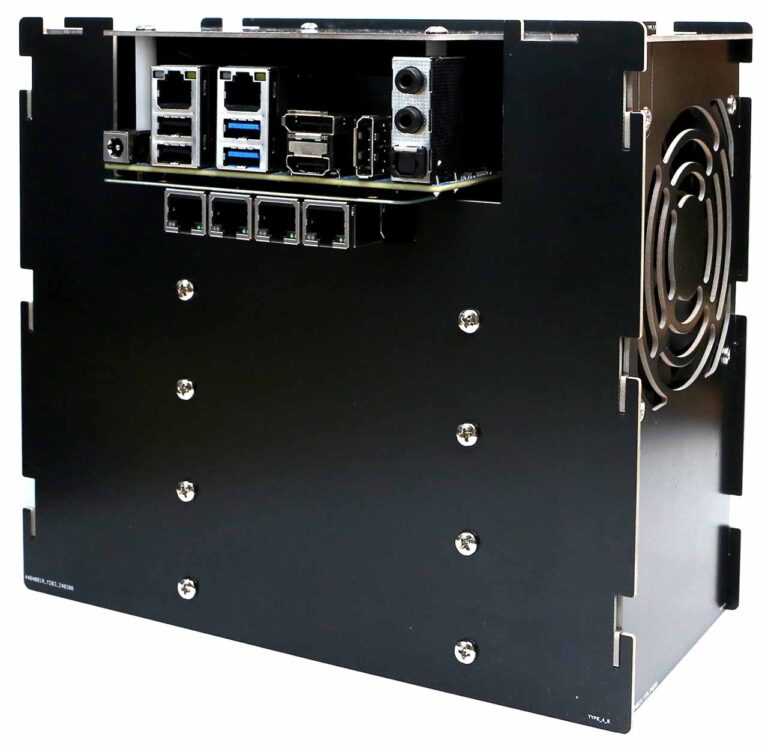
There are three models, the H4, H4+, and H4 Ultra. The H4 and H4+ use the N97 processor, and the Ultra ups that to an i3 N305. The basic difference between the H4 and the H4+ for me is that is offers 4 SATA ports. The power profile of this thing is perfect for a headless server. They offer a mini-ITX conversion kit, but they also offer 4 different designs of metal cases you can buy, and DC adapters to power them. Case Type 4 allows for 4 SATA hard drives, a fan, and the board. It is essentially 4 cut pieces of metal you can assemble, as well as screws and a fan. The picture in this post is courtesy of their site.

It doesn’t look like a normal NAS, or a computer…it looks like an appliance, which is what I want. I sourced the equipment through Ameridroid, who is the O-droid provider in the US and who I have dealt with minimally before. This included ordering the type 4 case, the board, and the power adapter. That ran me a little over $200.

It also limits me. If I install the operating system on an NVME SSD, plus the 4 SATA drives, I can’t grow the system with additional drives. Any changes become a drive replacement, or a system replacement. But I’ve stuck with only 4 drives up until now in my commercial unit, and even in the home built ones I’ve had in the past. It allows me to have a good mix of redundancy and performance.

Redundancy in the same system is not the same as a backup though. I will be talking more about that as I learn about the options TrueNAS offers, and will talk a little about my backup strategy in future.

We’ll see what happens when the board comes and if I made the right decision.
 

Published on April 28, 2024
Full Post
1 Response

Building My New Network Attached Storage(NAS): A Change of Plans, Keeping Up With The Jonsbo

Despite the fact that my ODroid H4+ had an issue, I still remained committed to the course of action of building a NAS to replace my commercial one. So, even as I pursue the Odroid H4+, I decided to explore the other option I’d explored. My original plan was build a mini-ITX NAS. And so, feeling nervous about the ODroid future, I decided to revisit that plan.

I really wanted a low power, small NAS, but while I liked the simplicity of the Odroid 4 drive case, the experience of assembling the case made me a bit concerned about how running a case that is supported entirely by the drives might work out. I decided, since I need to have a secondary location to store the backup for the NAS, I would use this for that, and I’d go more conventional for the primary location. That is a bit more than I’d budgeted for, so this is going to have to last me a while.

On reading a lot of commentary on Mini-ITX NAS cases, I had decided on the Jonsbo line of NAS cases. There’s the Jonsbo N2, which supports five hard drives, or the slightly larger Jonsbo N3, which supports eight hard drives. While I opted for the N2, I can understand some wanting the extra space for future expansion.

The budget board I opted to try is also a N100, the same line I’d been advocating for. There are a variety of variations of this board sold. For example, by CWWK. Or HKUXZR. Or Dytebeply. With minor variations, these boards contain 6 SATA ports…5 of which are via an expansion chip, which may cause throughput issues. They also have 4 2.5 gigabit ethernet ports and 2 M.2 ports on the board. Reading a lot of reviews of these boards, it takes a long time to post, may have limited RAM options, but a lot of people are using these boards, it seems. I’ll be talking a bit more about how I might set up the options I’ve chosen.

If I only wanted a 2 drive NAS, the Aoostar mini PC would be tempting.

The next challenge is how I am going to configure this. There are a lot of decisions, even once I have the hardware.

Published on May 27, 2024
Full Post
Home NAS server with drive bays and network cables, illustrating TrueNAS vs Unraid vs OpenMediaVault NAS software
1 Response

Best NAS Software for Home Use in 2026: TrueNAS vs Unraid vs OpenMediaVault

I originally wrote this article in 2024 while deciding what software to use for a home-built NAS. The basic question has not changed, but the software has.

TrueNAS has consolidated its Linux-based platform under the name TrueNAS Community Edition. Unraid has added much more ZFS support and changed its licensing. OpenMediaVault has moved to Debian 13 with OpenMediaVault 8.

My own answer has not changed very much.

My current NAS runs TrueNAS on a low-power Intel N100 system. I chose it because I wanted the NAS to behave primarily like a storage appliance. I have other computers for applications, containers and general home-server work. I want the box containing my files to be boring.

But that does not mean TrueNAS is automatically the best NAS software for everyone.

If I were building a home server around a collection of mismatched hard drives and wanted Plex, Docker containers and virtual machines on the same machine, I would look very seriously at Unraid. If I wanted a lightweight, completely free NAS operating system for modest hardware, OpenMediaVault would be hard to ignore.

Here is how I would choose between them in 2026.

Quick Answer: Best NAS Software for Home Use in 2026

NAS Software Best For Biggest Advantage Main Tradeoff
TrueNAS Community Edition Storage-first NAS, ZFS, snapshots and data integrity Excellent integrated ZFS storage platform Storage layout requires more planning
Unraid Home servers, mixed drive sizes, Plex, Docker and easy expansion Very flexible storage and application platform Costs money and its classic array works differently from traditional RAID
OpenMediaVault Free lightweight NAS, older hardware and Linux users Simple Debian-based foundation with low overhead More dependent on plugins and manual configuration for advanced features

If you want my short recommendation:

  • Choose TrueNAS if protecting and managing storage is the primary purpose of the machine.
  • Choose Unraid if you want one box to be both your NAS and your home server.
  • Choose OpenMediaVault if you want a free, lighter-weight NAS platform and are comfortable doing a little more yourself.

The Most Important Question: Is This a NAS or a Home Server?

A lot of NAS software comparisons start with features.

I would start somewhere else.

Decide what job you want the computer to have.

A dedicated NAS has a relatively simple job:

  • Store files
  • Share files over the network
  • Protect those files against a drive failure
  • Create snapshots
  • Monitor drive health
  • Replicate or back up important data
  • Stay running quietly for years

A home server may also run:

  • Plex or Jellyfin
  • Home Assistant
  • Immich
  • Nextcloud
  • Docker containers
  • Virtual machines
  • Game servers
  • Download clients
  • Web services
  • Dozens of other self-hosted applications

TrueNAS, Unraid and OpenMediaVault can all stretch beyond simple file storage.

But they approach the problem from different directions.

TrueNAS feels like storage software that learned how to run applications.

Unraid feels like a home-server platform that is also very good at storing files.

OpenMediaVault feels like Debian turned into a manageable NAS appliance.

That is a more useful way to think about the choice than counting checkboxes.

TrueNAS Community Edition: Best for a Storage-First NAS

TrueNAS is still my choice for my primary home NAS.

The main reason is ZFS.

ZFS combines the filesystem and volume-management layers and provides features that are particularly attractive for storage:

  • End-to-end checksums
  • Snapshots
  • Data scrubbing
  • Replication
  • Compression
  • RAIDZ redundancy
  • Mirrored pools
  • Dataset-level management

For a box whose main job is protecting a large collection of files, those are exactly the features I want.

TrueNAS CORE vs. SCALE Is No Longer the Decision

This was one of the biggest areas of confusion when I first wrote this article.

TrueNAS used to have two major community platforms:

  • TrueNAS CORE, based on FreeBSD
  • TrueNAS SCALE, based on Linux

That is no longer the way I would approach a new installation.

TrueNAS SCALE was renamed TrueNAS Community Edition in 2025 and is now the company’s primary free community platform.

TrueNAS CORE entered sustaining engineering, and TrueNAS says 13.3-U1.2 was the final release in that train. New development is happening on Community Edition.

If I were installing TrueNAS from scratch in 2026, I would use Community Edition rather than begin a new CORE system.

At the time of this update, TrueNAS 25.10 is the current stable release family, while TrueNAS 26 is still moving through beta development. You can check the current TrueNAS software status before installing.

TrueNAS Is More Flexible to Expand Than It Used to Be

One of the longstanding criticisms of ZFS was that you needed to plan your storage layout carefully before filling the pool.

That criticism is less severe than it once was.

TrueNAS now supports RAIDZ expansion, which allows an existing RAIDZ vdev to be expanded by adding drives one at a time.

That is a significant improvement for home NAS builders who do not want to buy every drive on day one.

There are still reasons to plan carefully. The capacity of drives inside a vdev, parity level and layout all affect usable capacity and performance. Adding a drive to RAIDZ also does not make every historical block magically identical to a freshly created larger vdev.

But the old advice that a RAIDZ configuration is essentially frozen forever is outdated.

TrueNAS Hardware Requirements

TrueNAS is not particularly demanding by modern computer standards, but it is heavier than a bare-bones Linux NAS.

The current minimum recommendations include:

  • 64-bit x86 processor
  • At least 8GB of RAM
  • A dedicated boot device
  • Separate drives for the storage pool

More RAM becomes useful as storage, applications, virtual machines and client workloads increase.

My N100-based NAS is a good example of why I like building rather than automatically buying a commercial appliance. Modern low-power CPUs can provide plenty of performance for ordinary home file serving while using very little electricity.

If you would rather buy the whole box instead of building one, see our guide to the best NAS systems for home use in 2026.

You Can Run Apps on TrueNAS

TrueNAS is no longer merely a file server.

Community Edition can run applications and virtual machines, and the platform continues to expand its container capabilities.

You can absolutely use one TrueNAS machine as both your storage system and a broader home server.

I simply prefer not to.

Every extra service I put on the storage machine creates another dependency, another update and another thing that can break.

I would rather reboot a home-server machine without thinking about every computer in the house suddenly losing its file shares.

That is a preference, not a requirement.

What I Like About TrueNAS

  • Excellent ZFS integration
  • Strong snapshot and replication tools
  • Free and open source Community Edition
  • Good storage monitoring
  • RAIDZ and mirrored storage layouts
  • RAIDZ can now be expanded incrementally
  • Apps and virtual machines are available if you want them
  • Large user and documentation base

What I Don’t Like About TrueNAS

  • You should understand ZFS and vdev layout before creating the pool.
  • It is heavier than a minimal NAS operating system.
  • Mixing random drive sizes is less elegant than it is with Unraid’s classic array.
  • The number of storage options can be intimidating for a first-time builder.
  • It can tempt you to turn a storage appliance into an everything-server simply because the features are available.

Unraid: Best for Flexible Home Servers and Mixed Drives

Unraid solves a different problem extremely well.

Suppose you already own:

  • One 16TB hard drive
  • Two 12TB drives
  • An 8TB drive
  • A couple of SSDs

And you would like to turn all of that into one useful server without replacing the drives simply to make everything match.

That is exactly the kind of situation where Unraid becomes attractive.

How the Unraid Array Works

Unraid’s traditional array does not stripe every file across all of the disks in the way conventional RAID does.

Files live on individual data disks, while one or two parity disks can protect the array against drive failures.

The parity drive must be at least as large as the largest data drive, but the data disks themselves can differ in size.

That makes expansion unusually convenient.

If you need more capacity, you can often add another disk rather than rebuilding the entire storage layout around a matching set.

For a home user accumulating storage over many years, that flexibility has real value.

Unraid Also Supports ZFS

The old shorthand that “TrueNAS is ZFS and Unraid isn’t” is no longer accurate.

Modern Unraid supports ZFS storage pools in addition to its classic parity-protected array and other storage pools.

That gives you choices.

You might use:

  • The Unraid array for large-capacity media storage
  • An SSD pool for applications and fast data
  • A ZFS pool for data where you specifically want ZFS features

That combination is one of the reasons Unraid has become such an interesting all-purpose home-server platform.

Unraid Is Especially Good at Applications

This is where I think Unraid has its clearest advantage for many homelab users.

Docker containers, virtual machines and the Community Apps ecosystem are central to the experience rather than feeling like features added around a storage appliance.

If you want one machine running:

  • Plex
  • Jellyfin
  • Immich
  • Nextcloud
  • Home Assistant
  • Download applications
  • Game servers
  • Windows or Linux virtual machines

while also holding a large collection of files, Unraid makes a lot of sense.

Unraid Pricing in 2026

Unlike TrueNAS Community Edition and OpenMediaVault, Unraid is commercial software.

Current pricing is:

License Price Storage Devices Updates Included
Starter $49 Up to 6 1 year
Unleashed $109 Unlimited 1 year
Lifetime $249 Unlimited Lifetime

The licenses themselves are perpetual. Starter and Unleashed include a year of updates; you can continue using the version you have after that or pay to extend update access.

Check Unraid’s current pricing before buying in case the structure changes.

For a server that may contain thousands of dollars of drives and years of your data, I do not consider $49 or $109 an inherently unreasonable software expense.

The question is whether Unraid’s flexibility provides enough value for your particular build.

What About Unraid 8?

Unraid announced Unraid 8 in August 2026, with planned changes including a new distribution base, Docker Compose integration and integrated backup features.

That is interesting, but I would not delay a NAS build or choose a platform based primarily on unreleased software.

Buy or install the platform based on what it does today.

What I Like About Unraid

  • Excellent support for mismatched drive sizes
  • Easy incremental expansion
  • Very good Docker and application experience
  • Strong community ecosystem
  • Virtual machines are well integrated
  • ZFS pools are now available alongside the classic Unraid array
  • Works particularly well as a combined NAS and home server

What I Don’t Like About Unraid

  • It is not free.
  • The classic Unraid array is a different storage model from RAIDZ or conventional RAID and should be understood before use.
  • Running every service on one machine can make that machine increasingly important and complicated.
  • Users who only want a storage appliance may never use much of what makes Unraid attractive.

OpenMediaVault: Best Free Lightweight NAS Software

OpenMediaVault is the option I think gets overlooked most often.

OpenMediaVault 8 is based on Debian 13 and provides a web interface for managing a NAS without requiring you to configure every service manually from the command line.

It supports ordinary NAS functions including:

  • SMB/CIFS file sharing
  • FTP
  • SSH
  • rsync
  • Drive health monitoring
  • Volume management
  • Network configuration
  • Notifications
  • Plugins

The result is something much closer to a conventional Linux server than TrueNAS, but much easier to administer as a NAS than installing Debian and building everything manually.

OpenMediaVault’s Biggest Advantage Is Simplicity

OpenMediaVault does not impose as much of a storage philosophy on you.

You have Debian underneath. You have a web interface on top. You can add the services you actually need.

That makes it useful for:

  • An old PC being repurposed as a NAS
  • A low-power small computer
  • A simple two-drive or four-drive file server
  • Users who already understand Linux
  • People who want free NAS software without adopting the full TrueNAS ecosystem

OpenMediaVault also has a large plugin ecosystem that can add functionality beyond the base installation.

The Tradeoff Is Integration

TrueNAS is built around ZFS.

Unraid is built around its storage array and home-server ecosystem.

OpenMediaVault is more modular.

That flexibility is useful, but it also means that some configurations depend on plugins, additional packages or more manual decisions.

If you want a carefully integrated ZFS appliance, I would choose TrueNAS.

If you want a deeply integrated Docker-heavy home server, I would lean toward Unraid.

If you want Debian with a good NAS management interface and the freedom to shape the machine yourself, OpenMediaVault becomes very appealing.

What I Like About OpenMediaVault

  • Free and open source
  • Based on standard Debian Linux
  • Lower hardware overhead
  • Web-based administration
  • Good choice for repurposed hardware
  • Modular plugin architecture
  • Easy to understand if you already know Linux

What I Don’t Like About OpenMediaVault

  • Advanced setups can rely heavily on plugins.
  • The storage experience is less unified than TrueNAS.
  • The application ecosystem is less central to the platform than it is with Unraid.
  • You may end up doing more Linux administration yourself.

TrueNAS vs. Unraid vs. OpenMediaVault: Feature Comparison

Feature TrueNAS Unraid OpenMediaVault
Software cost Free $49-$249 Free
Best storage model ZFS pools Parity array plus storage pools Flexible Linux storage
ZFS Core feature Supported Possible with additional configuration/plugins
Mixed-size drives Possible, but planning matters and each vdev is constrained by its smallest member Excellent in classic array Depends on chosen storage configuration
Easy drive-by-drive expansion Improved with RAIDZ expansion Excellent Depends on configuration
Snapshots Excellent with ZFS Available depending on storage pool/filesystem Depends on filesystem/plugin setup
Docker/apps Yes Excellent Available through additional components/plugins
Virtual machines Yes Excellent Not a primary strength
Minimum hardware Moderate Moderate Light
Best personality Storage appliance All-in-one home server Lightweight Linux NAS

Which NAS Software Is Best for Data Integrity?

I would choose TrueNAS.

ZFS is central to the platform rather than one filesystem option among many.

Checksums, scrubs, snapshots and replication are all integrated into how TrueNAS expects storage to be managed.

You can absolutely build safe storage with the other platforms. But if storage integrity is the reason the machine exists, TrueNAS is the easiest answer for me.

Which NAS Software Is Best for Plex?

I would probably choose Unraid if I were building a combined Plex server and NAS.

The combination of flexible drive expansion, Docker applications and hardware passthrough makes it particularly well suited to a large media server.

You can run Plex on TrueNAS too.

But if Plex and other self-hosted applications are central to the server rather than secondary functions, I think Unraid’s priorities line up better with the job.

Which NAS Software Is Best for Old Hardware?

I would look first at OpenMediaVault.

It is lighter and closer to ordinary Debian Linux.

TrueNAS officially recommends at least 8GB of RAM, while a simple OpenMediaVault system can be useful on much more modest hardware.

That does not mean every old PC is a good NAS.

Power consumption matters. A free twelve-year-old tower that idles at 80 watts can cost more to own than buying newer low-power hardware.

Which NAS Software Is Best If Your Drives Are Different Sizes?

Unraid has the clearest advantage.

The classic Unraid array was designed around exactly this problem.

You can add different-capacity data drives as long as the parity drive is large enough for the largest data disk.

If you have accumulated a pile of usable drives over the years and want to turn them into one system, Unraid can save a lot of money.

Which NAS Software Is Best If You Want to Add Drives Later?

Unraid remains the easiest answer, but TrueNAS is much more competitive than it was when I first wrote this article.

RAIDZ expansion now lets TrueNAS users add drives to an existing RAIDZ vdev one at a time.

That removes one of the biggest historical advantages Unraid had over ZFS for small home systems.

Unraid is still more forgiving if your future drives are likely to be whatever capacity happens to be cheap when you need more storage.

Should You Run Your NAS Inside Proxmox?

You can.

That does not necessarily mean you should.

Proxmox is primarily a virtualization platform rather than NAS software. A common homelab design is to run TrueNAS or another NAS operating system as a virtual machine under Proxmox.

If you do this, the storage controller or physical disks should be presented to the NAS in a way that gives the storage operating system appropriate direct access.

This can be an excellent design when you understand the virtualization and storage layers.

For my primary storage, I prefer fewer layers.

I want the NAS operating system running directly on the hardware because the ability to run another virtual machine on the same box is not worth making recovery more complicated for me.

Why Not Just Install Debian or Ubuntu?

You certainly can.

That is effectively what I did with some of my older home-server systems.

Install Linux, configure Samba, configure NFS, set up SMART monitoring, create filesystems, configure snapshots, configure notifications and maintain everything yourself.

It works.

It also made me appreciate NAS software.

The point of TrueNAS, Unraid or OpenMediaVault is not that Linux cannot share a directory.

The point is that I want storage management to behave like an appliance instead of becoming another custom Linux project I have to remember how I configured three years later.

What About Synology DSM, UGREEN UGOS and TerraMaster TOS?

Those are important NAS operating systems, but they are primarily part of buying their manufacturers’ NAS hardware rather than software I would normally install on a DIY server.

If you want the simplest home NAS experience, that may actually be the better route.

I would still recommend a prebuilt NAS to many friends before recommending that they build a server and install any of the software in this article.

Our 2026 home NAS buying guide compares Synology, UGREEN, TerraMaster and building your own.

Your Network Can Become the Bottleneck

Once you build a decent NAS, storage software is often no longer the thing limiting performance.

A single hard drive can already saturate a 1Gb Ethernet connection during large sequential transfers.

Modern SSD pools can go dramatically faster.

If you are building or upgrading a NAS, consider whether your network should move to 2.5GbE or 10GbE as well.

Our guide to 2.5GbE vs. 10GbE for a home network covers that decision.

Redundancy Is Still Not a Backup

Whichever NAS software you choose, RAID, RAIDZ and parity do not replace backups.

Redundancy can protect you when a drive fails.

It does not automatically protect you from:

  • Accidentally deleting a file
  • Ransomware
  • Filesystem mistakes
  • Software bugs
  • Theft
  • Fire
  • Flood
  • A major electrical event
  • Losing the entire NAS

Snapshots help with some of those problems. Replication helps with others.

Important data should still exist somewhere other than the primary NAS.

My Choice: TrueNAS, but for a Specific Reason

I still use TrueNAS.

My current system runs on an Intel N100 platform and primarily serves files.

I could load it with applications.

I don’t.

I have other systems for that.

I want the NAS to boot, make the storage available, monitor the drives and otherwise stay out of the way.

TrueNAS fits that philosophy extremely well.

If I instead wanted to consolidate my NAS, Plex server, Docker host and assorted homelab applications into one machine, I would be much more tempted by Unraid.

If I were turning an older low-power computer into an inexpensive two-drive file server, I might use OpenMediaVault.

There is no universal winner because these three platforms are trying to solve slightly different problems.

Frequently Asked Questions About NAS Software

What is the best NAS software for home use?

For a storage-first home NAS, I prefer TrueNAS Community Edition. Unraid is an excellent choice for a combined NAS and home server, especially if you have mixed drive sizes. OpenMediaVault is a strong free option for a lightweight Linux-based NAS.

Is TrueNAS better than Unraid?

It depends on the job. TrueNAS has an advantage if you specifically want a ZFS-focused storage appliance. Unraid is generally easier to expand with mismatched drives and has an especially strong home-server and application ecosystem.

Is Unraid worth paying for?

It can be. If Unraid allows you to reuse several mismatched drives, expand the server gradually and consolidate applications onto one machine, the license cost can be small compared with the hardware savings. If you only need basic file storage, a free platform may make more sense.

Is OpenMediaVault still good in 2026?

Yes. OpenMediaVault 8 is a current Debian 13-based NAS platform. It remains particularly attractive for lighter hardware, simple file servers and users who prefer a conventional Linux foundation.

Is TrueNAS CORE still recommended?

I would not start a new TrueNAS CORE installation in 2026. TrueNAS has moved new community development to the Linux-based TrueNAS Community Edition, formerly known as SCALE. CORE is now effectively a legacy branch.

Can TrueNAS use different-size hard drives?

Yes, but ZFS pool design matters. Within a vdev, usable capacity is constrained by the smallest drive, so matching drive sizes is usually more efficient. TrueNAS now supports expanding RAIDZ vdevs one drive at a time, which makes later growth easier than it used to be.

Does Unraid support ZFS?

Yes. Modern Unraid supports ZFS storage pools in addition to the traditional Unraid parity array and other filesystem options.

Do I need 10Gb Ethernet for a NAS?

No. 1GbE is adequate for ordinary file storage, backups and media streaming. 2.5GbE is an inexpensive and useful upgrade for many homes. 10GbE becomes more attractive for large transfers, multiple fast clients and SSD-heavy storage.

Can I use an old PC as a NAS?

Yes, assuming the hardware is reliable and has suitable storage connections. But check idle power consumption before assuming an old computer is the cheapest long-term choice.

Which NAS Software Would I Choose in 2026?

If I were starting again today:

  • TrueNAS Community Edition for a serious storage appliance
  • Unraid for an all-in-one home server with flexible drives
  • OpenMediaVault for a lightweight free NAS or inexpensive repurposed system

I chose TrueNAS because I wanted my storage to be storage.

Someone building a large Plex server from a pile of mismatched disks could make an equally rational choice and end up with Unraid.

And someone who wants little more than a reliable SMB share on modest hardware may find that OpenMediaVault is all the NAS operating system they need.

The software should follow the job you want the server to do.

Published on May 31, 2024
Full Post

Get New Posts By Email