Gadget Wisdom

3 Responses

Editorial: Find Me a Twitter Client

This icon, known as the "feed icon" ...
Image via Wikipedia

Guru is the editor of the Gadget Wisdom blog and the voice of GadgetWisdom on Twitter.

I have gotten addicted to Twitter. It wasn’t my idea. I got onto Twitter to promote the blog, initially, and didn’t think I would have much use for it. But like many Twitter has mostly replaced the RSS feed for me. I want to keep up on what is going on, and I want that information delivered to me.

So all of the sites I used to follow in my RSS reader that offer a Twitter feed, I unsubscribed to the RSS feed. I’m hardly alone in that. There is too much to go through out there. And the nice thing is that in addition to straight blog->twitter feeds, there is some human filtering. If Tweeter A shares my preferences, the things they link to and retweet are likely to be ones I want to know about. That also creates a social element, as there can be commentary/dialogue about these things.

I am also on Identi.ca/StatusNet, also at GadgetWisdom. It is the same philosophy, but has a significantly different set of people, and fewer of the news sources I’m looking for, so I use it less frequently. It does offer a higher percentage of tech people though, so it has its place.

The Gadget Wisdom blog auto-tweets new blog entries, and I do try to comment on what other people are saying to get involved in the conversation. But ultimately, my problem is finding the right Twitter client.

I am a Linux user. The most popular Twitter clients that will work on Linux are Adobe Air based. Adobe Air is nice in that Air programs will work on any OS you can successfully install the software onto. But Adobe software can be difficult, although to Adobe’s credit, they do maintain the software and try to improve it.

I’ve been using Twhirl, which has not been maintained since Seesmic acquired it. Seesmic has its own Desktop software, which they’ve spun off into a variety of other social networking products, including one for Android. Twhirl is not ideal, but it has several features I want. I am trying to find the Twitter client that does everything I want. So, here are my parameters for a Twitter client. Note: This is a discussion of desktop, not mobile clients.

When I return home after a few hours away, I want to catch up on my tweets. This is where the problems come in. For one, with any client, if I don’t leave the client running, then I can only retrieve an hour or two of tweets. What if I’m gone for the day…6-12 hours? Some programs even have a maximum number of tweets they’ll keep even if you do leave it running, causing you to lose some. And even using the web interface, it is hard to go back more than a certain number of hours in your timeline.

So, this is what I want in a Twitter client

  • Lightweight – It’s Twitter. I don’t need it to take up that much memory. I wouldn’t mind if it saved my Tweets locally in realtime. I could afford the hard drive space.
  • Keep Track of Read Tweets – When I go out, or even when I’m in, I want it to keep track of where I left off reading and make sure everything from then on until I return is retained.
  • Prioritize Mentions – When I return, I want to know if anyone said anything to or about me to reply with before I read through hours of tweets to catch up.
  • Multiple Account Support – I have to monitor more than one account.
  • Backup – Why can’t the program save my tweets locally as a backup? My IM client can. Is there a single Twitter client that can do this?

So, let’s take a look at some Twitter clients we’ve tried…We mentioned Twirl, and it isn’t maintained, so we’ll skip it for now…

TweetDeck

Tweetdeck is perhaps the most commonly used Twitter client after the Twitter web interface itself.

  • It uses a column based interface… It has a lot of good features.
  • No Status.net/Identi.ca support
  • Multiple Account Support, but you cannot combine/group information from multiple accounts together.
  • Online sync option, but only for column information, not for position or account information.
  • A dot appears next to Tweets to mark whether or not it is read or unread.

Seesmic

Seesmic Desktop is the most serious challenger to Tweetdeck.

  • Multiple Account Support
  • Either single or multiple column format. Offers a filter/columns to group information from multiple accounts or separately look at each feed.
  • No Status.net/Identi.ca support.
  • No Online Sync, despite the fact Seesmic offers a web-based product.
  • No good way to keep track of your place, except by clearing your read Tweets.

Seesmic Web is an online version of the Desktop client, with similar features.

Gwibber

I needed to cover a native Linux client. I want to love Gwibber. But it has a few showstoppers.

  • Multiple Account Support, including Status.net/Identi.ca.
  • Offers a singe column input, but offers the opportunity to filter the column to a specific stream, ie account, mentions, etc.
  • No way to keep track of read Tweets.
  • No support for Groups or Twitter Lists

A lot of the above is on their roadmap for future improvements, but it isn’t quite there yet. Of course, I’m running the latest testing version for Fedora, which is not the most current. Ubuntu Linux users would have a more current version.

Hootsuite

Hootsuite is a web based client, and very popular. But it has that same showstopping problem we can’t find a solution for. Keeping track of where we left off.

I’ve looked at other clients, but cannot find anything that works for me. So tell me, what do you use? What works?

Published on March 7, 2010
Full Post
1 Response

You and Your Android

Android Logo
Image by Arvid via Flickr

Recently, several members of the Wisdom family got themselves Android(TM) based phones. We all dived wholeheartedly into the application phone lifestyle. The term smartphone isn’t quite accurate, and the primary advantage of these types of phone are all the possibilities inherent in being able to run applications to do almost anything with them.

We’ve always been fans of the open platform.  For all the wonderful things iPhones can do, there is still a lot of things that are restricted by Apple‘s management policy. In some cases, the Android is perfectly capable of doing those things, but no one has yet written an app for that. But in that regard, the Android will be catching up as its popularity increases. Or so we hope.

But there are adoption problems. A recent survey indicated that 73% of Android users are male. However looking at the numbers, as is sometimes the case in technology, all numbers show a larger percentage of male users. The Blackberry, which has widespread adoption, is not listed. Verizon’s big Android push this year has put the technology, which was previously niche, into the mainstream. Every provider is increasing its Android phone offerings. We’ll be interested to see how the demographics evolve in a year.

Sometime in the near future Android will offer a Flash plugin. And while we find Flash is less than ideal as a platform, its everywhere online. This will spur more Android adoption in the future.

To that end, to celebrate our newfound enjoyment of the Android platform, we’ll be introducing some Android posts here on Gadget Wisdom. Look out for them.

Reblog this post [with Zemanta]
Published on March 1, 2010
Full Post
1 Response

MythTV Rig: Part 3 – The Home Theater Frontend

As the third part, and for now, the final part, of our multipart series, Better Know a MythTV configuration, we profile the second of our MythTV frontends. This frontend is the older of the two, and is hooked into some home theater equipment for a more immersive experience.

Now, with all of these systems, bear in mind they’ve been designed, redesigned, expanded, etc. But we are, by no means wealthy over here. Some concessions have been made, and parts upgraded and replaced as financial and practical considerations demand it.

The current system was built when HDMI was still at the upper end of hobbyist grade. Now, many computer monitors and amplifiers include HDMI switching. This system was designed originally with component video in mind, at the cusp of our upgrade to HD programming. It is set up for expansion, and likely will be, piece by piece in the future.

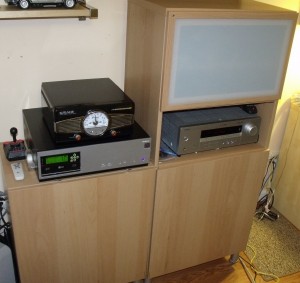
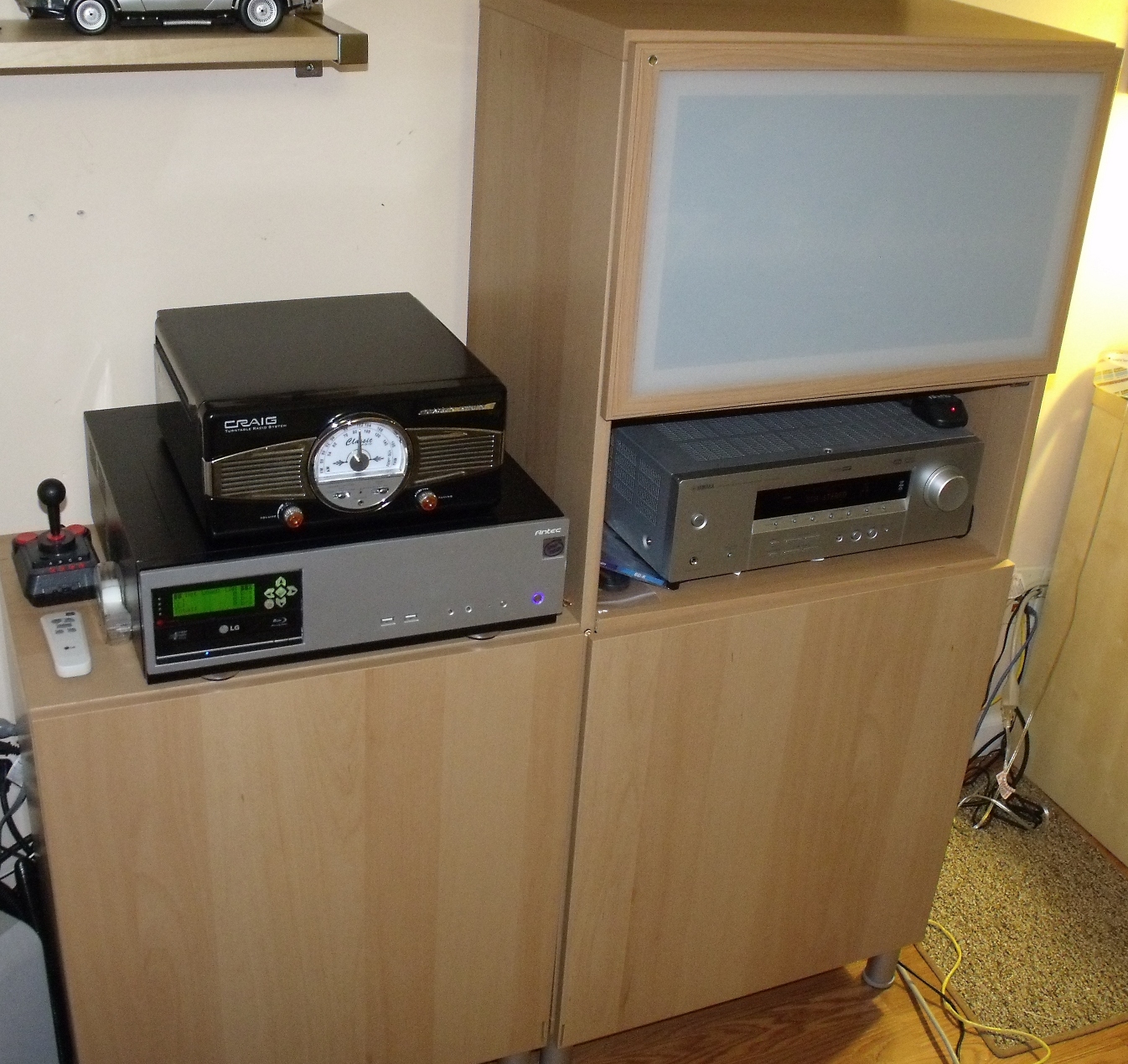
As you can see, we’ve continued our modular Ikea furniture theme from the other setup. Originally we did have a more conventional audio rack here, but switched to these two separate pieces. The router, the Silicondust HDHomerun, and the modem are actually stored in the bottom of one of those cabinets, and the glass door hides a tape deck and could hide additional equipment. An IR remote control would actually work through that glass.

Both rooms where you see the frontend setup were designed as possible backend locations. The whole goal of a redesign we implemented over the last two years was to allow us to rearrange the equipment in a variety of ways depending on changing need. For example, we moved a file cart to the right of the setup to show the wire hookups for relocating the backend if needed.

The receiver is located on the right, and is an inexpensive Yamaha that incorporated all the features we wanted at the time. On top of the frontend you can see what looks like an old style radio. It is that and a record player. It adds to the character of the room, in our opinion.

Then we finally get to the frontend itself. The case seen is long since discontinued. The closest current model is the Antec Fusion NSK2480, which is a newer version of what we actually have. Like all of the others, this system also has an Asus motherboard.  There is another CrystalFontz 635 LCD panel in this system, this one in Green. We prefer the blue, which is why we got it for the second panel.

The processor is an AMD Athlon(tm) 64 X2 Dual Core Processor 4200+, which was retired from the backend during a previous upgrade.  Both frontends have 2GB of RAM. RAM is fairly cheap nowadays anyway. The remote is an RF Snapstream Firefly.

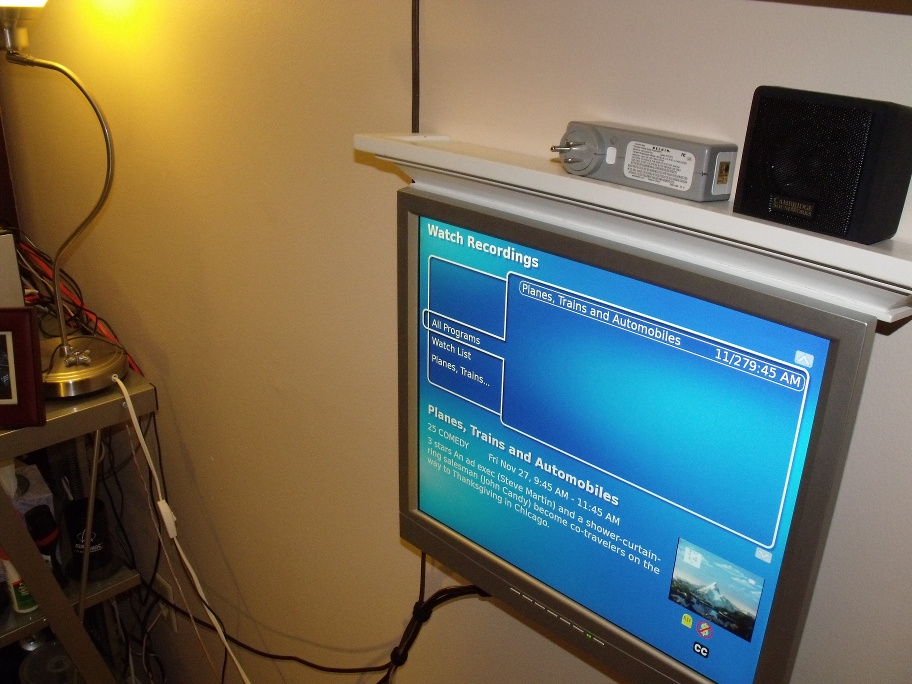
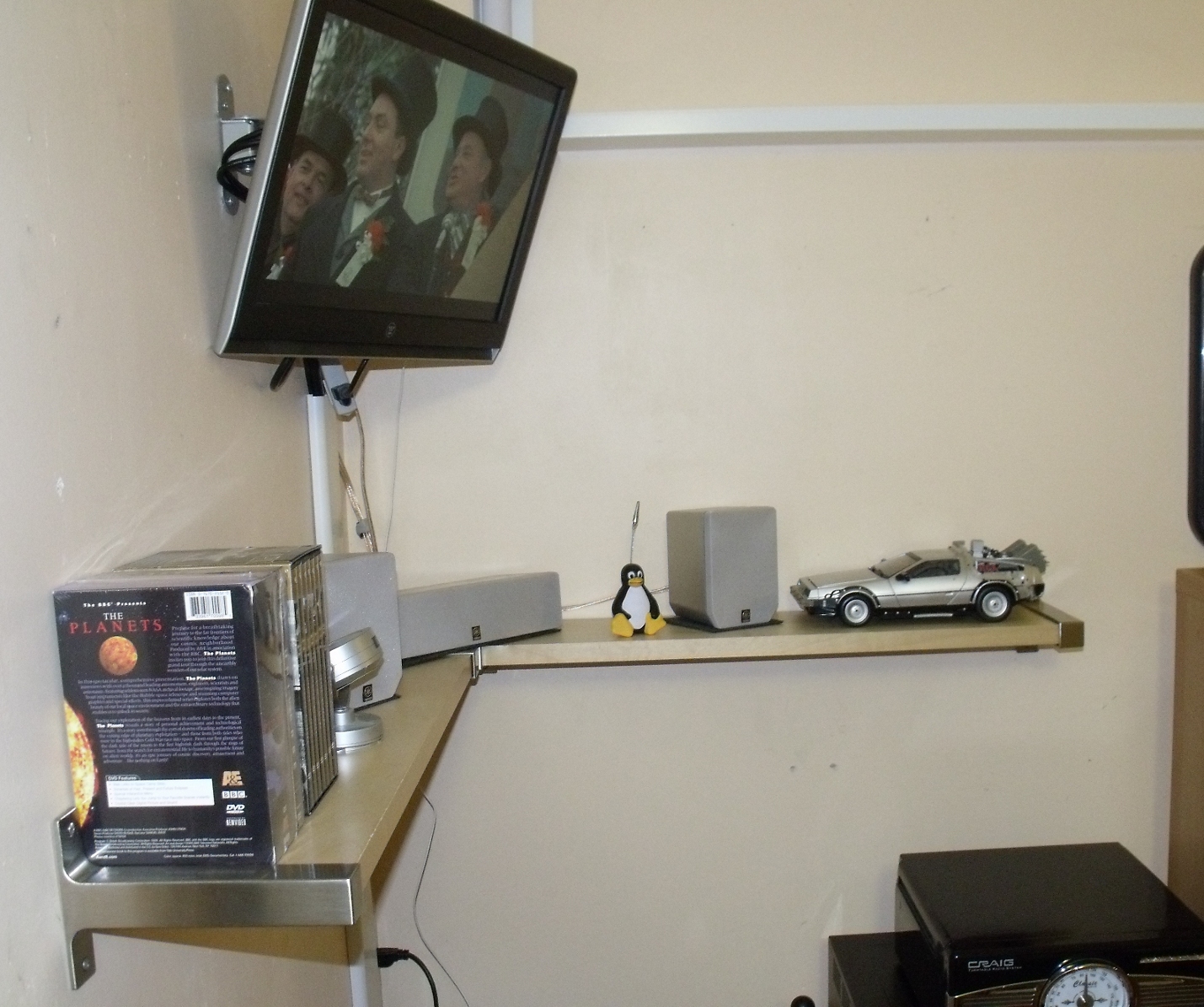
The screen here is a 23″ Westinghouse LCD with DVI and Component inputs and a maximum resolution of 1600×1200, mounted on a swing arm. This is one of the pieces we are hoping to expand soon into a larger, higher resolution with HDMI inputs, which will certainly, if nothing else, allow a thinner cable down to the computer.

You can see under the monitor the Left, Right, and Center channel speakers, the right speaker nestled in between Tux the Linux Mascot and the Time Machine, which we recently bought on a whim. The configuration of the room, a long rectangle, is not 100% conducive to a home theater design. To the left of the image is a window, and thus the positioning of the monitor and speakers is the only way to make sure viewing isn’t on top of the monitor, and that optimal viewing and sound is accomplished from either the couch, placed on a long wall, or a chair placed in the center of the speakers.

The rear speakers are not pictured, but are placed in the traditional isosceles trapezoid configuration, oriented according to the limitations of the space, again planned to surround primarily a person seated in a chair in the middle of the room. Under the shelf that holds all the speakers pictured is a through-the-wall air conditioner, which is why the units that hold the equipment are not placed against it. As mentioned, some of the decisions were made due to the configuration of the room. If anyone thinks they might have a better idea, please suggest it, as we’ve yet to figure out a superior layout.

So, that is it for now. We certainly have expansion hopes for the future, including to migrate to a monitor with an HDMI input, and possibly the receiver as well. Someday we’d like to try an Atom-based frontend, for the size of it.

Hopefully, you’ve gotten some ideas for systems of your own. What we’ve learned over the years is to build simply, but build room for expansion and redundancy. Any questions?

Published on February 21, 2010
Full Post
1 Response

MythTV Rig: Part 2 – A Frontend

As the second part of our multipart series, Better Know a MythTV configuration, we profile one of our MythTV frontends.

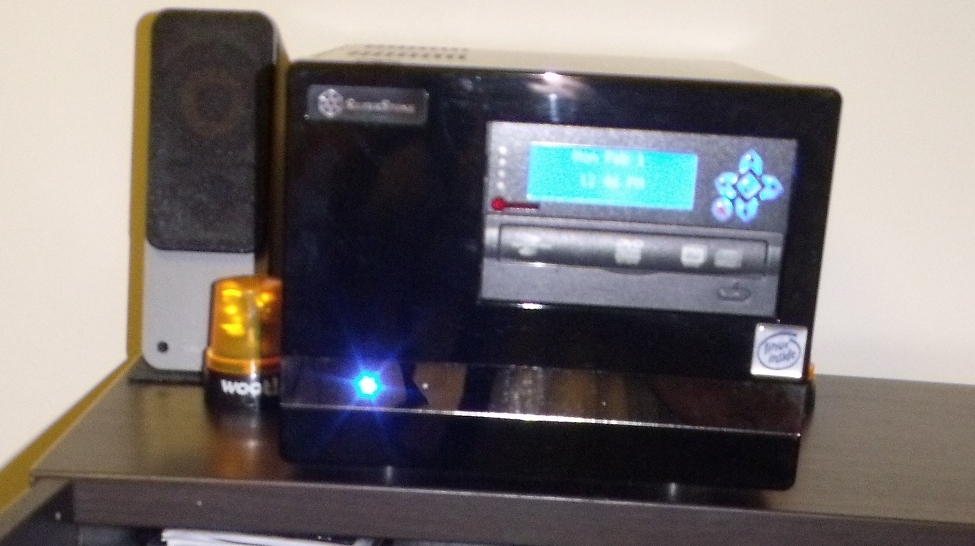
This is the newer of the two frontends we currently have in use. The case is a Silverstone Sugo SG-02, which looks rather nice in black. Inside, you can see a generic DVD drive and a CrystalFontz 20×4 LCD display that hooks into the internal USB headers on the Asus mainboard.

The processor is an Athlon X2 Dual Core BE-2400, the lowest power dual core available at the time of purchase, and rather inexpensive even then. The newest component is a NVidia GeForce 8400 series graphics card, which replaced an older video card. The card supports overloading of video decoding/playback under Linux, allowing a computer with little processing power to playback high definition video.

The hard drive is only used for the operating system, and happens to be one of the retired drives from the file server. A USB drive would work just as well, but would slow boot time. We could also have tried booting and loading data off of the network, but using an old drive to store the OS seemed simplest.

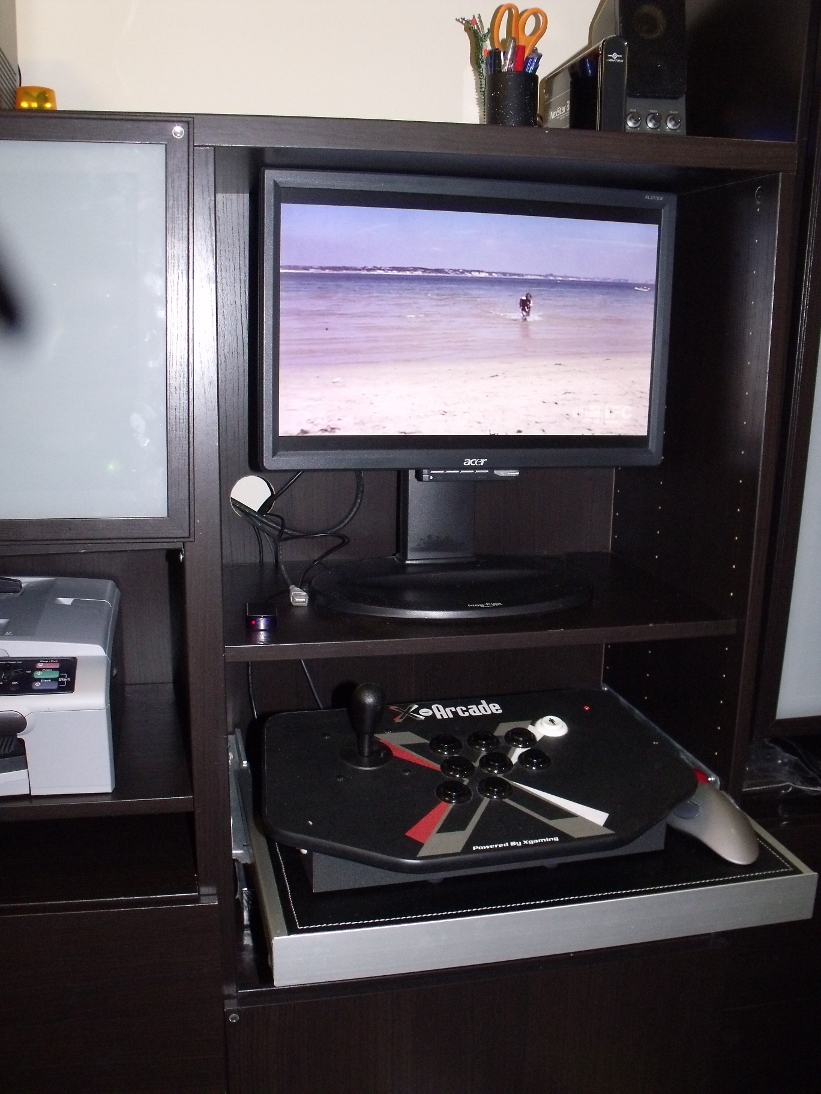
The monitor is an Acer 22″ computer, not television monitor, with a maximum resolution of 1600×1200.

One of the features that is unique to this frontend is the addition of the pullout X-Arcade Solo Controller, which slides in below the monitor when not in use. This system can also double as an arcade emulator, for the playing of classic arcade games. The monitor is even set to rotate to accommodate the portrait style screen of such a system, however when we put the system into its current cabinet, we didn’t account for the fact the monitor does not currently have enough clearance to rotate without being removed, a problem we have not bothered yet to solve.

We’re not big gamers, but we enjoy the nostalgia of playing the ones we played when we were young. MythTV includes a plugin/launcher for this.

The speakers are Creative Gigaworks T20 speakers, and do not offer a subwoofer. Our other system has full surround audio, but this one was designed to be much quieter, so we opted for a simpler speaker setup.

Finally, the remote is a simple Windows MCE infrared remote(not pictured). The system, when not in use, is turned off. It is plugged into a power strip(not pictured) with a master outlet, which shuts the power to the speakers and monitor when the computer turns off.

There have been other features/tweaks we have contemplated. for one, triggering the start of the computer with the remote, which we’ve run of but have been unable to get working. Like anything else, systems continue to improve.

The last major addition added Hulu Desktop for Linux into the Frontend, so it can be launched, control handed over to Hulu, then back to MythTV.

Next time, Part 3, the final backend.

Published on February 21, 2010
Full Post
2 Responses

MythTV Rig: Part 1 – The Backend

As part of the first of our multipart series, Better Know a MythTV configuration, we profile our MythTV Backend.

Our MythTV backend has gone through a lot of changes over the years. The first iteration was in a yellow server case on wheels. We went through a period of overbuilding, and the yellow version of the case was $17, the other colors were all closer to $100. We probably have a picture of that iteration somewhere, and will post it if it is ever found.

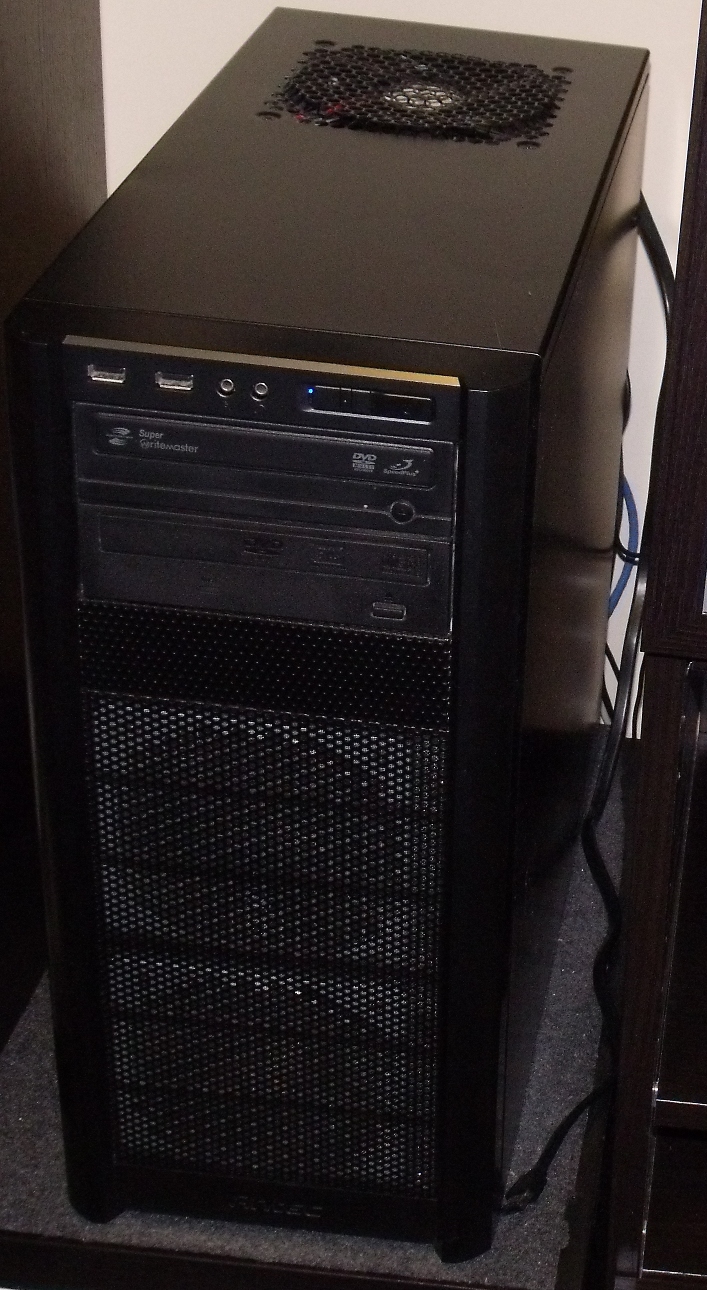
The current iteration, pictured left, is an Antec Three Hundred Mid Tower Case. This model is rather unique in that the power supply is at the bottom of the case, as opposed to the top. It was the first tower we ever had with that configuration. As you can see in the picture, there is space for 2 120mm fans in the front, right in front of the hard drive bays, and there is a washable filter in front of them. The top has a 140mm fan. and the back another 120mm fan. We used the quietest fans we could, but it can be heard as a low hum in the room. There is room for a side exhaust fan, which was have not installed.

There have been several generations of interior boards since the beginning. The current is an Asus board. The thing runs 24 hours a day, so we opted for one which, according to reviews, had high quality capacitors and good build quality. The computer runs headless, so we opted for a board with an onboard graphics card. There was no need for a discrete one when it was never used.

The processor is an AMD Athlon 64 X2 5600+. At the time of purchase, it was the highest speed AMD processor we could get that used 65W of power. Everything else used 95W or above. For our next generation, we are considering going to a higher speed, but low power Intel processor, but we’ll see where the market is when we decide for replacement.

A powerful processor is not inherently necessary for a MythTV backend. If you have a video encoding device that does its own encoding with significant use of the CPU, you could run the thing off of a low-power processor. But if you want to transcode some of your files into a smaller format for long-term storage, it helps to have something that can handle the extra load.

The system has 8GB of RAM, which is overkill, but the RAM was relatively cheap, and easier to install than the processor. Then we get to the hard drives. There are two 500GB drives in a mirroring RAID. So, in the event of failure, the system can go on. Only a small amount of the space is needed for the operating system and the MythTV database. The rest stores important data, our music collection, and any long-term video files.

To store active uncompressed recordings, we are currently taking advantage of MythTV’s storage group function. It distributes the recordings between two Green drives. These drives spin at 5400RPM and are supposed to be more power efficient. One is a WD 1TB and the other a Samsung 1.5TB. Because of the design of MythTV’s storage groups, files can be moved between any of the directories named in the storage group without pausing the server.

This means if one of the drives shows pre-failure, which we recently had, we can move the files to the other drive and take one of them out of commission. We also ensured that the system has an ESATA connector, which would allow us to plug in an external drive and add it to the storage group to keep the system running if we need the extra space.

The computer has two optical drives, and this was originally planned to allow for having one drive used to burn a rewriteable DVD on a time schedule, which would be rotated manually out of the system and placed in backup. That never happened, and at some point in the future, one of them will be replaced by a blu-ray burner, to allow for larger optical backups.

Support for firewire channel changing is what convinced us to dive in fully into MythTV. Originally, the output of the cable box fed into a PVR-150 capture card. Then, firewire recording became more reliable, so the PVR-150 was mostly retired. Finally, when the cable company changed its software and both capture and channel changing became unreliable, we switched to the tried and true infrared channel changing and high-definition capture using the Hauppauge HD-PVR box.

As having only one cable box and HD-PVR would mean we couldn’t resolve any conflicts, we have a Silicondust HDHomerun hooked directly into the cable lines, tuning any unencrypted channels, which are mostly local and public access stations. And, in the event cable goes down entirely, we hooked a line to the old roof antenna, disused for over a decade, and hooked it into an inexpensive card that could tune Over-the-Air digital. Digital Broadcast is often higher quality than the same channel over the cable lines, due to compression, so if you are an HD purest, you probably want to try to supplement your cable with digital broadcast.

The backend, as referenced before, also downloads video programming via MiroBridge and integrates it into the recording menus. This may change as time passes. Speaking of software, our system runs a non-graphical installation of the latest edition of Fedora, currently 12. We periodically update the system after a new release of Fedora has been released long enough for us to feel comfortable upgrading.

We upgrade by making a backup, then moving all the data from the RAID to the recording drives, wiping the RAID drives, installing the new OS, and moving the data back. The whole process takes a few hours, and most of it is waiting for the installation or copy to complete. Most configuration is already setup and just needs to be restored.

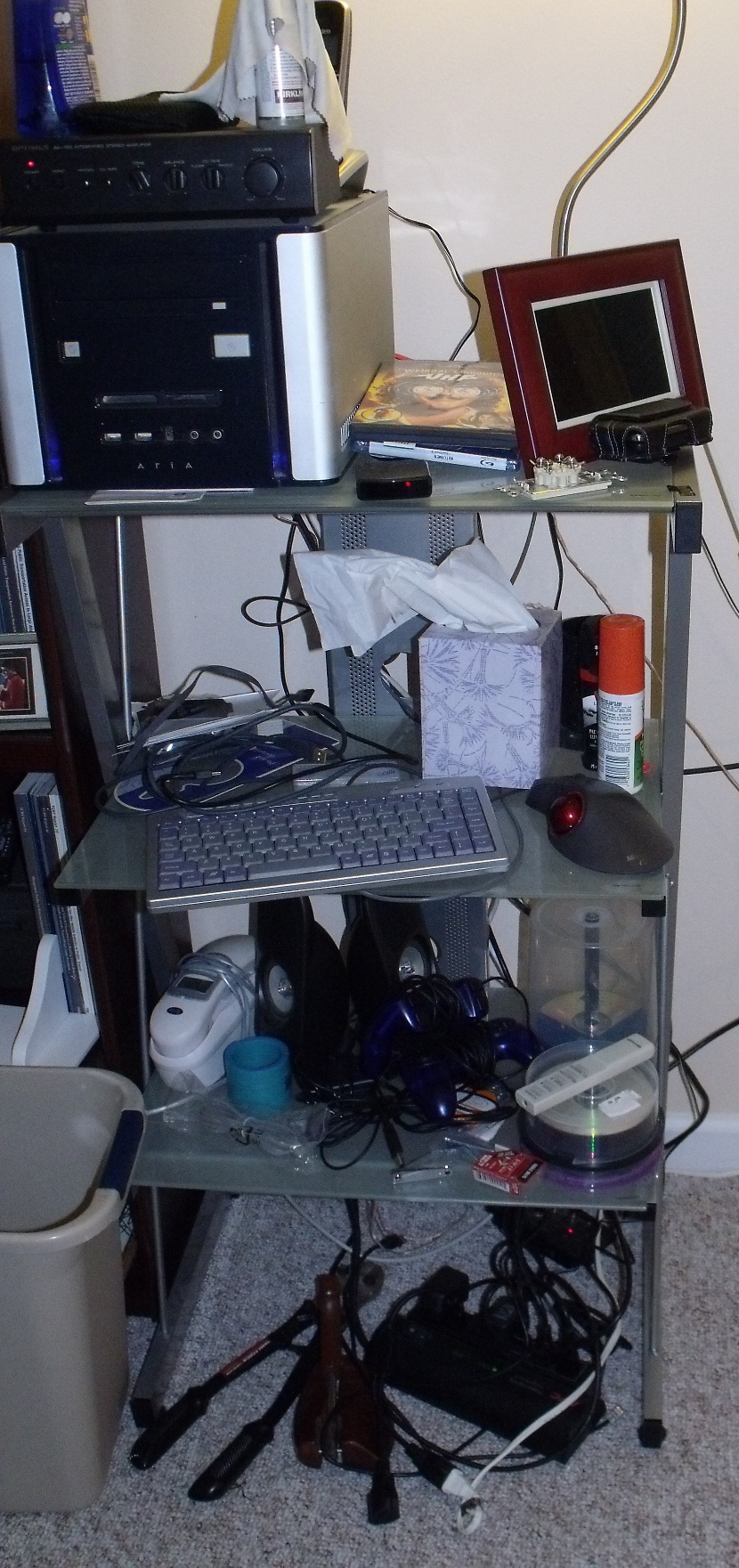
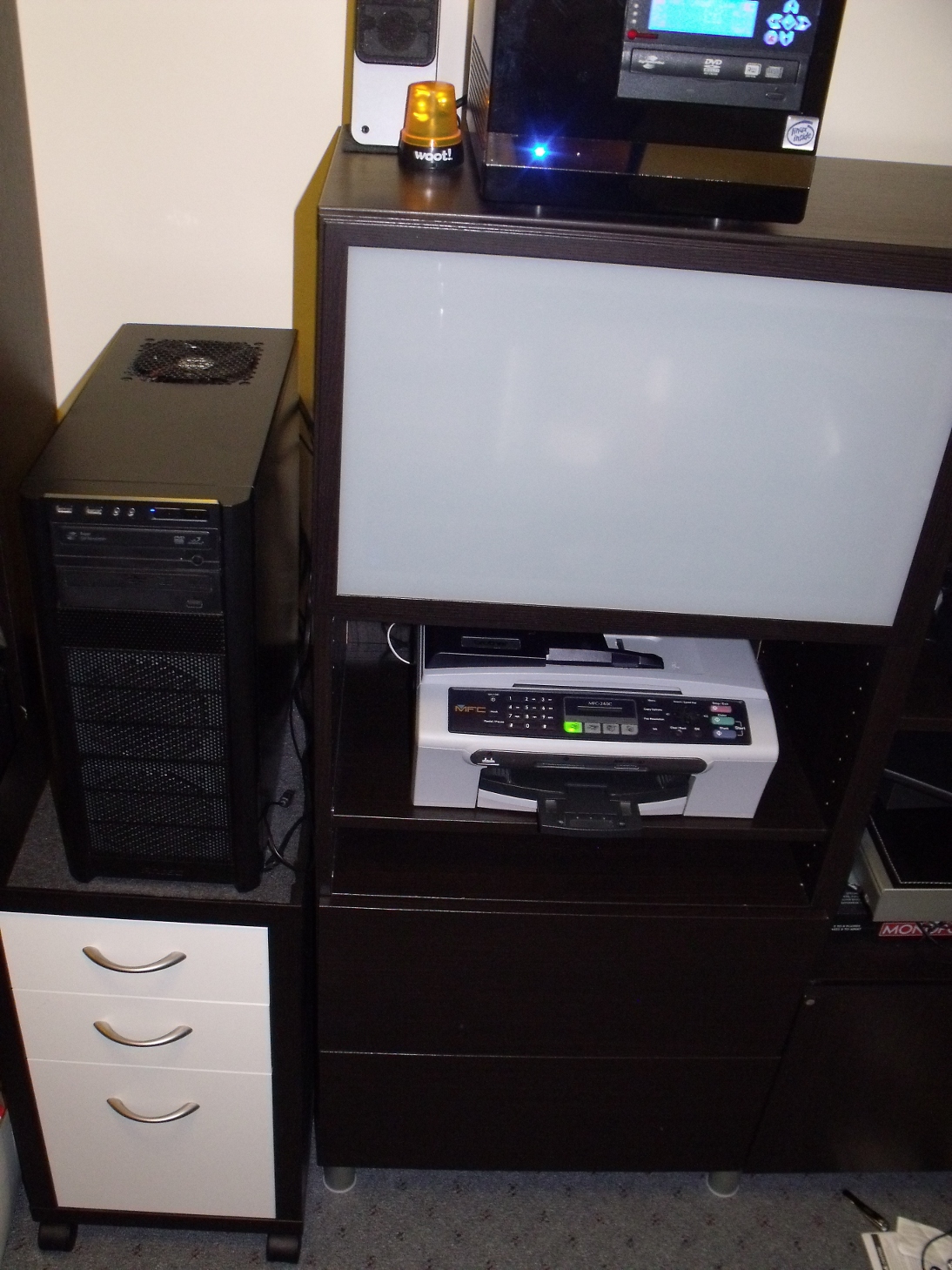
Here’s a wider shot of the system. Last year, we redecorated the room in early Ikea. The backend, codenamed Freshpond, sits on a rolling file cabinet called a Mikael. There is a sound baffling like material under it to prevent scratching, which is a cut piece of Ikea drawer liner. One of these days we may switch to a desk blotter or such for aesthetic reasons. There are both pros and cons to having the system off the ground. Next to it, you can see a printer and one of the two MythTV frontends currently operating. Behind that glass door is the HD-PVR and the cable box.

More on the first frontend, seen in the picture, in Part 2.

Like many, we constantly think about refinements to the system to improve it. Sometimes this is new hardware, sometimes consolidating redundant systems, and sometimes software improvements. For example, in addition to the once hourly check for new internet video from the RSS feeds we monitor to import, a separate job also searches for audio podcasts we have told it to monitor and downloads them.

Ultimately, like any hobby, maintaining the system takes on a passion. But for those of you looking to build a system, it really doesn’t take that much day to day effort and the basic setup is simple. More advance concepts…well, you can always ask someone who has done it. Like us, for example. Comments welcome.

Published on February 16, 2010
Full Post
2 Responses

Bad Luck Comes in Threes – Detecting Hardware Failure

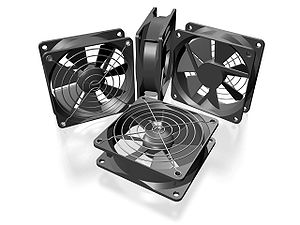
A set of 4 industry standard 80mm fans, most c...
Image via Wikipedia

It would be very easy if we could blame Geektonic for this. After he featured a MythTV system, we agreed to offer him a profile of our primary MythTV setup. It seemed like a good time to dust the system both inside and out, in preparation for some fresh photos.

We have a dedicated MythTV backend which doubles as a file server. We exercise basic power saving functions on it, including CPU frequency scaling. We discovered some hardware problems during the cleaning process.

There was an odd grinding noise that gradually appeared. Originally, we attributed it to a cable hitting against one of the case fans, but there was no such cable. We used velcro cable ties to bundle our cables together just in case. The server scales the CPU to its normal specs only when it is under load. We’d been having crashes whenever we tried any video transcoding. Finally, we tied these two problems we thought unrelated together. The fan was failing, and could handle cooling, but not when the computer went full throttle, during which it gradually overheated till the built-in BIOS shutdown temperature is reached.

So we ran to the store the next day, bought a new CPU fan, and replaced ours. We’re always nervous about pulling off a long-running CPU fan, as the thermal paste used between the heatsink and the processor can tend to act, as the name paste implies, as a bond that could cause damage if you are not very careful in pulling it up. But there were no problems, and the CPU temperatures returned to normal.

Then, today, half a week later, we received notification of prefailure on one of the drives. As we speak, we’re moving data off of it. It will be removed, lashed to a different system, and a manufacturer low-level test mechanism used to check the drive. Either way, it is still under warranty and could be exchanged for replacement by the manufacturer.

It is said bad luck comes in threes, so we thought this was a perfect time to discuss how you can monitor and protect yourself from hardware failure. We’ll focus on these techniques for Linux users, but the idea applies to all systems.

  • S.M.A.R.T.(Self Monitoring, Analysis, and Reporting Tool) -  A system built into every hard drive that monitors several variables to predict drive failure before it happens.
  • Temperature/Fan – There are temperature and fan speed sensors in motherboards that permit monitoring of computers for overheating.

Here are, in our opinion, two very important things you need to enable if you are going to protect your computer. But should be enabled in the motherboard BIOS to start. If your BIOS has a shutdown temperature option, that if reached, will turn the computer off…enable it. Enable SMART reporting as well.

Smartmontools is available in all Linux distributions. Make sure it, or another SMART monitoring tool is enabled and configured to send you an alert if it detects anything. Smartmontools on one of our systems was configured to send an email to the root email account, which was local to the system, and rarely used. Make sure it is sent somewhere you will see it.

For temperature and fans, the standard is LM_Sensors, which may tae some tweaing. Check your estimated CPU temperature in BIOS, then boot and compare it to the one in lm_sensors. If they don’t match, you may need to tweak your settings. Make sure this also generates an alert when it reaches a threshold so you can take action.

We’re a bit mystified as to why features like this aren’t built into Windows, but many manufacturers do offer their own monitoring utilities you can install to monitor vitals. Either way, by setting up your computer early on monitor for these things, you can head off some catastrophic failure. Barring that…backup often.

Published on February 7, 2010
Full Post
1 Response

The iPad…You Can Do Better

SAN FRANCISCO - JANUARY 27:  Apple Inc. CEO St...
Image by Getty Images via Daylife

If you’ve read this blog before, you know we have some very legitimate issues with Apple products, while accepting that they have some useful and popular designs.

The iPad is essentially a giant iPod Touch, with a 10 inch screen, and the ability to run iPhone applications. There are criticisms, many of which are legitimate, but like many things, many wlll accept it because they’ve drank the Apple koolaid and because it has those good features.

Some think it may challenge the Kindle, but while the Kindle certainly has its problems, the iPad uses a conventional LCD screen, which may create readability issues for some over high-contrast E-ink screen of a Kindle or any of its current challengers. As part of the launch, Apple will launch iBook, their own online book store. We look forward to seeing how this plays out.

Can the downsides, and Apple’s unwillingness to respond to public feature requests be overcome by the fact that it is a cool giant iPod Touch with a new E-book service? We’ll wait and see.

Published on January 28, 2010
Full Post
3 Responses

MythTV Rigs

Recently, Geektonic featured a showcase of a MythTV setup. It has inspired us to break out the camera and take some pictures of our own equipment. You’ve already seen some screenshots from our MythTV setup, but coming soon, we’ll be offering some shots and specs on our current equipment setup, as soon as we clean it up.

In the meantime, check out Rothgar’s MythTV setup, courtesy of Geektonic.

Published on January 27, 2010
Full Post
0 Responses

Review: The Sansa Clip Plus

Sansa Clip+ Front
Image by Touzeen Hussain via Flickr

[asa]B002MAPRYU[/asa]

We love the Sansa Clip. We bought a 1GB Clip refurbished a while back, and it replaced a slightly more sophisticated player with video playback capabilities. Sometimes, simplicity is more useful. Now, we’ve replaced our 1GB Sansa Clip with a new Sansa Clip Plus(or Clip+).

The Plus offers a slightly sturdier construction, the buttons have been reorganized, and one big new feature…a microSDHC slot for expansion. It also contains the features that we loved about the Clip.

  • It can play FLAC and OGG files.
  • It has good Podcast and Audiobook support.
  • The sound quality is good.
  • It is REALLY small
  • It has a screen, something the Shuffle lacks
  • It has a built in FM radio

We commented on the Clip+ when it first came out. Sandisk advertises the expansion slot as a slotMusic slot. slotMusic and slotRadio were Sandisk’s attempt at selling preloaded microSD cards, which we still insist, on the face of it, is not a bad idea, but never took off. Sandisk’s implementation was not quite what we thought would work. We’d like to see an on-demand kiosk that would allow you to buy files, load them onto the little card, and that could be available in airports and music stores.

That aside, the Clip form factor is the perfect size for sticking into a bag. Everyone we’ve shown it to, even iPod lovers, have agreed that if you are looking for a simple, utilitarian, good quality music player, the Clip is superior to the iPod shuffle and to many other players on the market in similiar price ranges. For those who are Linux users, or like a simple interface, the Clip offers easy loading of new music by copying it over a USB cable. The jack built-in is a standard Mini-USB jack, as opposed to any proprietary plug.

It relies on ID3 tagging to allow you to browse for files to play, but offers Playlist(created on your computer not the device, although this may change), and an folder browse mode to allow you to select by the directories you have put on the device. When we bought it, there was already a new firmware we could load on, which gives us hope Sandisk will continue to maintain it. AnythinButiPod has a list of possible firmware improvements.

They also show how you can get a microSD to SD converter to, with a corresponding increase in size, get cheaper SD as opposed to microSD memory for the Clip.

Elsewhere, the Clip V1 has unstable support for the Rockbox alternative music firmware and other versions may come someday.

The only complaint we could see having about it is that it is so small, it is easy to lose. We’ve narrowly avoided misplacing it a few times for that reason. But a device being too portable is the sort of complaint we can live with.

Update: There is a newer version of the Sansa Clip, called the Sansa Clip Zip. Have not tried it, but the link appears below.

[asa]B005FVNGRS[/asa]

Published on January 24, 2010
Full Post
1 Response

Musings on Theme Park Technology

http://www.youtube.com/watch?v=KKz6qdexetY

The Carousel of Progress was created by Disney for the 1964 World’s Fair. It features an animatronic show that shows how the American home has changed over four scenes, the turn of the 20th century, the 20s, the 40s, and finally, the most updated piece…the future. Right now the future was determined in 1994.

In a recent trip to Disney World, surprising as it may seem, the Carousel of Progress, despite its lack of popularity, ranked as one of the more interesting rides. Sometimes, simplicity really does just work. But we want more.

In the Twilight Zone Tower of Terror, the ride uses a randomized pattern of movements so the ride is not identical each time. Why can’t all rides be different every time we go through them? Epcot‘s Mission: Space offers a more mild version of the ride for people prone to motion-sickness. Why not ten different versions they can rotate through? Even if it doesn’t change for each passenger, the recordings could change once a day, or once an hour.

Systems like this, ones that adapt and offer a variety of options, are present in computer gaming and a variety of other fields. What do you think? What is the future of theme parks?

Published on January 17, 2010
Full Post

Get New Posts By Email