
I debated a variety of different system configurations and decided I wasn’t going to have my NAS also handle other server duties. It’s primary job would be to run applications. I have a server for that. I just want to run functionality related to file serving, and TrueNAS offers most of that out of the box…although there are more decisions to be made. It isn’t a pure drop in replacement.
So, I settled on the N100 series of CPU processors. Generally available, reasonably priced, and more than enough power for what I wanted. Looking around, that meant I needed to pick a case, a motherboard, etc. While looking, I stumbled across a product just launching, from Hardkernel, who makes the Odroid line of products, which are single board computers. I’d rejected single board, wanting a x86 compatible processor, but the newly launched H4 series is just that.
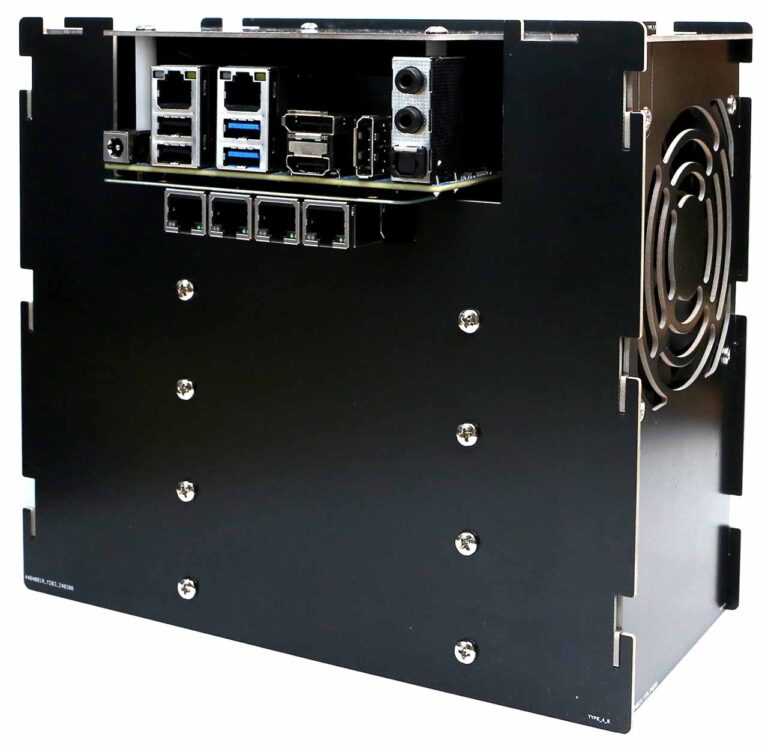 There are three models, the H4, H4+, and H4 Ultra. The H4 and H4+ use the N97 processor, and the Ultra ups that to an i3 N305. The basic difference between the H4 and the H4+ for me is that is offers 4 SATA ports. The power profile of this thing is perfect for a headless server. They offer a mini-ITX conversion kit, but they also offer 4 different designs of metal cases you can buy, and DC adapters to power them. Case Type 4 allows for 4 SATA hard drives, a fan, and the board. It is essentially 4 cut pieces of metal you can assemble, as well as screws and a fan. The picture in this post is courtesy of their site.
It doesn’t look like a normal NAS, or a computer…it looks like an appliance, which is what I want. I sourced the equipment through Ameridroid, who is the O-droid provider in the US and who I have dealt with minimally before. This included ordering the type 4 case, the board, and the power adapter. That ran me a little over $200.
It also limits me. If I install the operating system on an NVME SSD, plus the 4 SATA drives, I can’t grow the system with additional drives. Any changes become a drive replacement, or a system replacement. But I’ve stuck with only 4 drives up until now in my commercial unit, and even in the home built ones I’ve had in the past. It allows me to have a good mix of redundancy and performance.
Redundancy in the same system is not the same as a backup though. I will be talking more about that as I learn about the options TrueNAS offers, and will talk a little about my backup strategy in future.
We’ll see what happens when the board comes and if I made the right decision.


When things go wrong, I admit to a certain amount of anxiety about whether or not things will turn out well. I was so excited…
In a previous post, I was excited about the arrival of the ODroid H4+. Then I got a bit nervous because of broken SATA connector…