
Unfortunately, UPS shopping gets weird quickly. Some models are meant for routers and modems. Some are better for desktops. Some are designed for active PFC power supplies. Some can tell a NAS or home server to shut down cleanly. Some have replaceable batteries. Some are basically disposable power strips with a battery inside.
The right UPS depends less on the brand name and more on what you are trying to protect.
People buying power strips don’t think that much about them. But not only are UPSes designed to protect your devices, they are designed to keep them running during a power outage. How do you pick the right combination of features and price? In a previous post, I talked about how a problem with my UPS could have caused disaster.
Quick Answer: What UPS Features Actually Matter?
The most important UPS features are enough battery capacity for your load, automatic voltage regulation, replaceable batteries, surge protection, and a USB or network data connection if you need a computer, NAS, or home server to shut down cleanly. For modern desktop PCs and some servers, you may also want a UPS designed for active PFC power supplies.
| Feature | Why It Matters | Who Needs It Most |
|---|---|---|
| Enough VA/watt capacity | The UPS has to handle the devices plugged into it | Everyone |
| Automatic Voltage Regulation | Helps smooth brownouts and voltage dips without switching to battery | Areas with unstable power |
| Replaceable battery | Lets you replace the battery instead of throwing out the UPS | Anyone keeping a UPS for years |
| USB/data port | Allows clean shutdown for a NAS, desktop, or home server | NAS, homelab, desktop PC users |
| Active PFC compatibility | Helps avoid problems with modern PC/server power supplies | Desktops, workstations, some servers |
| LCD/status display | Shows load, runtime, voltage, and battery condition | Useful, not always essential |
APC vs. CyberPower: Which UPS Brand Should You Choose?
APC and CyberPower are the two consumer UPS brands most people run into first. I have used both. Neither is perfect, and I would not make the decision on brand alone.
For basic protection, either brand can be a big improvement over plugging important equipment straight into the wall. The better question is whether the specific model has the features your setup needs: enough capacity, replaceable battery, USB shutdown support, AVR, and the right waveform/PFC support for the devices you are protecting.
In recent years, I have mostly bought CyberPower units because the feature mix has worked well for my networking equipment and homelab gear. That does not mean every CyberPower model is the right model, or that APC is wrong. It means you should compare the actual unit, not just the logo.
AVR, PFC, and Cleaner Power: What These UPS Features Mean
The UPS feature list can look like alphabet soup, but a few features are worth understanding.
- AVR, or Automatic Voltage Regulation: AVR helps correct voltage dips or surges without immediately switching to battery. That can matter if your power flickers, sags, or runs a little unstable.
- PFC, or Power Factor Correction: Many modern computer power supplies use active PFC. If you are protecting a desktop PC, workstation, or server, make sure the UPS is compatible with that kind of load.
- USB or data port: This lets a NAS, desktop, or home server know when the UPS is on battery so it can shut down safely before the battery dies.
- Replaceable battery: UPS batteries wear out. If the battery cannot be replaced, the whole unit becomes a future e-waste project.
- LCD/status display: Not essential, but useful for seeing load, runtime, battery condition, and voltage at a glance.
Choose the UPS Based on What You Are Protecting
A router, a NAS, and a desktop gaming PC do not need the same UPS.
| Use Case | What Matters Most | What I’d Prioritize |
|---|---|---|
| Router and modem | Long runtime at low power draw | Efficient UPS, enough outlets, simple status monitoring |
| NAS | Clean shutdown and uptime during short outages | USB data connection, replaceable battery, enough runtime |
| Home server | Graceful shutdown and stable power | USB/network shutdown, AVR, PFC compatibility |
| Desktop PC | Avoid sudden shutdowns | Enough watt capacity, PFC compatibility, AVR |
| Security or smart-home gear | Keeping monitoring online | Runtime, router/modem backup, simple alerts |
If your goal is mainly to keep the internet online during an outage, see my more specific guide to the best UPS for router and modem backup.
UPS Models I’d Consider
For a fuller-featured CyberPower unit, I would look at the CyberPower CP1000PFCLED or a similar model in that family. The reason to choose this tier is not just bigger battery capacity. It is the feature set: AVR, active PFC support, replaceable battery, data port, and LCD status display.
That kind of UPS makes more sense for a desktop, homelab server, NAS setup, or anything where a clean shutdown matters.
For lighter networking gear, the CyberPower EC650LCD can make more sense. It still has useful features like an LCD screen, replaceable battery, and data port, but it is better suited to lower-power equipment such as networking devices, small accessories, or a simpler monitoring setup.
I use the less expensive model for some of my networking equipment and the fuller-featured one for my homelab server. That split is the real lesson: do not buy one UPS model for every job just because it is familiar.
My Minimum UPS Requirements
For anything I expect to keep using for years, I want at least two things:
- A replaceable battery: UPS batteries are consumables. If the battery cannot be replaced, the UPS has a built-in expiration date.
- A data port: If the UPS is protecting a computer, NAS, or server, it should be able to tell that device when it is running on battery so the system can shut down cleanly.
For simple router/modem backup, the data port may matter less. For a NAS or home server, it matters a lot.
AVR and PFC support are not always mandatory, but they become much more important as the equipment gets more expensive or sensitive.
UPS Backup For Home Monitoring Systems
If you are using smart-home gear to monitor a second home, vacation home, cameras, leak sensors, or smoke/CO alerts, the router and modem become part of the safety system. If the network dies, the alerts may stop reaching you.
That does not mean every sensor needs a huge UPS. It does mean your modem, router, network switch, and possibly your camera/NVR setup deserve backup power.
For the broader monitoring setup, see my guide to vacation home remote monitoring.
Choosing the Right UPS
A UPS is not just a bigger power strip. It is part battery, part surge protector, part power conditioner, and sometimes part shutdown controller.
The right choice depends on what you are protecting. A router needs runtime. A NAS needs clean shutdown. A desktop needs enough capacity and PFC compatibility. A home monitoring setup needs the network to stay online long enough to send alerts.
Buy for the job, not just the brand.





 .
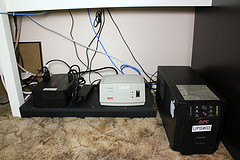
. . There are several variations that offer different numbers of outlets and/or coaxial or modem surge protection. One of the most useful options on this surge strip is a adjustment knob to adjust the master outlet’s sensitivity. The APC UPS also has three adjustment settings.
 . It is that adjustment knob we missed. On the system we tried to put it on, it didn’t accurately detect the turning on of our low-energy thin-client PC. Of course, it may not have been designed for low-power systems, and lacks the adjustment knob of the Smart Strips.
 . Sounds good in theory. A surge protector you conceal with a wireless remote to allow you to turn things on. There are also all manner of surge protectors that hide the wiring.
![Reblog this post [with Zemanta]](http://img.zemanta.com/reblog_e.png?x-id=53272885-609e-4b55-8e8b-d3a8279f7f44)