
That is changing.
2.5GbE ports are now showing up on NAS devices, desktop motherboards, mini PCs, Wi-Fi access points and routers. If you have bought relatively recent networking or home-lab hardware, there is a decent chance you already own equipment capable of running faster than 1Gbps.
The switch in the middle may be the thing holding everything back.
For many home networks, 2.5GbE is now the sensible upgrade. It can run over existing Cat5e cabling in many installations, is substantially cheaper and easier to deploy than an all-10GbE network, and is fast enough to make a noticeable difference when moving large files to and from a NAS. There are very few places within a home where you might need 10GbE right now.
I would not overcomplicate the switch purchase.
For most homes, I would choose among three basic configurations:
- Five 2.5GbE ports: inexpensive and enough for a small multi-gig network.
- Eight 2.5GbE ports: better if you know five ports will disappear quickly.
- 2.5GbE ports plus a 10GbE uplink: the more interesting architecture if your NAS or network backbone can run at 10Gbps.
My 2.5GbE Switch Picks
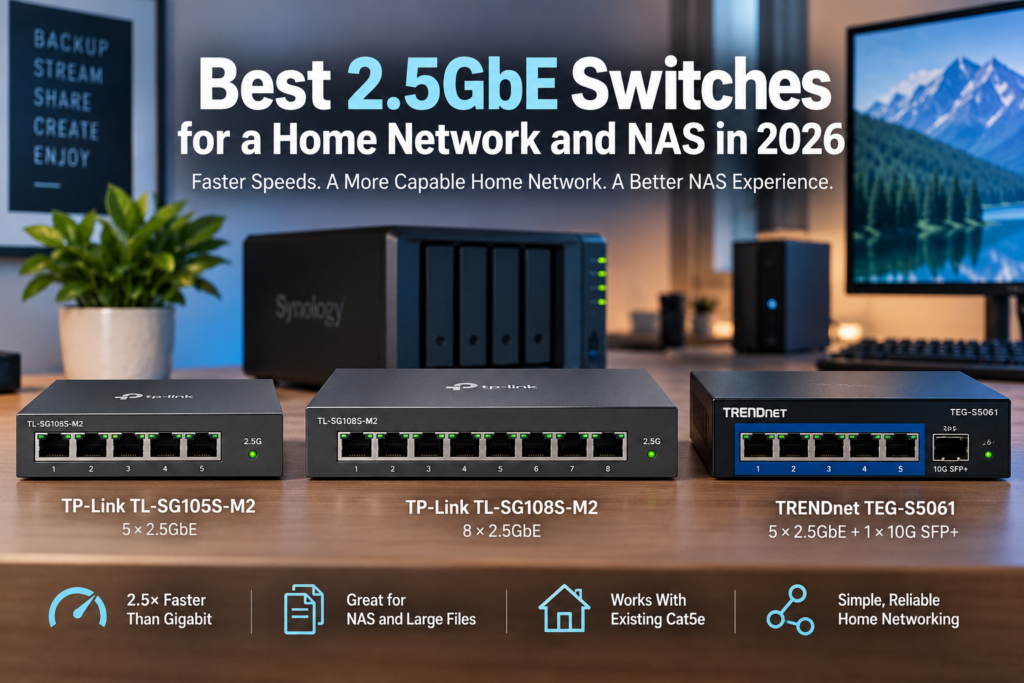
| Switch | Ports | Best For |
|---|---|---|
| TP-Link TL-SG105S-M2 | 5 × 2.5GbE | Small, simple 2.5G upgrade |
| TP-Link TL-SG108S-M2 | 8 × 2.5GbE | Larger home networks |
| TRENDnet TEG-S5061 | 5 × 2.5GbE + 1 × 10G SFP+ | 2.5G clients with a 10G NAS or backbone |
All three are unmanaged and fanless. If you simply want faster Ethernet without configuring VLANs, management interfaces or enterprise networking features, that is a feature rather than a deficiency.
Best Simple 2.5GbE Switch: TP-Link TL-SG105S-M2
If you only need a few multi-gigabit connections, I would start with the TP-Link TL-SG105S-M2.
It provides five RJ-45 Ethernet ports, each capable of negotiating at:
- 100Mbps;
- 1Gbps;
- or 2.5Gbps.
TP-Link rates the switch for 25Gbps of switching capacity, which is enough to run all five 2.5GbE ports at full duplex without deliberately creating an internal switch bottleneck.
It is also fanless.
That is something I care about for home networking hardware. A switch that sits in an office, bedroom, basement rack or networking closet should not add another tiny fan that eventually becomes the loudest thing in the room.
Check the TP-Link TL-SG105S-M2 on Amazon
I would buy this one if: you have a 2.5GbE NAS, desktop and router and simply need to connect them without rebuilding the entire network.
The Problem With Five Ports
Five ports sounds like plenty until you start using them.
Imagine:
- one port to the router;
- one to the NAS;
- one to your desktop;
- one to a Wi-Fi access point;
- one to a second desktop or server.
You are done.
If you are already wondering what will occupy port six, buy the eight-port model instead.
Best 8-Port 2.5GbE Switch: TP-Link TL-SG108S-M2
The TP-Link TL-SG108S-M2 follows the same basic idea but gives you eight 2.5GbE RJ-45 ports.
TP-Link specifies:
- 8 × 100Mbps/1Gbps/2.5Gbps Ethernet ports;
- 40Gbps switching capacity;
- fanless operation;
- support for jumbo frames;
- and a compact unmanaged design.
Check the TP-Link TL-SG108S-M2 on Amazon
This is probably the better default purchase if the price difference from the five-port version is reasonable.
Network ports have a tendency to get used.
An eight-port switch gives you room for:
- a router;
- NAS;
- two desktops;
- home server;
- Wi-Fi access point;
- mini PC;
- and another switch or device;
without immediately reaching for another switch.
I would buy this one if: you want a straightforward 2.5GbE network and expect to connect more than three or four multi-gig devices.
Best 2.5GbE Switch With a 10G Uplink: TRENDnet TEG-S5061
The TRENDnet TEG-S5061 is the most interesting of these three switches.
It has:
- 5 × 2.5GBASE-T RJ-45 ports;
- 1 × 10G SFP+ port;
- 45Gbps switching capacity;
- fanless operation;
- and support for Cat5e or better cabling on the 2.5GbE ports.
Check the TRENDnet TEG-S5061 on Amazon
The 10G SFP+ port changes what you can do with it.
You can run ordinary computers and other devices at 2.5Gbps while giving the switch a much faster connection to:
- a 10GbE NAS;
- a larger core switch;
- a server;
- or another part of the network.
This hybrid approach makes a lot of sense to me.
Why Have a 10G Port on a 2.5G Switch?
Suppose you have four computers connected at 2.5Gbps and all of them access the same NAS.
If the NAS is also connected at 2.5Gbps, those computers are all sharing one 2.5Gbps path to the storage.
The NAS connection becomes the bottleneck.
Give the NAS a 10Gbps connection instead, and several 2.5GbE clients can transfer data simultaneously without immediately saturating that single upstream link.
This is one of the reasons I like a mixed network:
2.5GbE where it is cheap and convenient, 10GbE where aggregated traffic actually justifies it.
You do not need a 10GbE port on every television, printer and desktop simply because your NAS can move data quickly.
The other place a 10GbE port can make sense is in between switches as the backbone of your home. Sometimes, spending a little more on the connections between switches, where the individual devices branch off, can have a benefit to the overall stability of the network.
Our 2.5GbE vs. 10GbE home-network guide goes into that tradeoff in more detail.
2.5GbE Is Much Faster Than Gigabit for a NAS
A 1Gbps Ethernet connection has a raw theoretical limit of 125 megabytes per second.
Real file transfers are somewhat lower after protocol overhead and other limitations.
A 2.5Gbps connection raises the raw theoretical ceiling to 312.5 megabytes per second.
That is enough to make a significant difference when:
- backing up a computer;
- moving video files;
- working directly from NAS storage;
- copying large disk images;
- or transferring large collections of photos.
A modern NAS with multiple hard drives or SSD storage can often exceed Gigabit Ethernet speeds without much difficulty.
If you recently bought one of the newer 2.5GbE-equipped NAS systems, leaving it connected to a 1Gbps switch can mean you are using only part of the networking capability you paid for.
See our best NAS for home use guide if you are building the storage side of the network too.
Do You Need 10GbE Instead?
Maybe, but I would not assume so.
10GbE is wonderful when you actually have hardware capable of feeding it.
It makes sense for:
- fast SSD-based storage;
- large NAS arrays;
- video-production workstations;
- servers moving lots of data;
- and network backbones carrying traffic from multiple clients.
But an all-10G network costs more.
10GbE equipment can also consume more power and generate more heat, and some 10G switches require fans.
For a desktop that browses the web, streams video and occasionally accesses a NAS, 2.5GbE is already considerable bandwidth.
I would put 10G where it removes a real bottleneck instead of chasing a larger number on every port.
Will 2.5GbE Work Over Existing Cat5e Cable?
Often, yes.
One of the main attractions of 2.5GBASE-T is that it was designed to provide multi-gigabit networking over existing copper cabling.
Both TP-Link and TRENDnet specify Cat5e or better for 2.5GbE operation on these switches.
That makes 2.5GbE particularly attractive in a house where Cat5e is already installed inside walls.
You may be able to upgrade:
- the switch;
- network adapters;
- and perhaps the router;
without pulling new cable through the building.
Actual performance still depends on cable quality, termination, distance and the condition of the installation.
Do You Need Cat6 for 2.5GbE?
No, not necessarily.
Cat6 is certainly fine, but properly installed Cat5e is specified for 2.5GBASE-T.
I would not replace functioning in-wall Cat5e simply because you want to move from 1Gbps to 2.5Gbps.
Try the existing wiring first. However, if you are installing new wire, you do want to go for Cat 6 at minimum. Outside of the wall, you may want to identify older cables and replace them during other work.
What About 5GbE?
5GbE exists and can be useful, but the home-networking market has largely made 2.5GbE the more common inexpensive step above Gigabit.
A lot of current consumer hardware arrives with:
- 1GbE;
- 2.5GbE;
- or 10GbE.
That makes a 2.5G-access/10G-backbone design particularly convenient.
Unmanaged vs. Managed 2.5GbE Switches
All three switches here are unmanaged.
You connect the cables and they switch Ethernet traffic.
There is no web management interface to configure.
For many homes, that is exactly what I want.
A managed switch becomes worthwhile if you need features such as:
- VLANs;
- more detailed traffic control;
- link aggregation;
- port monitoring;
- more sophisticated QoS;
- or a managed home-lab environment.
If none of those phrases describes something you were already planning to use, I would hesitate to pay extra simply because “managed” sounds more capable.
Do You Need PoE?
None of these three switches is a PoE switch.
That is perfectly fine for:
- desktops;
- NAS devices;
- servers;
- routers;
- and other equipment with its own power supply.
PoE becomes important when the Ethernet cable also needs to power something such as:
- a Wi-Fi access point;
- security camera;
- VoIP phone;
- or another powered network device.
If you plan to deploy several Wi-Fi 6E or Wi-Fi 7 access points with 2.5GbE interfaces, a 2.5GbE PoE switch may be a better purchase than one of the switches on this list. Depending on what you are powering with it, you may wire a section of your network with less expensive Gigabit POE. For example, security cameras are commonly powered by POE, but rarely support more than gigabit ethernet. I have a newer access point that does have a 2.5GbE port, but older ones did not. Consider the benefits here as well. You have to assess what is best for your needs.
You can also use a separate PoE injector for an occasional device, closer to the end of the drop.
Fanless Matters More Than It Sounds
All three of these switches are fanless.
I strongly prefer that in a home environment when the hardware can operate reliably without active cooling.
A switch may stay powered on for years.
A small inexpensive fan can:
- collect dust;
- develop bearing noise;
- become annoying in a quiet room;
- and eventually fail.
A silent switch in the networking closet is easy to forget about.
Networking hardware should aspire to being forgotten.
What About Jumbo Frames?
Jumbo frames can reduce packet-processing overhead in some high-speed LAN workloads, particularly large sequential transfers to a NAS.
They are not required to get useful 2.5GbE performance.
If you decide to use jumbo frames, configure the network carefully. Every relevant device along the path needs compatible settings.
I would much rather have a stable network using standard Ethernet frames than spend an afternoon debugging one device that does not agree with everyone else’s MTU.
How I Would Build a Small 2.5GbE Home Network
For a simple setup:
- 2.5GbE router;
- TP-Link TL-SG105S-M2;
- 2.5GbE NAS;
- 2.5GbE desktop;
- 2.5GbE access point;
- and one spare port.
That gives you a substantial improvement over Gigabit Ethernet without turning networking into a hobby.
How I Would Build a Larger 2.5GbE Home Network
Once you have multiple wired rooms or several computers:
- 2.5GbE router;
- TP-Link TL-SG108S-M2;
- NAS;
- multiple desktops;
- server;
- access point;
- and spare capacity.
The eight-port switch simply gives you more breathing room.
How I Would Build a 2.5G Network Around a 10G NAS
This is where the TRENDnet becomes attractive.
I would connect:
- ordinary workstations to the five 2.5GbE ports;
- the NAS or core network through the 10G SFP+ port;
- and allow multiple 2.5G clients to share the faster upstream connection.
The SFP+ port requires an appropriate SFP+ connection, such as a compatible DAC cable or transceiver setup.
For a rack, server or NAS that already has SFP+, this can be a very economical architecture.
Which 2.5GbE Switch Should You Buy?
Buy the TP-Link TL-SG105S-M2 if:
- you need only a handful of 2.5G ports;
- you want something simple;
- your NAS is 2.5GbE;
- and you do not need a 10G backbone.
See the TP-Link TL-SG105S-M2 on Amazon
Buy the TP-Link TL-SG108S-M2 if:
- five ports already sounds limiting;
- you have several wired rooms or computers;
- you want eight 2.5GbE ports without management complexity;
- and you do not need 10GbE on this switch.
See the TP-Link TL-SG108S-M2 on Amazon
Buy the TRENDnet TEG-S5061 if:
- your clients mostly use 2.5GbE;
- your NAS, server or backbone can use 10GbE;
- you want to avoid bottlenecking several 2.5G clients behind a single 2.5G uplink;
- and an SFP+ connection fits your network.
See the TRENDnet TEG-S5061 on Amazon
Frequently Asked Questions
Is a 2.5GbE switch worth it?
If you have multiple devices with 2.5GbE ports—especially a NAS and desktop—the upgrade can be very worthwhile. The theoretical bandwidth is 2.5 times that of Gigabit Ethernet, while 2.5GBASE-T can often use existing Cat5e cabling.
Will a Gigabit device work on a 2.5GbE switch?
Yes. These switches auto-negotiate with slower Ethernet devices. A Gigabit device will simply connect at 1Gbps.
Will 2.5GbE work with Cat5e?
Yes. 2.5GBASE-T was designed to operate over Cat5e cabling. Poor terminations, damaged cable or unusual installations can still cause problems.
Do I need a 2.5GbE router too?
Not necessarily for local transfers. A desktop and NAS connected to the same 2.5GbE switch can communicate at 2.5GbE even if your internet connection or router is slower. A multi-gig router becomes important if you also want internet traffic above 1Gbps. If you are buying a new router for other reasons, you may want to future proof it.
Can a 2.5GbE switch make my internet faster?
Only if some other part of the network was limiting your internet connection. If you have 500Mbps internet service, replacing a Gigabit switch with a 2.5GbE switch will not turn it into 2.5Gbps service.
Is 2.5GbE fast enough for a NAS?
For many home users, yes. It provides a raw theoretical bandwidth of 312.5 MB/s, substantially above Gigabit Ethernet. High-performance NAS systems, SSD arrays and multiple simultaneous users can justify 10GbE.
Why would I want a 10G SFP+ uplink?
A 10G uplink lets several 2.5GbE clients share a faster connection to a NAS, server or core switch. It can prevent one 2.5G uplink from becoming the choke point for the entire group.
Do I need a managed 2.5GbE switch?
Not for a basic home network. Buy managed hardware when you have a reason to use its management features, such as VLANs or more advanced traffic control.
2.5GbE Has Become the Sensible Middle Ground
Gigabit Ethernet is still perfectly adequate for an enormous number of devices.
10GbE is significantly faster and absolutely worthwhile in the right places.
But 2.5GbE occupies a useful middle ground.
It is fast enough to noticeably improve NAS transfers, increasingly common on consumer hardware and often able to use the Ethernet cable already installed in your walls.
For a small network, I would buy the five-port TP-Link.
If I expected the network to grow, I would spend a little more on the eight-port TP-Link.
And if the NAS or backbone is already capable of 10GbE, the TRENDnet TEG-S5061 is the configuration I find most interesting: cheap 2.5GbE at the edge with a faster 10GbE path where the traffic converges.