

0 Responses
The Remember Ring
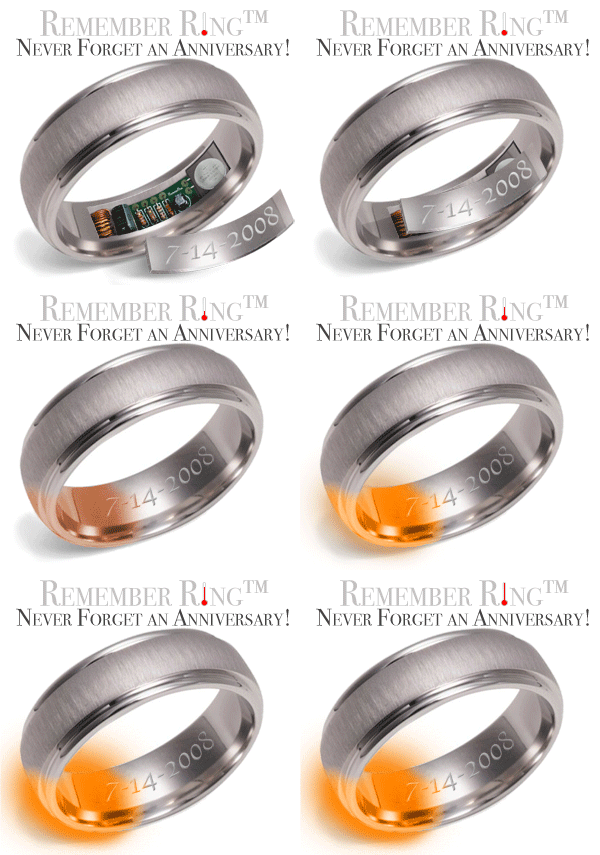
We found a fascinating item on Hackedgadgets.com, called The Remember Ring. The Remember Ring appears to be a standard ring that contains a heating element that heats 24 hours from the day you want to remember. It starts at 120 degrees and gets warmer after that point. It only lasts for ten seconds, and causes discomfort, not damage. It is charged up by the heat from your hand.
0 Responses
What is a Hack and Why Should I Not Be Scared By It?
Hackers have received a bad name, mostly because of the abuse inherent in circumventing design. Hacks are innovation…the result of those who explore and experiment.
Teaching hardware tricks it wasn’t originally intended to do is a great example of that. We will be featuring new ways of using old ideas over the coming days as an introduction to this new feature.
0 Responses
Toshiba Joins Apple and Dell in Battery Recall
The Associated Press reported the other day that Toshiba is recalling 340,000 laptop batteries made by the Sony Corporation. Toshiba insists that no injuries or accidents have been reported. All this bad publicity for Sony batteries may not bode well for the company’s public image.
Certainly puts into people’s minds doubts about the quality of Sony electronics. But we will see what will happen.
0 Responses
Flash Memory Drives
Recently, we discussed USB Flash Memory Drives, a highly mobile piece of technology that is very useful. We mentioned that in a future post we would be discussing installing a complete operating system on a USB memory drive.
However, yesterday, Tom’s Hardware reviewed Samsung’s 32GB Flash Drive. 32GB is large enough to install a full and complete operating system instead of a scaled down one. Modern hard drives are the slowest components in a computer. Memory, flash or RAM, is being added to hard drives to speed up access times. The alternative for the future is flash drives…essentially the same technology as USB flash drives but with a different interface. The price per gigabyte of flash memory is much higher than hard drives right now, but those prices continue to drop each year.
The advantages are many. Power consumption is less, as there are no motors or moving parts to operate. It produces little heat and takes up little space. There are concerns, however, about the lifespan of this type of drive, as well as its current size limitations.
Eventually, the sizes and speeds will be more comparable with hard drives. Until then, even a version this large is useful for operating systems and productivity systems. 32GB is enough to satisfy most uses except multimedia file storage. When the price goes down, it may be a good alternative in the future, at first for a niche market, then the mainstream.
The Future is Here…
2 Responses
A New Rechargable Battery

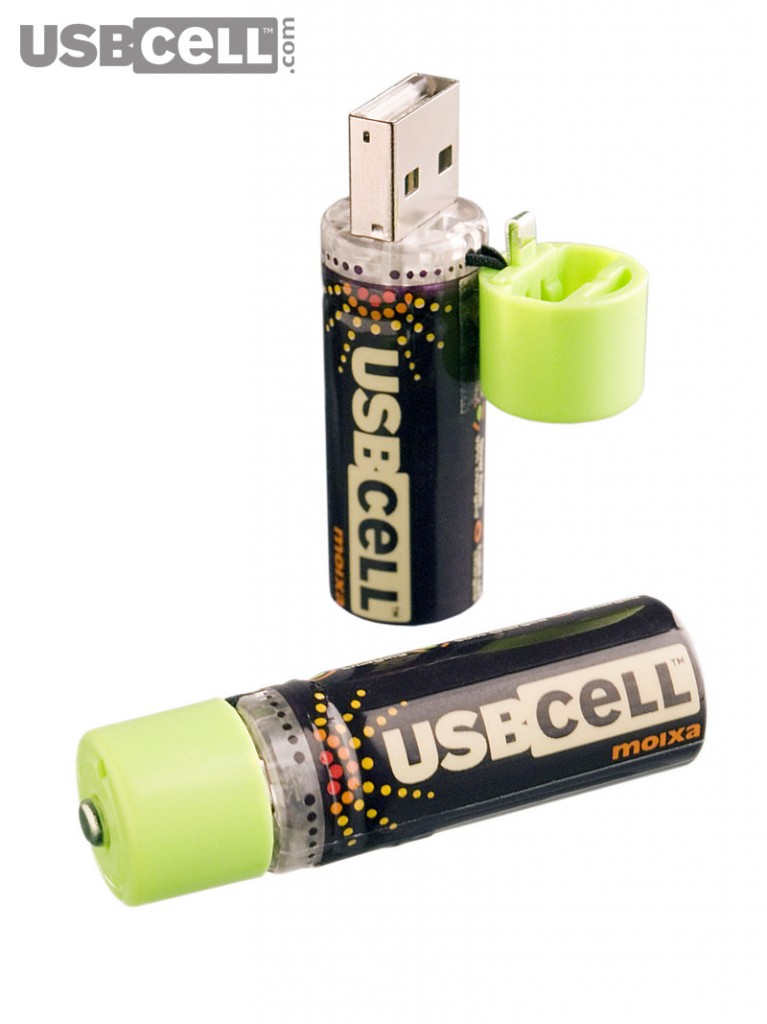
USBCELL from Moixa Energy was launched on September 18th. The concept is a rechargeable battery which can charge from any USB port. The lid pops open to reveal a USB port which can be plugged in to charge the battery. Currently only the AA battery type is available, but AAA, C/D, 9v, and various cell phone and other device batteries will be coming.
We’ve signed up for their notification list. The product is currently only available in the UK. We will advise you when we are told it is available in the US. Either way, we think it is a cool idea.
0 Responses
Using Your Laptop at the Airport
Our colleagues at Flight Wisdom have posted a quick post on using your laptop at the airport. We thought it was a good opportunity to discuss the wireless hotspots in general.
Now, there are hotspots operated by individuals, community hotspots, and hotspots operated by companies(Sometimes for Pay). Paid Hotspots are popular at coffeehouses, airports, some hotels, and other places. Community hotspots are operated by nonprofit organizations, although occasionally by municipalities. NYCWireless, a New York City group responsible for free wireless in places like Bryant Park, is a good example of this. And individual hotspots are those unaffiliated ones.
Sometimes, individuals do not realize they are running a hotspot. They have simply not enabled any security on their wireless router and thus are giving their internet away to the neighborhood.
In a future post, we will be discussing ways to secure your wireless network. Stay Tuned.
0 Responses
Portable Security and Data Protection
Putting all your eggs in one basket is not a good idea. Keeping all your critical data on an item you keep on your person at all times, a USB drive, ensures that it is protected. However, it also means that your data is moving around and thus increases the number of places you could be parted from it.
Now, your USB drive may include a security program for encryption. If it does not, or you wish to use a program that will work on any drive and not just on the drive you purchased, try TrueCrypt. TrueCrypt creates a virtual encrypted disk within a file and mounts it as a disk. TrueCrypt can run in Traveller Mode, which allows it to not be installed on the Operating System. You will need administrative privileges in order to run it that way and records of the mount may be left on the computer, although the data will be secure.
For portable versions of various popular applications, visit Portableapps.com. It includes portable versions of the Firefox Web Browser and the Thunderbird Email Client, as well as an IM client, a portable version of OpenOffice, and so on. Our ideal portable applicatiion USB drive contains Openoffice, Firefox, Thunderbird, TrueCrypt, KeePass(which we mentioned in a previous post), and Miranda IM Portable. Our data USB drive contains KeePass, TrueCrypt, and our secure data.
In a future post, we will discuss how to install a bootable operating system on your USB drive, if you wish to go a step further in mobile security.
Just remember when using a USB drive with portable applications that they can spread viruses and malicious code in between computers. Scan your USB drive for viruses on a regular basis, especially when it has been in strange computers. Also, back up your USB files regularly to ensure your protection.
In our next security piece, we’ll discuss strategies for backing up your data.
1 Response
Buying a USB Drive
As promised, we’re going to review USB flash memory drives. For some historical background, we once again referred to the people at Wikipedia for their entry on the subject.
There are many types of drives, and unfortunately we do not have the funding to do speed tests on a large selection of USB drives…unless someone would like to send us such a selection, in which case we will be happy to make such a comparison. In June of 2004, CNET reviewed 14 tiny USB flash drives. In November of 2005, PC Magazine published their USB Key Superguide.
Now that we’ve referred you to people who have the budget for intensive reviews, we’re going to refer you to a few different types of USB drives that are good for various uses. Now, most USB Drives look pretty much the same. A little rectangle that has a loop for a keychain. Many have a cover for the USB port that frequently is lost. We recommend you review Amazon’s user reviews for each drives to see what people are saying.
For rugged durability, you might want to try a Lexar Jumpdrive Sport. It is available in several sizes:
- Lexar Media 512 MB JumpDrive Sport Portable USB 2.0 Drive (PC/Mac)
- Lexar Media 1 GB JumpDrive Sport USB Flash ( JDSP1GB-231 )
Lexar 2 GB JumpDrive Sport JDSP2GB-231

If you are interested in a newer feature we recently reported on, another Lexar Product, the Jumpdrive Mercury, has a built in usage gauge.


USB Drives from Kingston also receive favorable reviews:
- Kingston Data Traveler 1 GB USB Flash Drive ( DTI/1GB )
- Kingston 2 GB USB 2.0 DataTraveler II write up to 7MBps KUSBDTII/2GB


While there are many others, we do want to cover the other popular brand, Sandisk…
- SanDisk Cruzer Mini 2GB USB 2.0 Flash Drive (SDCZ2-2048-A10, Retail Package)
- SanDisk SDCZ2-1024-A10 1 GB Cruzer Mini USB 2.0 Flash Drive (Retail Package)


Now, most of these drives have some kind of security software, often proprietary, designed to protect the data inside. If you don’t wish to spring for this, or wish to explore the wealth of open-source options for using your USB drive, please stay tuned for the next part of our series, where we will show you how to use your new USB drive to protect yourself.
0 Responses
Electronic Paper
As Wikipedia says, electronic paper is a display technology designed to mimic the appearance of regular ink on paper. Electronic paper reflects light like ordinary paper and is capable of holding its display without power, requiring it only to change the display.
The technology has been used limitedly for various things and is now coming into the mainstream. The E-Ink Corporation is responsible for many applications of this technology thus far, including the Lexar 2 GB JumpDrive Mercury JDMC2GB-431

While E-books as well as low-power informational displays are the most popular of the expected usage of this technology, it is definitely worth monitoring. For now, its use on the Jumpdrive makes us endorse the Mercury should you wish this feature. We will be reviewing USB drives and purchase considerations in a future article.
0 Responses
Mourning the Death of Imagination
CNET UK has an intriguing opinion piece on consumer electronics is causing the death of childhood and imagination and an open letter to the British government in the Daily Telegraph from 110 teachers, psychologists, children’s authors, and experts calls on the government to prevent this.
We wonder about the next generation and if they will be capable of taking on the future. We have no doubt that a technology based world is changing things. When a five year old has more mastery of a computer than their parents, we cannot say the world is not changing. However, if it is all for the worst, we doubt. We do however, believe we have some problems we must overcome.
The problems of society though, are somewhat beyond the scope of this blog. We bring it up so that you keep in mind, while we are very much in favor of a tech-filled world…it can occasionally be damaging to us.