Gadget Wisdom

0 Responses

Some Observations on the Kindle and E-Book Reading

Amazon Kindle PDF
Image by goXunuReviews via Flickr

Over a month ago now, our editor went out and bought a Kindle. This was a hard decision, as we had spent a lot of time over here at Gadget Wisdom talking about how we weren’t going to buy a Kindle. Of course, when we said that, it cost significantly more than the $139 we paid to buy a Kindle.

Amazon announced this week you can now give Kindle books as gifts to anyone with an email address. This is a tremendous boost in possibilities. You get to give more thought to a gift than an Amazon gift card. And if the person doesn’t like it, they can get the gift card instead. We eagerly await the day we open up an email and discover that someone has gifted us a book.

The latest generation Kindle weighs 8.5 ounces, and measures 4.8 by 7.5 inches. Mashable suggests the true audience for a dedicated e-reader is someone who travels frequently, has overcrowded bookshelves, or read books for hours at a time. We focued on the overcrowded bookshelf issue. One commenter on the same story described the Kindle as “the ideal bridge for those interested in moving to a paperless environment.”

So, why did we go with the Kindle? We already had the Kindle App on Android, along with the Nook App, the Borders app, and Aldiko Book Reader. We read an entire e-book on the Droid, and it is doable. But it is a little screen. The 7″ screen is such a good, yet portable size, we’re already wondering about 7″ Android tablets(but that’s another blog post entirely).

We don’t really like DRM. If we have a choice between DRM and DRM-free, the DRM-free gets our business. So we buy O’Reilly books directly from O’Reilly, and then port them to Android and Kindle ourselves. But, with the Kindle app available on all platforms(save Linux), making it relatively easy to use your property anywhere, it is hardly the restriction that some DRM programs are.

Earlier today, we tried a free trial of a magazine on Kindle…a magazine we used to read every month. While we quickly cancelled our trial, as that title did not provide the value we desired, we still wished to read more content off the screen and on the Kindle…which is where Calibre, which we previously mentioned, comes in.

Because, as many have said before. With all the information overload that we experience with real time information sources like Twitter and such…it is nice to have a device where we can focus on what we are reading.

The next step we may do is the elimination of our classics sections in favor of Kindle books. Kindle versions of the classics are free of charge. And the shelf space would be most welcome. We’ve bought too many books to have room for more without losing something And that is why the Kindle works.

Published on November 22, 2010
Full Post
0 Responses

Xmarks and Bloglines will Live

Image representing Bloglines as depicted in Cr...
Image via CrunchBase

Cross-Browser Bookmark and Password Syncing Service Xmarks will remain alive, it seems. The company is in the final stages of a sale to an as-yet unrevealed new owner who will keep the product alive. The new service will have a free and a premium component, and details will be forthcoming. So those of you who have already switched, you can come back.

Another product, Bloglines, a once-popular RSS aggregator, also slated to shutdown, has been sold to MerchantCircle. MerchantCircle provides a business directory for merchants in smaller towns. The free service will remain, and new services will grow around the technology. The Clippings feature will be discontinued, but all other features will remain.

Published on November 8, 2010
Full Post
0 Responses

LaCie PassKey

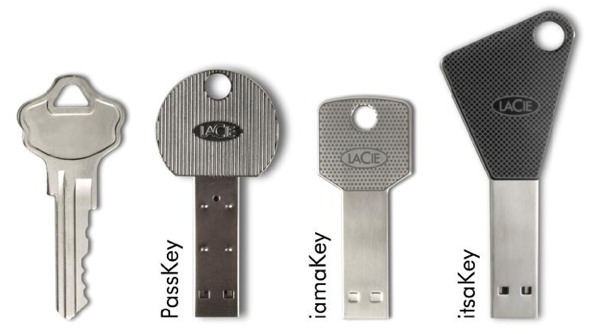
LaCie USB KeysToday, we were at the store returning a faulty hard drive and saw the LaCie PassKey sitting there, and picked it up at a discount.

LaCie(pictured right), makes a line of USB keys that are shaped like keys. The Passkey is a microSDHC reader you can keep in your pocket.

The Passkey, as opposed to some of others, is pretty bulky up at the key section, but it is solid metal. Most USB drives use a plastic exterior, and can crack under heavy use. And it takes microSDHC cards, the same sort used in cell phones, which we are carrying anyway inside a cell phone.

It isn’t news, but it is certainly worth a look. There is nothing geekier than a giant USB key on your keychain.

Published on October 31, 2010
Full Post
1 Response

Fun with Instapaper

Image representing Instapaper as depicted in C...
Image via CrunchBase

In the course of reading and assembling topics to write for Gadget Wisdom and other sites, we come across many different articles we may wish to reference later. Which means, as there are never enough hours in the day, we end up with stuff we need to read or review later.

You can bookmark the site, as we did, but keep doing that and you end up with a very crowded bookmark list with things that stay there long beyond their usefulness.

Recently, we decided to try Instapaper as an alternative. We set up folders for our categories, and a pull down menu of bookmarklets that save the current displayed URL into them. We use Google Reader to read blogs, and it offers a Send To function for stories that will send them right to Instapaper.

On the Android, we are recommending Instafetch, as the paid version supports folders, unlike the free Everpaper. If you want to save money, of course you can move things into folders later.

If you don’t have the desire for any apps, you can forward emails with links directly to a special Instapaper email address. Or, our personal favorite, email your Instapaper articles as a Kindle book to your Kindle for reading.

Instapaper is not new, but being as we just started using it, it seemed worth a a bit of a review. Try it out. And if you have thoughts for improving our workflow, send them on along.

Published on October 28, 2010
Full Post
0 Responses

MythTV .24 Release Candidate 1 Available

Myth tv logo
Image via Wikipedia

The MythTV Development team has announced that the first release candidate for MythTV version .24 is now available for download. This means that the full version is not far behind. The Dev team has adopted a much more aggressive development cycle of late, possibly due to the long period between .21 and .22. New features of note(at least to us) include:

  • A new themeable on screen display
  • Audio – Support for 24 bit audio and HD audio formats, output up to 7.1, autopopulation of soundcard devices in settings
  • Beginnings of Blu-Ray support
  • Experimental support for CrystalHD hardware accelerated video decoding
  • Rework and Stabilization of DVD Playback
  • Support for ISOs over storage groups, which was missing from 0.23
  • Add a custom rule example for re-recording SD shows when/if it re-airs in HD
  • Enabling backend as a source of internet content sources, scripts, and grabber search requests
  • Allow the scheduler to attempt to rerecord a failed recording
  • MythNetvision now has grabbers for BBC iPlayer, Hulu, Revision3, The WB, PBS, Comedy Central, TedTalks, etc.
  • MythWeather now supports wunderground as a source
Published on October 19, 2010
Full Post
0 Responses

Fedora Docs Directly in your Electronic Reader

Publican, which is the software that generates Fedora Documentation, now supports OPDS, the Open Publication Distribution System. OPDS is a syndication format for electronic publications. Thus, Electronic Reader programs or devices can be given a URL for the Fedora Docs catalog, and can browse through it, and download publications for reading.

If you have a program that supports OPDS, add in the URL http://docs.fedoraproject.org/opds.xml, or if you want our preference…US-English, try http://docs.fedoraproject.org/en-US/opds.xml.

We use Aldiko,  an ebook book reader for the Android mobile OS. But there are several more. For a list of some complaint readers, click here.

Published on October 5, 2010
Full Post
0 Responses

Xmarks to Shut Down

Image representing Xmarks as depicted in Crunc...
Image via CrunchBase

XMarks is a service that offers cross-platform and cross-browser bookmark, password, and tab syncing. We’ve been using this service since it was Foxmarks, many moons ago. However, now, after four years, they have announced the discontinuing of service in January of 2010.

We’re not sure what we’ll do, as we tend to switch between Chromium and Firefox, using Xmarks to keep the two in sync. At this point, we suppose we’ll have to abandon one or the other. Firefox offers Firefox Sync. Chrome/Chromium offers sync to your Google account built in. Tough decision. As tough as choosing a browser.

Todd Agulnick, Co-Founder and CEO in a farewell blog post, thanked users, investors, and colleagues for their loyalty and signed off in true geek fashion, quoting Douglas Adams, “So Long and Thanks for all the Fish.”

Published on September 27, 2010
Full Post
0 Responses

Why You Might Finally Give in and Buy a Kindle

booting up the Kindle 3
Image by The Shifted Librarian via Flickr

It is time to revisit the pros and cons of the Kindle, which has finally plummeted into the land of reasonable pricing. Let’s go back to some of the reasons we quoted for buying and not buying a Kindle last year, and update it a bit.

Reasons to Buy a Kindle

  • It’s Great For Travel
  • You can email files to your Kindle address. With the new Wi-Fi option, you can do so for free. Over 3G it costs a few cents. But you can set a threshold to avoid overcharging
  • It looks great. Especially in graphite. The screen is much more conducive to long periods of reading than a conventional LCD screen. They’ve really improved the contrast. It is still in greyscale, but this is for reading. You want color, go to your computer.
  • Almost any book is available. And publishers and content owners can pull out old and out of print books and sell them on the Kindle as there is only a small cost to start out. Crunchgear reports the U.S. Kindle store has over 700,000 books. Barnes and Noble claims more, but includes public domain books in its tally, something Amazon apparently does not.
  • It is the future. Paper books won’t die, we don’t want them to.
  • You can switch seamlessly between your Kindle and reading the book on your computer, smartphone, etc. as Amazon has released Kindle apps for most major platforms.
  • Amazon is a large, stable company and the likelihood of them discontinuing the Kindle and taking your e-books with them is probably slim.

Reasons Not to Buy a Kindle

  • Books…old ones at least, can be cheaper.
  • There is still a value to the printed book
  • No expansion slot, but the new one has 4GB of memory, which is an estimated 3,500 books.
  • It must be charged. Your paper book never needs any batteries. Admittedly, advertised battery life is measured in weeks, not hours like most devices.
  • You are locked into the Kindle format. Your property is licensed, not owned, and you cannot move it to other platforms.
  • It doesn’t support EPUB format, which means you’d have to convert any book delivered in that format.
  • It doesn’t support lending, which the Nook limitedly does.
  • You can read periodicals for free online, why do they make you pay to subscribe to a blog?

Just remember, when we started advising against the cost of an e-book reader, it cost about four hundred dollars. For that price you could buy a computer. Now, at $139 for the wi-fi only version that we bought, or $50 more for adding 3G, it is at a price point that makes it more realistic. We’d like to see sub-$100 pricing soon, at least on the wi-fi version. The Kindle has estimated sales of about 5 million since it launched in 2007. The latest one is so popular it keeps getting sold out. The Nook, by comparison, has sold 1 million since it launched last year.

Books are are an over twenty billion a year business. About eight percent of U.S. readers use an e-book reader and in a recent poll, twelve percent of Americans said they are likely to get one within the next six months. Of course, the same poll indicated that e-reader purchasers were more likely to read(not a big surprise) and that the majority of them read more now than they did six months ago.

“”Customers tell us they love the freedom and flexibility of our Buy Once, Read Everywhere approach because they always have their full reading library at their fingertips and never lose their place in a book-whether they are reading on a Kindle or one of their other favorite devices,” said Dorothy Nicholls, Director, Amazon Kindle, in a recent press release announcing an update to Kindle for Android. The idea is this. If your platform is locked down, but you can get it on any device, is that not the type of DRM you can live with? The biggest complaint about DRM is the lack of portability. We’d like to see things more open, but given the choice between DRM content and no content at all…

In the music business, choosing between DRM-music and buying a CD kept us with CDs, which could be turned into DRM free music. We’ll see what happens. For the Kindle, the issue of library lending has to be handled. the revenue from selling licenses and services to libraries can be a wonderful one if they unveil a system to do so. Why should Overdrive Media Console and Adobe Digital Editions have this market?

To go back to the issue of EPUB and loading your own stuff onto it…you can load PDF files onto it. And if you don’t want to hook up via USB, you can email it to username@free.kindle.com to get it over Wireless. username@kindle.com to be charged for over 3G. And programs like Calibre, which we will get into in another post, can be set up to not only convert e-books from Google and Project Gutenberg, but support Kindle profiles and assemble news sources into an e-book format and autotransfer it to the Kindle every day, so you do not get charged(which you will if you subscribe to same through Amazon).

There is one final thing we have to get to. Many of us, including our editor, are Android phone users. Reading books on a 3-4 inch phone screen is doable, but it is small and can hurt one’s eyes. so, while it is doable for short periods, there is still a market for a device more conducive to reading.

And even with the larger LCD screen, the iPad hasn’t killed the Kindle yet, has it?

What do you think?

Published on September 26, 2010
Full Post
0 Responses

LED Bulbs Coming into their Own?

100-240V 2W (15W equivalent) E27 Osram LED Lig...
Image via Wikipedia

We bought our first LED light bulb a few months ago and put it into our desk lamp. The suspicious yet understandable issue with LED lightbulbs is lumens.

We aren’t used to lumens. We’re used to watts. Even though they aren’t accurate. CFL lightbulbs are labeled with lumens, which indicate light output, but they also note the equivalent in a traditional incandescent bulb because that is what we understand. Those notes are suspiciously missing from the LED packaging we see.

Even CNET’s Green Tech, and its editor, Martin LaMonica agrees with us.  But, he advises that is changing. He tried some samples from Lighting Science Group, which manufactures many of the LED bulbs for Home Depot‘s Ecosmart line. The bulbs are available on the Home Depot website, and should be in stores sometime this month.

But these bulbs which are getting brighter and more capable of what we demand of them are not cheap. Twenty to thirty-five dollars for a single light bulb is a bit much. The savings over time are a consideration, but the price will have to drop before it becomes a mainstream option.

The Department of Energy is set to unveil a program to help shoppers understand these new options. They will have a new label called Lighting Facts. It certainly will help if all bulbs use the same designations. We guess it is time to internalize the lumens system.

In the meantime, we have added some Sylvania ACCENT LED bulbs to a bathroom. Three produce enough to shine in this small room. But we knew that going in that they weren’t incredibly bright. We compared the lumens to the package of CFLs next to them at the store.

The concern is that the information isn’t getting to us. The New York Times reports that the Federal Trade Commission is suing Lights of America for misrepresenting the light output and life expectancy of their LED lightbulbs. For example, the company claimed one of its bulbs could replace a 40-watt incandescent, which typically puts out 400 lumens. They found the bulb in question only produced 74 lumens. In addition, they claimed another bulb would last 30,000 hours, but lost 80% of its light output after only 1,000 hours.

The company responded by stating that the bulbs that are the focus of the suit were introduced before formal standards were established for LED’s. Furthermore, they advise that they already responded by removing the equivalency claims from its packaging…which explains why the useful comparison of equivalency is omitted from LED packaging.

In the end, we’ll continue to experiment with these bulbs. Why? Because they last longer, use less electricity, and like the CFLs of a few years ago, will continue to improve. Why? Because the government and the public demands it.

Published on September 15, 2010
Full Post

Get New Posts By Email